

The 40-to-4 Pattern — Why This Keeps Happening Across Every Industry
In every business, in every industry, in every department, the same pattern appears: a process that consumes forty hours per month in manual effort, human attention, and accumulated frustration — which should take four. The specific process varies. The pattern is identical. It is a high-volume, repetitive, rules-based task that humans are executing manually because nobody has sat down to question whether it could be automated. And when someone does sit down and question it — the automation that follows is rarely complex or expensive. It is often a few properly connected systems and one good decision about sequence.
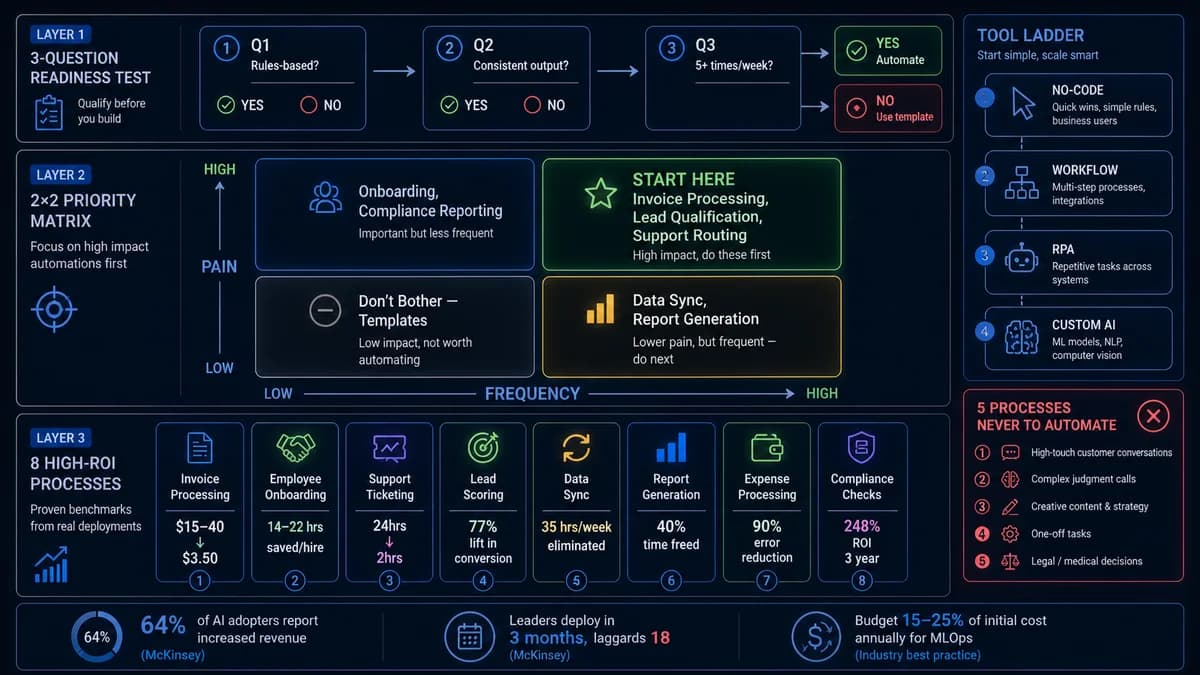
The scale of the opportunity is consistent across industries: 60% of business process automation initiatives report positive ROI within 12 months. 73% of IT leaders say automation has reduced their process time by half. Finance departments reducing processing time by 65% and eliminating 88% of data entry errors. Sales teams closing 23% more deals. Marketing generating 80% more leads at 33% lower cost per lead. These are not predictions. They are outcomes that have been documented across thousands of automation projects, consistently enough that they have become reliable benchmarks.
The eight case studies in this guide cover different functions, different industries, and different automation approaches — but they all follow the same structure: the painful before state with specific numbers, what was automated and how, the measured after state, and the specific reason the automation worked. The goal is not to describe what automation can do in the abstract. The goal is to make it concrete enough that you can identify the equivalent pattern in your own operation before you finish reading.
Case Study 1: Invoice Processing — Finance
Before Automation
After Automation
A mid-sized finance team was processing 2,000 invoices per month entirely manually — each invoice requiring a team member to open the document, key the data line by line into the ERP, route for approval by email, chase approvers, file the document, and respond to vendor status enquiries. The process was consuming the equivalent of one full-time employee's working month every month, and the error rate was producing $50,000 in late fees and forfeited early payment discounts annually.
The automation combined intelligent document processing (IDP) to read incoming invoices regardless of format variation, a rules engine to validate invoice data against purchase orders and apply the correct approval routing, RPA to enter validated data into the legacy ERP system with no modern API, and automated payment triggers for approved invoices below the manual review threshold. The AP team's role shifted from data entry and email chasing to exception review (8% of invoice volume) and supplier relationship management.
Invoice processing is the textbook business process automation candidate: high volume, structured data (even when documents vary in format), predictable routing logic, and a measurable cost per execution. The key design decision was setting exception thresholds correctly — the automation handles 92% of invoices autonomously, and human review is reserved for the 8% that genuinely require judgment. Setting this threshold too high (trying to automate 100%) would have produced constant failures; too low would have undermined the ROI.
Case Study 2: Employee Onboarding — HR
Before Automation
After Automation
The onboarding process for a 200-person company was consuming 18 person-hours per new hire across HR, IT, and the hiring manager — welcome email drafting, creating accounts in twelve separate systems, ordering hardware, scheduling week-one training sessions, sending pre-start documents, and setting up task structures in the project management tool. For a company hiring 50 people per year, this represented 900 hours of senior team time annually — equivalent to nearly five full working weeks — producing an output that was inconsistent (some new hires received different tool access than others) and often delayed (IT system access averaged 2.3 days after start date).
The automation used a workflow triggered by the offer acceptance signature in DocuSign. The signed document triggered: welcome email sequence automatically delivered on a pre-set schedule, IT provisioning requests sent to the provisioning system, accounts created in HRIS, payroll, project management, and communication tools, hardware order placed with the relevant vendor, week-one training calendar automatically populated, and an onboarding task checklist created for both the new hire and the hiring manager. The new hire's first day experience was standardised and complete, regardless of who was in the office that day.
Onboarding is a highly sequential process — step B always follows step A — with clearly defined outputs at each step, making it highly automatable. The critical design element was mapping the current process completely before automating it, including all the informal steps that different people handled differently. The standardisation that came from documenting the process before automating it was itself valuable — it would have improved consistency even without automation. The automation made consistency permanent and effortless.
Case Study 3: Order Processing — Operations
Before Automation
After Automation
A mid-size distribution company was manually transferring order data between their warehouse management system and QuickBooks — an entirely mechanical data transcription process that consumed 48 minutes per order and, at 200 daily orders, theoretically required 160 person-hours per day of manual entry (in practice, handled by a large team working intensively). Errors in the manual transfer caused mispicked orders, incorrect invoices, and a customer service queue dominated by order status enquiries.
The automation was a direct system integration: an API connection between the WMS and QuickBooks, with a transformation layer to map the data fields correctly between the two systems. Order records were created in QuickBooks automatically when orders were confirmed in the WMS. Status changes in the WMS triggered automated customer notification emails. The operation went from a data-entry-heavy workflow to a monitoring-and-exception workflow — the team's job became managing the 7-minute exception cases rather than executing the 48-minute standard process.
This is a pure data-transfer automation — moving structured data from one system to another according to a defined field mapping. The process had no judgment requirement, no exceptions in the standard case, and a well-defined output. The 85% time reduction was achievable specifically because the process was entirely mechanical. The lesson: if your team spends significant hours moving data between two systems that both have APIs, the automation is almost always faster and cheaper than it appears. The integration, not the automation logic, is the primary implementation cost.
Recognising your own process in these case studies? The 40-to-4 opportunity formula at the end of this guide quantifies it for your specific team size and hourly rate — or skip ahead and discuss it with us directly.
Automely maps automation opportunities and builds the systems that capture them. Free 45-minute consultation.
Case Study 4: Customer Support Ticket Routing — Customer Service
Before Automation
After Automation
A B2B SaaS company's support team was receiving 800 tickets per week across email, web form, and chat. Every ticket arrived in a shared inbox and was manually read, categorised, assigned a priority level, and routed to the correct support tier by a human triage agent — a process that took 4-8 minutes per ticket and consumed 50-100 hours weekly just on triage, before any resolution work began. The result was a 24-hour average first response time, consistent customer dissatisfaction, and a support team that spent a disproportionate share of its day on classification rather than the help delivery that was the actual value they provided.
The automation used an AI classification layer to read incoming tickets, detect intent and urgency from content and metadata, assign category and priority automatically, route to the correct tier and agent based on the category and current queue depth, and surface suggested response templates from the knowledge base. Tickets were routed within seconds of arrival. Agents received pre-classified tickets with suggested responses and all relevant customer context populated — their job became evaluation and personalisation of the suggested response, not triage and lookup.
The AI classification layer was essential here because ticket content is unstructured — RPA alone could not read and classify email content. The IDP and NLP components that powered intent detection required training data (several months of historically classified tickets) before deployment. The critical success factor was integrating the automation into the existing ticketing workflow rather than replacing it — agents accepted the change quickly because it reduced their workload rather than changing their core job.
Case Study 5: Sales Lead Scoring — Sales Operations
Before Automation
After Automation
A 12-person B2B sales team was treating all leads equally — the same outreach effort regardless of company size, intent signals, or ICP fit. Reps were spending 3-5 hours per week on manual lead research (LinkedIn, Crunchbase, company website), CRM data entry, and deciding which leads to prioritise, which was ultimately a gut-feel process that varied by rep and produced inconsistent pipeline quality. The highest-value leads were mixed in with high-volume low-intent enquiries and received the same level of attention — which meant both groups were underserved.
The automation implemented a lead scoring model trained on 18 months of historical closed deal data. Every inbound lead was automatically enriched with company data (size, tech stack, funding history, job postings, recent news) from Apollo and Clay, and scored against the ICP criteria. The score determined routing: 80+ to sales immediately with the full enrichment package; 50-79 to a targeted nurture sequence; below 50 to long-range nurture. Reps opened their CRM each morning with their prospects ranked by conversion probability — the research was done, the prioritisation was complete.
Lead scoring requires historical training data to be accurate — the model learns what a qualified lead looks like from your specific closed deals, not from generic industry benchmarks. The 77% lift in ROI came primarily from two changes: reps stopped spending time on low-probability leads, and high-intent leads received immediate follow-up (within minutes vs the previous hours-to-days response time). Speed-to-lead had the larger impact — the research automation made reps better prepared, but responding before competitors reached the prospect was the higher-value outcome.
Case Study 6: Client Reporting — Agency
Before Automation
After Automation
A 15-person digital marketing agency managing 25 clients was spending a conservatively estimated 100+ hours per month on client report creation — an entirely non-billable, high-labour process that consumed significant account manager time every reporting cycle. The reports were valuable to clients but the creation process — logging into six platforms, extracting data, pasting into a template, formatting slides — produced the same output every month from a template that never changed. The reports were also often delivered 2-3 days after the reporting period closed, meaning clients were reviewing stale data.
The automation used AgencyAnalytics connected via API to all client platforms — Google Analytics, Meta Ads Manager, Google Search Console, LinkedIn Ads, and the client CRM. Reports were generated automatically at the end of each reporting period, formatted in the agency's white-label template, and delivered to the client portal or email list automatically. Account managers received a notification to review the report — their job shifted from building the report to adding a 20-minute strategic commentary layer on data that was already accurate, current, and formatted.
The key insight was that report creation and report analysis are two separate activities — automation eliminated the former and created more time for the latter. Clients benefit from both: more timely data delivery and higher-quality strategic commentary from account managers who are no longer exhausted from data assembly. The strategic layer — the "why did this happen and what should we do next" — became the agency's visible value add because the automation made the data layer invisible.
Case Study 7: IT Service Management — Information Technology
Before Automation
After Automation
An IT operations team at a 400-person company was receiving 120 support tickets per week, 65 of which (54%) were password resets, software access requests for standard applications, and account unlock requests — tasks that required a human to log into Active Directory, verify identity, and execute a mechanical action with zero technical judgment involved. The team was spending approximately 2.5 hours per day on these tickets, which delayed response to genuine technical issues that required actual expertise.
The automation implemented a self-service portal for password resets and standard software requests, with identity verification via MFA rather than manual IT review. Standard software provisioning was connected to the HR system — when an employee was onboarded in the HRIS with a specific role, the standard application access for that role was provisioned automatically within 15 minutes. Access removal was similarly automated when offboarding was triggered. The 120 weekly tickets dropped to 55, with the remaining 55 being actual technical problems requiring IT expertise.
The specific insight that made this automation work cleanly was connecting provisioning to the HR system trigger rather than the IT request process. Previous automation attempts had focused on automating the IT request workflow — making the manual process faster. The correct approach was eliminating the manual request entirely by detecting the need from the authoritative source (HR) rather than waiting for the employee to submit a ticket. This distinction — automating to the trigger, not the request — produces dramatically better outcomes than simply automating the existing request workflow.
Case Study 8: Loan Processing — Banking
Before Automation
After Automation
The National Bank of Abu Dhabi's Program Lending products required 10-12 working days to process from application to decision — a timeline that produced significant applicant attrition as borrowers sought faster alternatives. The process involved manually collecting documentation from applicants, validating against multiple data sources, routing through a multi-stage approval hierarchy, and entering data into legacy core banking systems. Each handoff between departments added hours of queue time.
The automation combined intelligent document processing to read and extract loan application data regardless of document variation, automated validation against credit bureaus and internal risk databases, rules-based routing through the approval hierarchy based on loan value and risk category, RPA to enter validated data into the legacy core banking system, and automated applicant notification at each stage. Standard applications below the manual review threshold completed end-to-end without any human involvement until final approval sign-off. Complex applications were routed to the appropriate credit officer with full context pre-populated.
Financial services automation succeeds when compliance requirements are built into the automation architecture from day one rather than retrofitted. The approval hierarchy automation specifically encoded the regulatory requirements — which loan types require which approval levels — into the routing logic, making compliance automatic rather than dependent on individual officer judgment. The IDP layer was critical: loan applications arrive as unstructured documents from applicants, which RPA alone cannot process. The AI interpretation layer was the enabling component that made the end-to-end automation possible.
All 8 Cases — The Results Summary, and Finding Your Own 40-to-4
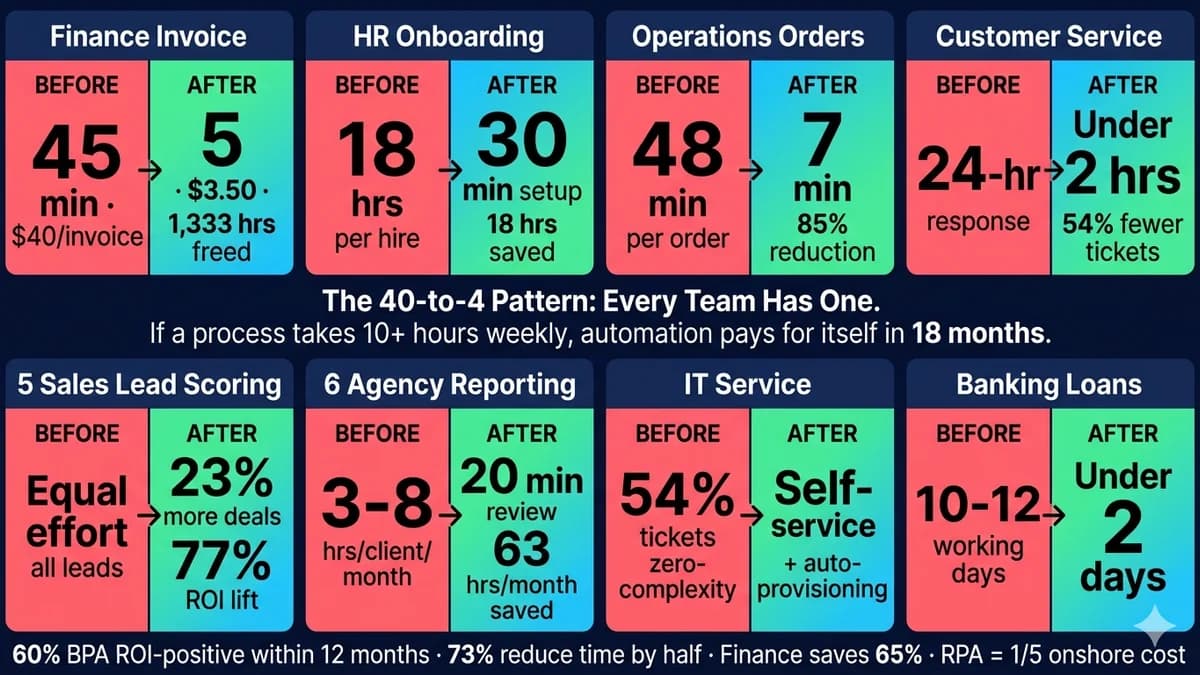
| Function | Process | Before | After | Key Metric |
|---|---|---|---|---|
| Finance | Invoice Processing | 45 min per invoice · $40/invoice | 5 min human time · $3.50/invoice | 1,333 hrs freed/month at 2,000 invoices |
| HR | Employee Onboarding | 18 hrs per new hire | 30 min human setup | 18 hrs saved per hire · 900 hrs/year at 50 hires |
| Operations | Order Processing | 48 min per order · Manual data transfer | 7 min per order · WMS to QuickBooks integrated | 85% time reduction |
| Customer Service | Ticket Routing | 24-hr response time · Manual triage | Under 2 hrs · AI classification | 54% fewer escalation tickets |
| Sales | Lead Scoring | Equal effort all leads · 5 hrs/wk manual research | AI-prioritised queue · Research in 20 sec | 23% more deals · 77% ROI lift |
| Agency | Client Reporting | 3-8 hrs/client/month manual | 20 min review per client | 63 hrs/month saved (documented) |
| IT | Service Management | 54% of tickets zero-complexity | Self-service + auto-provisioning | 54% fewer support tickets |
| Banking | Loan Processing | 10-12 working days | Under 2 days | 80%+ cycle time reduction |
Every case in this table shares a structure: one process, currently manual, consuming disproportionate time relative to the value it creates, with a clear trigger event and a predictable output. The 40-to-4 opportunity formula makes it systematic to find the equivalent pattern in your operation.
The 40-to-4 Opportunity Formula — Find Your Own
Map every repeating task — your team performs — anything done more than 3 times per week. List them on paper first.
Measure the time — hours per execution multiplied by frequency per month equals monthly manual hours per process.
Score automation fitness — Is it rules-based? (checklist-followable consistently) Is the input structured? Does it run 5+ times/week? Three yes answers equals a strong automation candidate.
Calculate the margin drain — Monthly hours multiplied by fully loaded hourly rate equals monthly cost of the manual process. This is the ROI baseline for the automation business case.
The automation investment for the invoice processing case above — IDP, validation layer, RPA for legacy system entry — typically runs $25,000-$75,000. At £80,000 per month in savings, the payback period is measured in weeks, not months. This arithmetic is why business process automation has a 60% positive ROI rate within 12 months: when the process is correctly selected, the economic case is overwhelming before the first bot is built.
For the complete framework on process selection — including the readiness test and the anti-automation list (processes that should not be automated regardless of how painful they are manually) — see our business process automation framework guide. For context on when AI augmentation is needed beyond standard BPA tooling, see our RPA vs AI automation guide.
Which of these case studies maps most closely to a process in your business? Automely will run the 40-to-4 formula for your specific process, team size, and cost structure in a free 45-minute consultation.
We identify your highest-ROI automation opportunity, calculate the monthly margin drain, and recommend the simplest automation approach that solves it.