

Only 4% of businesses have achieved fully automated workflows. The other 96% — including most businesses that have already bought automation tools — are still running on email chains, spreadsheets, and manual handoffs that consume 30% or more of every knowledge worker's day. The gap between what is possible and what is actually deployed is costing those businesses tens of thousands of hours and millions of dollars in avoidable work every year.
This guide is the 90-day operational playbook that closes that gap — not for the entire business in one sweep, but for the two or three highest-value manual processes that are consuming the most time and generating the most errors. By day 90, you will have those processes automated, measured, and generating demonstrable ROI that funds the next wave.
By the end of 90 days: your manual process inventory is complete, your highest-value targets are identified and scored, your first automation is live and measured against a documented baseline, and your second automation is in production or close to it. This is an operational programme — week by week, with specific deliverables — not a strategic framework. Print it. Use it.
The Real Cost of Your Manual Processes — Before We Automate Anything
Most businesses know their manual processes are inefficient. Very few have calculated what that inefficiency actually costs. McKinsey research shows that 60% of employees could save 30% of their time with workflow automation. For a team of 10 people earning $50,000 annually each, that is $150,000 in wasted productivity — every year — from a single team, before any calculation of error costs or opportunity costs.
Manual processes have five-to-fifteen percent error rates. Each error does not just cost money to fix — it damages client relationships, delays project delivery, and creates cascading corrections through systems downstream. A mis-entered invoice triggers a payment delay, which triggers a supplier follow-up, which takes a finance person 45 minutes to resolve. The original error was 30 seconds of careless data entry.
📋 Visible Costs
Staff time on repetitive tasks, error correction and rework, overtime during high-volume periods, and temporary staff to cover manual processing peaks. Most businesses are aware of these.
🕳️ Hidden Costs
Opportunity cost of time not spent on strategic work, knowledge silos when processes live only in people's heads, slower customer response times that drive churn, and innovation paralysis when teams spend 90% of their capacity on repetitive execution.
📈 Scaling Costs
The fundamental constraint: to double output under manual processes, you roughly double headcount. Every new hire adds recruitment cost, onboarding time, and management overhead before they reach full productivity.
🚨 Competitive Costs
While your team manually copies data between spreadsheets, competitors using automation are responding to leads in minutes instead of hours, closing faster, and serving more clients with fewer people. The competitive gap compounds with every quarter of inaction.
What "Full Automation" Actually Means — And Does Not Mean
The title says "full automation." Let's be honest about what that means in practice, because misunderstanding this is the number-one cause of automation programme failure.
Full automation does not mean 100% of your processes automated. McKinsey estimates 50% of all work activities can currently be automated with existing technology. But not every automatable process is worth automating — the ROI calculation must come first. Some processes occur so rarely, or with so much necessary human judgment, that the automation overhead exceeds the savings.
Full automation means all high-value, high-volume manual processes are automated. For most businesses, this is 20–40% of total manual work time — the processes that are both high-frequency and time-consuming. When these are automated, the remaining manual work is either high-judgment work that benefits from human attention, or low-frequency work where automation overhead is not justified.
Full automation is a state you reach through waves, not a single implementation. The 90-day programme gets you through Wave 1: your highest-value two processes automated, measured, and generating ROI. Wave 2 uses that ROI to fund the next three. Wave 3 brings you to the state where the business's operational core runs on automated infrastructure — and your team's time is genuinely redirected to the work that only humans can do.
The Process Audit — Your Day 1 Action
The process audit is the foundation that every other decision in the 90-day programme rests on. Without it, you automate based on intuition — and intuition almost always picks the most annoying process rather than the highest-value one. The highest-value process and the most annoying process are rarely the same.
The audit takes 2–3 days. Here is how to do it:
- Inventory every recurring manual process. Ask every department head to list every task their team does more than once per week. Include: what triggers it, what inputs it requires, what it produces, how long it takes per occurrence, and how often it occurs. Do not filter at this stage — capture everything.
- Score each process on four criteria, 1–3 each: Volume (1 = fewer than 10/week, 3 = 50+/week); Time cost (1 = under 10 minutes/occurrence, 3 = 30+ minutes/occurrence); Consistency requirement (1 = errors are easily corrected, 3 = errors are costly); Data digitisation (1 = primarily paper or non-digital, 3 = fully digital and API-accessible).
- Rank by total score. Processes scoring 10–12 are your Wave 1 targets. Processes scoring 7–9 are Wave 2. Below 7 are deferred.
- Document the top three processes in detail. For each: draw the end-to-end process map, identify every system involved, note every decision point where human judgment is currently required, and quantify the current time cost per week.
| Process | Volume (1–3) | Time Cost (1–3) | Consistency (1–3) | Digitised (1–3) | Total | Wave |
|---|---|---|---|---|---|---|
| Lead qualification from web forms | 3 | 3 | 3 | 3 | 12 | Wave 1 |
| Support ticket routing and response | 3 | 2 | 3 | 3 | 11 | Wave 1 |
| Invoice processing and data entry | 3 | 3 | 3 | 2 | 11 | Wave 1 |
| Weekly status report generation | 2 | 3 | 2 | 3 | 10 | Wave 1–2 |
| Client onboarding documentation | 2 | 3 | 2 | 2 | 9 | Wave 2 |
What to Automate First — and What to Leave Alone
The process audit gives you a ranked list. But before proceeding to automation, apply two filters:
Filter 1: Is the process stable? Automate stable processes — ones that change less than once per quarter and have well-defined rules for most inputs. Do not automate processes that are currently broken, poorly documented, or changing rapidly. Automation makes a process run faster, not better — a broken process runs broken faster.
Filter 2: Is the success criteria definable? You must be able to state what a correct output looks like before you build the automation. If you cannot define success for the manual process, you cannot verify success for the automated one.
✓ Best First Automation Targets
- Data entry between systems (form → CRM, email → spreadsheet)
- Notification and alert triggers
- Document routing and categorisation
- Report generation from existing data
- Lead qualification and scoring
- Tier-1 customer support responses
- Invoice and document data extraction
✗ What to Leave Manual (For Now)
- First conversations with high-value prospects
- Processes that are currently broken or inconsistent
- Low-volume processes (fewer than 5/week)
- Decisions requiring novel judgment on each occurrence
- Emotionally sensitive customer interactions
- Legally sensitive decisions and approvals
Want help running the process audit and identifying your highest-ROI targets?
Automely's discovery process includes a structured automation audit for your specific business. Book a free 45-minute call.
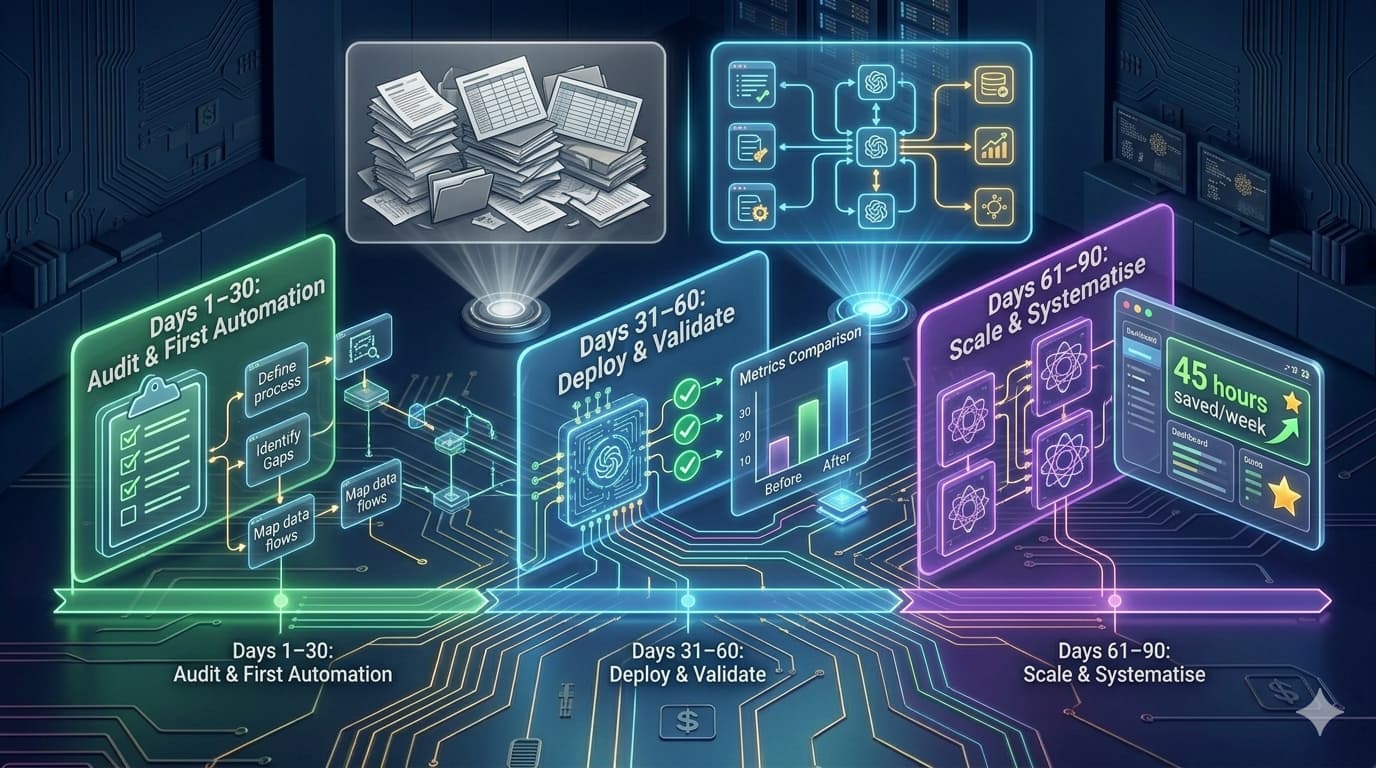
The 90-Day Week-by-Week Business Automation Plan
Audit, Baseline, and First Automation
Days 1–30Run the Process Audit
Conduct the process inventory across all departments. Score every recurring manual process on the four criteria. Produce your ranked list. Select your Wave 1 target — the highest-scoring process that passes both filters (stable, definable success criteria). Assign a business owner and a technical lead to the project.
Document and Baseline the Target Process
Create a detailed process map of the Wave 1 target. Document: every input type, every decision point, every system involved, every output format, and every known exception. Measure the baseline: hours per week currently spent, cost per occurrence, error rate over the last month, and maximum output volume at current capacity. This baseline is the document you will compare against at day 60.
Select Tools and Begin Building
Choose the right tool for the process complexity (see the tool selection guide below). For simpler processes, configure the no-code automation. For complex or AI-powered processes, commission the development team. Begin building the automation on your test environment — not live data yet. Test against five to ten real historical inputs from the prior month.
Test, Refine, and Deploy in Parallel
Test the automation against 20–30 real historical inputs. Review each output for quality against your success criteria. Fix any failures in the logic or knowledge base. Deploy the automation in parallel with the manual process — both run simultaneously for 1–2 weeks while you verify output quality on live data before switching over.
Validate, Measure, and Commission Second Automation
Days 31–60Switch Over and Monitor Closely
Stop the manual process. The automation handles the workflow fully. Assign someone to review 20–30% of automated outputs daily for the first week — not to redo them manually, but to catch any systematic errors that did not appear in testing. Log every output that fails quality review. Categorise failures (logic issue, knowledge base gap, edge case, tool error). Fix each category.
Measure Week-1 Results vs Baseline
Compare week-one automated performance against your documented baseline. Hours saved per week. Error rate vs prior manual error rate. Output volume (is the automation handling the same volume, more, or less than the manual process managed?). Calculate the weekly time saving and annualise it. This number — the actual achieved ROI — is your business case for Wave 2 and 3.
Document the Wave 2 Target and Begin Building
Apply the same documentation process to the Wave 2 target. Process map, baseline measurement, success criteria definition, tool selection. Begin building the second automation. If the first automation required custom development, the second benefits from the infrastructure already built — integration patterns, authentication, data models — reducing the build time and cost.
Reduce Monitoring on Wave 1, Increase on Wave 2
Wave 1 automation is now producing stable results. Reduce daily output review to a weekly sample of 10–15 outputs. Establish a monthly quality review as the ongoing cadence. For Wave 2, follow the same parallel deployment process — automation runs alongside manual until quality is verified on live data.
Scale, Systematise, and Build the Automation Backlog
Days 61–90Switch Over Wave 2 and Validate
Stop the Wave 2 manual process. Monitor closely as with Wave 1. By this point, the team has done this once — the monitoring process is faster and the pattern recognition for failure types is sharper. Expect fewer issues because the second automation benefits from the infrastructure, error handling patterns, and organisational learning from the first.
Build the Full Automation Backlog
Return to the full process audit list from Week 1. Re-score every process in context of what has been automated — some processes that scored lower in Week 1 may now be more accessible because the infrastructure built for Waves 1 and 2 reduces the integration effort. Produce a prioritised backlog of the next five automation targets, with rough effort and ROI estimates for each. This becomes the board-level document for funding Wave 3.
Establish the Quarterly Automation Review
Set up the quarterly governance process that keeps the automation programme expanding: quarterly process audit refresh (new processes added, existing ones changed), monthly quality review on all live automations, and an annual ROI review that reports cumulative time saved, error rate reduction, and cost of automation vs cost of the manual alternative. Name the programme owner and the review cadence. Without this, the programme stalls after Wave 2.
Document Results and Prepare Wave 3 Business Case
Produce the full 90-day automation report: processes automated, baseline vs achieved metrics for each, cumulative time saved per week, annualised ROI, and the Wave 3 backlog with ROI projections. This document is the business case that funds the next wave — whether from operational savings or as a formal capital request. The 90-day programme does not end at day 90. It ends when Wave 3 is funded and underway.
Automation Tools by Process Complexity
| Tool | Type | Best For | When to Use |
|---|---|---|---|
| Zapier | No-Code | Simple trigger-action automation with 5,000+ app integrations | Week 3 of Phase 1 if your process involves common apps with existing Zapier integrations |
| Make (Integromat) | No-Code | More complex multi-step automations with data transformation | When your process involves multiple steps, routing logic, or data manipulation between systems |
| n8n | Low-Code | Self-hosted, open-source, AI nodes built in, strong for data pipelines | When you need AI processing within the automation flow, or need self-hosting for data compliance |
| Custom AI Agent | Custom Dev | Complex reasoning, unstructured inputs, multi-system integration, RAG knowledge | Lead qualification, support triage, document processing, any process requiring contextual judgment |
| Custom Integration | Custom Dev | Proprietary systems, non-standard APIs, enterprise data with compliance requirements | When your process touches systems that no-code tools do not natively integrate with |
The selection rule: use the simplest tool that handles the process reliably. No-code tools are faster to deploy and maintain for processes within their integration library. Custom development is warranted when the process requires AI reasoning, proprietary system integration, or reliability standards that no-code platforms cannot guarantee.
Calculating Your Automation ROI — The Formula
Before commissioning any automation, calculate the projected ROI. This determines whether the automation is worth building at all, and sets the accountability baseline for measuring actual vs projected impact.
Worked Example — Lead Qualification Automation
Always run this calculation before committing to a build. If the projected ROI is under 80% in year one, reconsider whether the process is the right Wave 1 target — or whether a simpler automation approach reduces the build cost enough to make the economics work. For the detailed ROI framework with two more worked examples, see our AI development ROI guide.
Getting Your Team to Adopt the Automation — The People Problem
The most technically sound automation programme in the world fails if the team does not use it, routes around it, or actively undermines it. Automation adoption has a human dimension that technical implementation plans routinely underestimate.
The four success factors for team adoption of business automation:
- Involve the team in selecting the first automation target. People support what they help create. The most effective way to generate early enthusiasm for the programme is to ask the team: "What manual task do you hate most because it is tedious, error-prone, or repetitive?" Their answer should rank highly in the process audit. Starting with the thing the team wanted automated most generates a first win that people care about.
- Be transparent about where redirected time goes. When the automation saves 15 hours per week of the team's time, clearly communicate in advance where those 15 hours are going to be directed — to specific higher-value work, not to a vague "higher-value activities." The fear that underlies automation resistance is "this replaces me." The response is not a reassurance — it is a plan, with named activities and named people whose time is being freed for what.
- Address the replacement fear directly and specifically. State explicitly: "This automation is not replacing [person's name]. It is removing the 12 minutes per lead they currently spend on manual research so they can spend those 12 minutes actually talking to qualified leads." Specific is reassuring. Generic is suspicious.
- Show the result transparently in week one. Share the first week's performance data with the whole team: how many tasks the automation handled, how long it took, how many errors compared to the manual baseline. Make the automation's performance visible and concrete. A team that can see the automation is actually working — and working well — becomes its most effective advocate.
5 Mistakes That Kill 90-Day Automation Programmes
Automating a broken process
The most expensive automation mistake: automating a process that is already poorly designed. Automation scales what exists. A broken approval process becomes a broken automated approval process running at 10x the speed — and 10x the downstream damage. Before automating any process, document it fully. If the documentation reveals inconsistencies, undefined exceptions, or dependency on individual judgment that is not written down anywhere — fix the process first. Automate the stable, documented version.
No baseline measurement — making ROI unverifiable
If you do not measure the manual process before automating it, you cannot prove the automation improved it. "The team feels more productive" is not an ROI. Hours saved, error rate reduction, output volume, and cost per output are ROI. Establish every baseline metric in Week 2, before any development begins. The team that skips this step has no defence when someone asks whether the automation programme was worth the investment.
Trying to automate everything at once
Automation programmes that try to automate five processes simultaneously consistently deliver zero by month three: the complexity of coordinating multiple development tracks, the data preparation requirements for each, the testing overhead, and the change management burden combine to produce paralysis. Automate one process. Deliver it. Measure it. Use the result to fund and justify the second. The velocity of a sequenced programme consistently exceeds the velocity of a parallel one.
Choosing the wrong first target — most annoying vs highest value
The process audit exists specifically to prevent this. The most annoying manual process and the highest-value automation target are almost never the same thing. Automating the thing the team finds most frustrating generates goodwill but may not generate ROI. Automating the highest-scoring process in the audit generates ROI that funds Wave 2. Start with the ROI, not the frustration.
No maintenance owner — the automation slowly breaks and nobody notices
A business automation without a named owner and a maintenance cadence starts degrading the month after it launches. Knowledge bases become stale as business information changes. External APIs update their response formats. New edge cases in production inputs reveal unhandled scenarios. Within 6 months, a well-built automation can become unreliable — and nobody notices because there is no monitoring and no owner. Name the owner in Week 1. Establish the weekly review cadence in Week 1. Both come before the automation is live.
Running Your 90-Day Programme with Automely
Automely's AI automation service and AI agent development have run this 90-day programme with businesses across the US, UK, and EU. Our engagements follow the same three-phase structure: structured process audit in week 1 (we run it with you), Wave 1 automation documented and baselined in weeks 2–4, first automation live by week 8 (custom builds), and Wave 2 in parallel deployment by week 12.
Our production automation track record includes the B2B lead qualification agent (replaced 2 FTE, 270%+ first-year ROI, delivered in 11 weeks), Cerebra Caribbean customer communication automation (10,000+ conversations at 95% CSAT, 14 weeks), and the education consultancy session management system (4 manual workflows replaced, 14 weeks). Each project followed the same sequence: process audit, baseline measurement, parallel deployment, full switchover, monthly quality review.
Browse our case studies, read client testimonials, and explore our full AI services portfolio including generative AI development, AI chatbot development, and AI consulting services. For the full picture of what business automation costs at each scope level, see our AI workflow automation guide.
Ready to start your 90-day business automation programme?
Book a free 45-minute call. We will run the process audit with you, identify your Wave 1 target, and give you a scoped build plan with a week-by-week timeline — before you commit anything.