

The Real Reason Most Business Process Automation Fails — It's Not the Technology
28% of business process automation failures are caused by choosing the wrong processes to automate. 70% of automation projects underperform against their original goals. These are not failures of technology. Tools like Zapier, Make, Power Automate, and UiPath are mature and reliable. The failures are failures of sequencing and process selection — businesses automate the wrong things, in the wrong order, before the underlying process is ready to be automated.
The most common version of this failure: a business automates a process that was already broken. Automation does not fix broken processes — it makes them faster and more consistent. A broken invoice approval workflow that takes three weeks manually becomes a broken invoice approval workflow that consistently takes three weeks at scale. Automation amplifies whatever is already happening. The first step is never choosing a tool. It is answering three questions about the process you are considering automating.
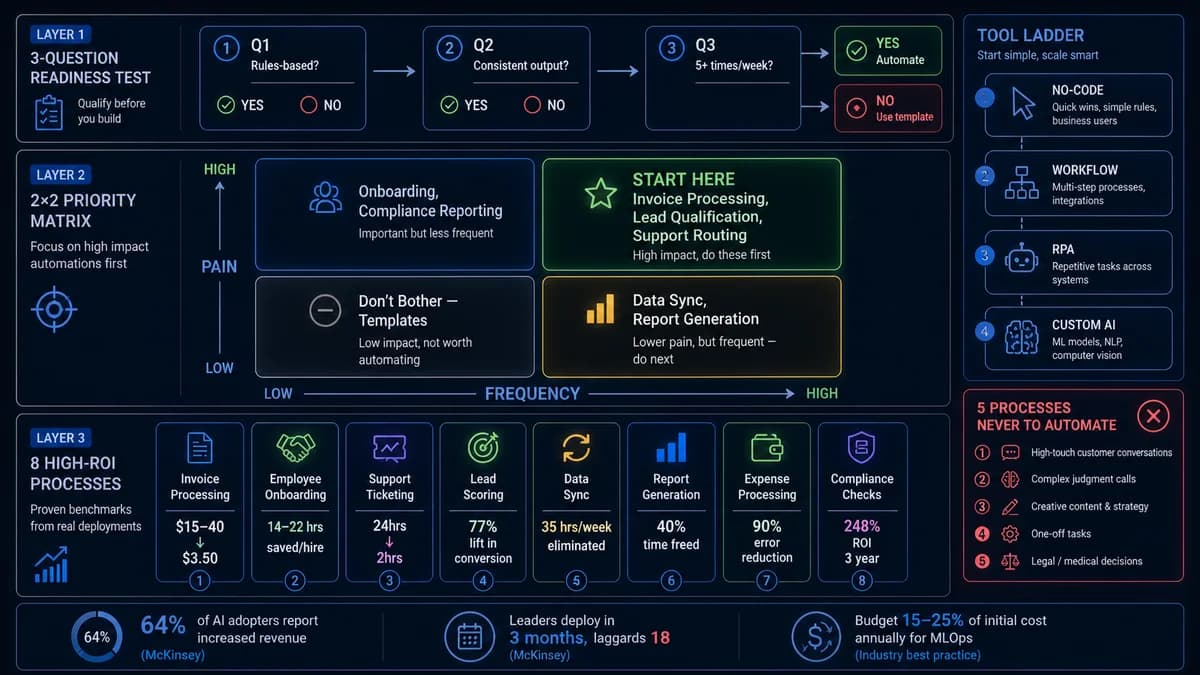
The 3-Question Readiness Test — Is This Process Actually Automatable?
Before you evaluate a single tool or write a single workflow rule, run every candidate process through this three-question test. A process that fails any one of these questions is not ready for automation — it needs to be fixed first or left alone. This test eliminates the most expensive automation mistake: automating a process that was not ready.
Is the decision logic rules-based? Can you write it as explicit if/then conditions?
If a human can write down the complete decision logic — "if X, then Y; if A AND B, then C; if the invoice amount exceeds $10,000, route to the CFO" — the process is a candidate for automation. If the decision regularly requires context, intuition, or judgment that cannot be reduced to explicit rules, it is not automatable with standard workflow tools. It may be addressable with AI, but that is a different project with different requirements.
Does it produce consistent output when performed manually? Same input → same output every time?
Automation reproduces what already happens — reliably, at scale. If you run this process ten times and get ten slightly different results depending on who performs it, when it is performed, or the judgment calls made along the way, automation will reproduce that variability at scale. You will have a consistently inconsistent process running 50 times faster. Standardise the process first — get the manual execution to produce consistent outputs — then automate it.
Does this process run at least 5 times per week — enough to justify build time and ongoing maintenance?
This is the ROI threshold question. A process that runs twice a month does not generate enough compounding time savings to justify the build time, the documentation effort, the testing, and the ongoing maintenance overhead. Below five repetitions per week, the better answer is almost always a template, a checklist, or a standardised procedure — not a built automation. The mathematics are simple: an automation that saves 15 minutes per run creates 75 minutes of savings at five runs per week, or 65 hours per year. At two runs per month, the same automation saves just 24 hours per year — and the build takes longer than that.
Fix the process before you automate it. Spend one week running the process manually with full documentation before you write a single workflow rule. If you cannot describe the process in a flowchart that a new employee could follow without asking questions, the process is not ready to automate. Automating an undocumented or inconsistent process is the #1 cause of automation projects that “technically work” but do not deliver ROI.
The Priority Matrix — What to Automate First
Once you have a list of processes that pass the three-question readiness test, you need a framework for sequencing them. The priority matrix below uses two axes — frequency (how often the process runs) and pain (the cost of manual execution in time, errors, and delay) — to determine where to invest automation effort first.
High Frequency × High Pain
Processes that run constantly and are genuinely painful to execute manually. The compounding time savings are large and immediate. ROI is visible within weeks. This is where every automation program should begin.
Examples: Invoice processing, lead qualification routing, customer support ticket routing, daily report generation
Low Frequency × High Pain
Processes that are painful but don't happen every day. The ROI per run is high (these are the processes teams dread), but the compounding effect is slower. Important to get right because errors in low-frequency processes often go unnoticed longer.
Examples: Employee onboarding, contract generation, compliance reporting, client offboarding
High Frequency × Low Pain
High-volume but relatively painless. These processes are worth automating eventually for error reduction and consistency, but they shouldn't be prioritised over the high-pain quadrants where ROI is more visible.
Examples: Data synchronisation between systems, status update notifications, recurring email sends
Low Frequency × Low Pain
The ROI of automating these processes rarely justifies the build and maintenance cost. Use a standardised template or checklist. Revisit once the higher-priority automation program is delivering consistent results.
Examples: Quarterly one-off reports, rarely-used forms, ad hoc data requests
The 8 Highest-ROI Business Processes to Automate in 2026
These are the eight processes that consistently deliver the fastest and largest measurable ROI across industries in 2026. Each includes specific dollar benchmarks sourced from industry research and production deployment data. They are ordered by typical payback speed.
The Manual Cost
Manual invoice processing costs $15–40 per invoice in fully loaded labour and error-correction costs. A business processing 200 invoices per month spends $3,000–8,000 monthly on a process that produces no competitive advantage. A 3% invoice error rate generates additional correction costs and supplier relationship friction.
The Automated Outcome
Automated invoice processing reduces per-invoice cost to under $3.50. Accenture data shows financial data accuracy improves by up to 90%. 80% of finance departments are integrating AI processing platforms by 2026. Payback on automation investment: under 90 days for businesses processing 100+ invoices monthly.
The Manual Cost
Sales teams manually entering lead data, evaluating lead quality, and routing prospects lose both time and speed-to-lead advantage. Every hour a lead sits uncontacted after enquiry is converted value walking out the door. Manual lead scoring introduces bias and inconsistency — different reps evaluate the same leads differently.
The Automated Outcome
Companies using automated lead scoring see 77% lift in lead generation ROI (HubSpot). Marketing automation delivers $5.44 for every dollar spent over three years with payback under six months (Nucleus Research). Automated lead qualification routes high-intent prospects instantly and triggers personalised follow-up sequences — consistently, at any volume.
The Manual Cost
Manual support ticket triage requires reading every ticket, classifying it by type and urgency, assigning it to the right team member, and tracking whether it was responded to. For teams handling 50+ tickets per day, this triage work alone consumes 1–2 hours daily that produces no customer value. Misrouted tickets result in delayed resolution, escalations, and CSAT damage.
The Automated Outcome
Zendesk data shows automated smart routing reduces response time from 24 hours to under 2 hours. AI-powered ticket classification routes support issues automatically by type, urgency, and required expertise. Customer service average handle time drops 41% with intelligent routing. For a 10-person support team, this is 2–4 hours per day returned to resolution work.
The Manual Cost
Employee onboarding in most businesses involves the same 30–40 tasks executed slightly differently every time: system access provisioning, equipment ordering, document collection, policy acknowledgement, introduction emails, first-week schedule creation, and training assignment. These tasks are low-judgment and high-volume when aggregated across all new hires.
The Automated Outcome
Companies like BambooHR report saving 18 hours per new hire with automated onboarding workflows. HR teams handling 5+ hires per month recover 90+ hours monthly. New hires complete compliance requirements faster, equipment arrives on day one, system access is ready before first login, and the onboarding experience is consistent regardless of which HR team member initiated the process.
The Manual Cost
Manual data re-entry between disconnected systems — CRM to accounting, order management to inventory, support tickets to CRM contact records — is pure cost with zero strategic value. A mid-sized logistics firm manually re-entering data between their WMS and QuickBooks spent 35 hours per week on this single task. At $45/hour loaded labour cost, that is $82,000 per year.
The Automated Outcome
API-based synchronisation between modern SaaS systems is among the fastest automation wins — often buildable in 1–2 weeks with no-code tools (Make, Zapier) for standard integrations. The logistics firm reduced 35 weekly hours of manual entry to zero. Error rate on the data transfer dropped from 2–3% to near zero. The saved hours were redeployed to value-adding logistics work.
The Manual Cost
Weekly performance reports, monthly financial summaries, and recurring operational dashboards require someone to gather data from multiple sources, compile it, format it, and distribute it — every cycle. This process is high frequency (weekly), highly consistent (the same report every time), and entirely rules-based — a perfect automation candidate that most businesses perform manually for years.
The Automated Outcome
By 2026, 80% of finance departments are integrating AI platforms capable of automated report generation. Automated reporting frees 40% of finance team time from data compilation to analysis. For SMBs, automated dashboards deliver a median 340% first-year ROI with a 2.3-month payback period (Salesforce 2025 Small Business Trends Report). Data quality is consistently higher because human transcription errors are eliminated.
The Manual Cost
Expense submission, approval routing, and reimbursement processing involves predictable decision trees: is the expense within policy? Is the amount within the approver's authority? Is the receipt attached? These are exactly the conditions that make a process automatable — explicit rules, consistent inputs, consistent outputs, and high frequency in businesses with active teams.
The Automated Outcome
Automated expense processing routes submissions through policy checks, triggers approvals to the correct level of authority automatically, and integrates with accounting systems to post approved expenses without manual entry. Error rate drops by up to 90% (Accenture). For a 20-person team submitting 5 expense reports per week, automated processing recovers approximately 15 hours of collective weekly admin time.
The Manual Cost
Customer onboarding — account setup, contract delivery, portal access, welcome sequences, first-touchpoint scheduling — involves the same sequence of tasks for every new client. When performed manually, onboarding quality and speed varies based on who handles it. At growth stage, this process becomes a bottleneck: the team can only onboard as fast as people can complete the manual steps.
The Automated Outcome
Automated customer onboarding workflows trigger from a single event (contract signed, payment received) and execute the entire sequence: account creation, welcome email with portal credentials, CRM status update, kickoff call scheduling, and first-week check-in reminder — without human intervention. One team member can effectively onboard 3–5× as many clients when the orchestration is automated.
Want to know which of these 8 processes applies most to your business — and what specific ROI your situation would produce?
Automely runs free 45-minute automation audits. We map your workflows, identify the highest-ROI candidates, and tell you whether no-code tools or custom automation is the right answer — before you commit to anything.
The Anti-Automation List — 5 Processes You Should Never Automate
Every vendor in the automation space will tell you what to automate. Very few will tell you what not to automate. This is the list that protects your automation budget from being spent on projects that look promising in the demo and deliver nothing in production.
Processes That Change Frequently
If your business rules, compliance requirements, or operational logic shift every few months, the cost of maintaining and updating your automation to stay current will erode — and eventually eliminate — the ROI. Every rule change requires a workflow update, a testing cycle, and a deployment. Keep a human in the loop until the process stabilises.
Processes Requiring Genuine Human Judgment and Empathy
Complex customer escalations, sensitive HR situations, high-stakes negotiations, and nuanced relationship decisions cannot be reduced to if/then logic. Automating the triage or routing of these interactions is appropriate — but the decision itself requires a human. Automating the wrong part of a complex interaction creates the most customer damage.
Broken Processes That Have Not Been Fixed First
This is the single most common expensive automation mistake. "Automating a broken process makes it a fast broken process" is accurate. If your manual process produces inconsistent results, has frequent exceptions, or requires constant human correction, the automation will reproduce all of these problems — at scale and at speed.
Exception-Heavy Processes Where More Than 30% of Cases Require Human Intervention
If three out of every ten instances of a process require a human to intervene, the automation only handles the easy 70% and creates a manual queue for the hard 30%. The team is now managing two workflows instead of one. When the exception rate exceeds roughly 20–30%, the operational overhead of managing the exception queue typically exceeds the time saved on straightforward cases.
Low-Frequency Processes That Run Less Than 5 Times Per Week
A process that runs twice a month produces 24 automation runs per year. Even if the automation saves 30 minutes per run, that is 12 hours of annual savings — a number that almost certainly does not justify the build time, documentation effort, testing cycles, and ongoing maintenance overhead of a purpose-built automation. Use a template, a checklist, or a standardised procedure instead.
Tool Selection by Process Complexity — Matching Platform to Problem
| Complexity Level | Best For | Tools | Cost Range | Implementation |
|---|---|---|---|---|
| No-Code Workflow Automation | App-to-app integration, form routing, notification triggers, simple if/then logic between popular SaaS tools | Zapier, Make (Integromat), Microsoft Power Automate | $20–100/month | 1–4 weeks. Business users can build without developers. |
| Workflow Automation Platforms | Multi-step workflows, conditional branching, moderate integrations, team approvals, process tracking dashboards | n8n, Kissflow, Monday.com, Asana automations, HubSpot workflows | $50–500/month | 2–8 weeks. Business analysts or technical team members. |
| Robotic Process Automation (RPA) | Legacy systems without APIs, screen scraping, complex multi-step desktop interactions, ERP automation | UiPath, Automation Anywhere, Blue Prism | $10,000–100,000+ | 8–24 weeks. Requires specialist RPA developers and governance framework. |
| AI-Powered Automation | Unstructured data (documents, emails, voice, images), intelligent classification, decision augmentation, RAG-grounded knowledge systems | Custom-built using GPT-4o, Claude, LangChain / LangGraph orchestration, vector databases | $20,000–200,000+ | 4–12 weeks for targeted automation; 6–12 months for enterprise-wide AI workflow systems. |
| Hybrid: No-Code + Custom AI | Standard app integrations handled by no-code tools; AI layer added for document processing, intelligent routing, or decision support within the same workflow | Make or Zapier + custom AI API integration for the intelligent step | $5,000–50,000 build + $100–500/month running cost | 4–10 weeks. Most cost-effective approach for mid-market businesses with mixed process types. |
For 70–80% of SMB and mid-market automation opportunities, no-code or workflow automation platforms handle the need at a fraction of enterprise RPA costs. Invest in RPA only when you have documented processes interacting with legacy systems that lack modern APIs. Invest in custom AI automation when your process involves unstructured data — documents, emails, voice recordings — that rule-based tools cannot interpret. The key question: are you bending your business processes to fit the tool's limitations, or is the tool fitting your business processes?
The ROI Formula — How to Justify Automation Investment to Finance
Direct labour savings understate automation ROI by 30–50%. A complete business case includes error reduction value, cycle time savings (faster processing frees working capital), scalability value (handling 3× the volume without 3× the headcount), and employee redeployment to higher-value work.
Business Process Automation ROI Formula
Example: Invoice processing automation for a business processing 200 invoices per month. Current cost: 200 invoices × 20 minutes × $50/hour loaded labour = $3,333/month = $40,000/year. Plus 3% error rate: 72 errors × $200 correction cost = $14,400/year. Current total: $54,400/year. Automated cost: 200 invoices × 2 minutes human review = $4,800/year. Error rate drops to 0.3%: 7 errors × $200 = $1,440/year. Annual savings: $48,160. Tool licensing: $3,600/year. Build cost amortised: $4,000/year. ROI: 534%.
The Correct Implementation Order — Avoiding the Stack-Before-Proven Mistake
The most common reason automation programs collapse is stacking multiple automations before the first one is proven. A single automation failing in an interconnected stack can cascade failures across every workflow it touches. The correct order is sequential, not parallel.
Select One Process
Use the priority matrix to identify your highest-priority candidate from Quadrant 1 (high frequency, high pain). Document it completely: every decision, every input, every output, every exception. If you cannot document it completely, it is not ready to automate.
Build and Pilot on 20 Real Cases
Build the automation against the documented process using the simplest tool that handles the complexity. Run it on 20 real cases with active monitoring. Measure actual vs expected output. Record every exception that requires human intervention. If the exception rate exceeds 30%, revisit the process definition before scaling.
Prove ROI on One Measurable Metric
Do not scale until you can prove ROI on a single specific metric — time saved per week, error rate, cost per transaction. "It seems like we're saving time" justifies nothing. A specific number justifies the next investment.
Scale to the Next Process
Apply lessons from Phase 1 to the next candidate. Build an internal library of reusable workflow components. Develop a standard documentation template that every future automation starts from.
Build Toward a Centre of Excellence
By months 4–9, formalise your automation governance: documentation standards, tool selection criteria, exception management processes, and maintenance schedules. Automation without governance creates a fragile, undocumented system that fails when team members leave.
How Automely Builds Business Process Automation
Automely designs and builds custom business process automation for businesses across the US, UK, and EU — from no-code workflow implementations for straightforward integration needs to AI-powered automation systems for processes involving unstructured data, complex decision logic, or proprietary operational workflows that generic tools cannot handle.
Every automation engagement starts with a process audit: we map your current workflows, apply the three-question readiness test to your automation candidates, prioritise using the frequency-pain matrix, and recommend the appropriate tool layer — including when the right answer is a $30/month no-code tool rather than a custom build. We do not recommend custom development when simpler approaches serve the use case.
Our reference builds: a German-language lead qualification agent that produced 270%+ ROI in 11 weeks, and Cerebra Caribbean's conversational AI platform handling 10,000+ customer interactions with 95% CSAT. For the technical architecture behind AI-powered automation, see our AI agent guide. For integrating AI into existing workflows, see our AI integration services guide.
Ready to map your highest-ROI automation candidates, get a specific ROI projection, and know whether to use no-code tools or build custom automation — before committing any budget?
Free 45-minute automation audit. We tell you where to start, what it will save, and what to avoid — including if you don't need us.