

Why “RPA or AI Automation?” Is the Wrong Question
Robotic Process Automation (RPA) and AI automation are not competitors. They do not replace each other. They solve fundamentally different problems and are most powerful when combined. Asking “should we use RPA or AI automation?” is like asking “should we use a calculator or a spreadsheet?” — the answer depends entirely on what you are trying to accomplish, not on which tool is newer or more sophisticated.
The useful question is: what type of task am I trying to automate, and which technology handles that task type? RPA handles structured, rules-based tasks on any computer system — including legacy systems with no API. AI automation handles tasks that involve unstructured data, judgment, or decision-making that cannot be expressed as explicit rules. Most real-world business processes involve both types of tasks within the same workflow — which is why the most effective automation programmes in 2026 combine both technologies into what is called Intelligent Automation or Hyperautomation.
What RPA Actually Is — Beyond the Vendor Pitch
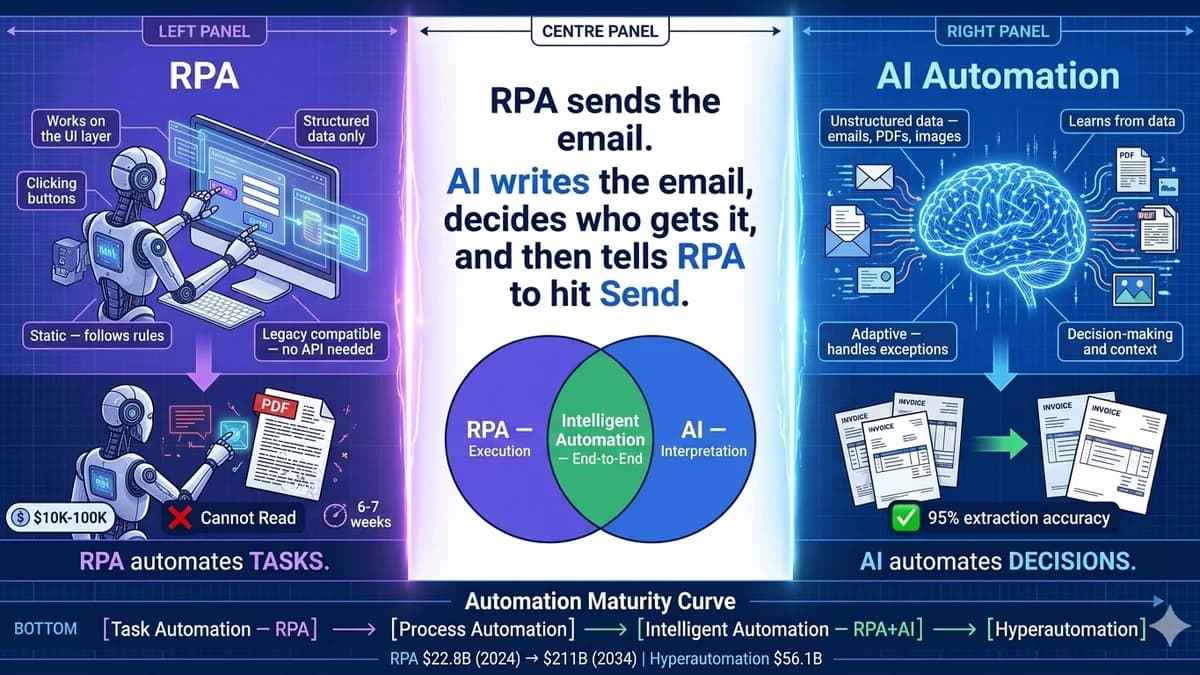
Robotic Process Automation is software that mimics exactly what a human does when sitting at a computer: it clicks buttons, reads text from screens, fills in form fields, copies data between applications, opens files, navigates menus, and triggers actions — all without human intervention. The “robot” in RPA is not a physical robot. It is a software programme that interacts with computer interfaces the same way a human operator would.
The critical capability that distinguishes RPA from API-based workflow automation: RPA works on the user interface layer. It does not need the underlying software to expose an API. If a human can navigate to a screen and perform an action, an RPA bot can be configured to do the same thing. This makes RPA the automation technology of choice for legacy ERP systems, older accounting software, government portals, and any system a business depends on but that cannot be connected via modern integration methods.
What it does well
Executes defined sequences of actions on any computer system, regardless of whether the system has an API, using the same interface a human would use.
- Legacy system automation without API integration
- High-volume, repetitive execution with zero errors on the structured steps
- 24/7 operation — bots don't take lunch breaks or sick days
- Fast implementation: 6–7 weeks for medium-complexity processes
- Clear, auditable decision trail — every action logged
Where it breaks down
RPA is deterministic and fragile. It follows the rules it was given and fails — or takes a predefined exception path — when anything outside those rules is encountered.
- Cannot read unstructured data — emails, PDFs in varied formats, images, handwriting
- Breaks when the UI changes — a menu renamed or a button moved requires reprogramming
- Cannot make judgment calls — every decision must be pre-programmed as an explicit rule
- Does not learn or improve — each process change requires a reprogramming cycle
- High exception rate processes require constant human intervention
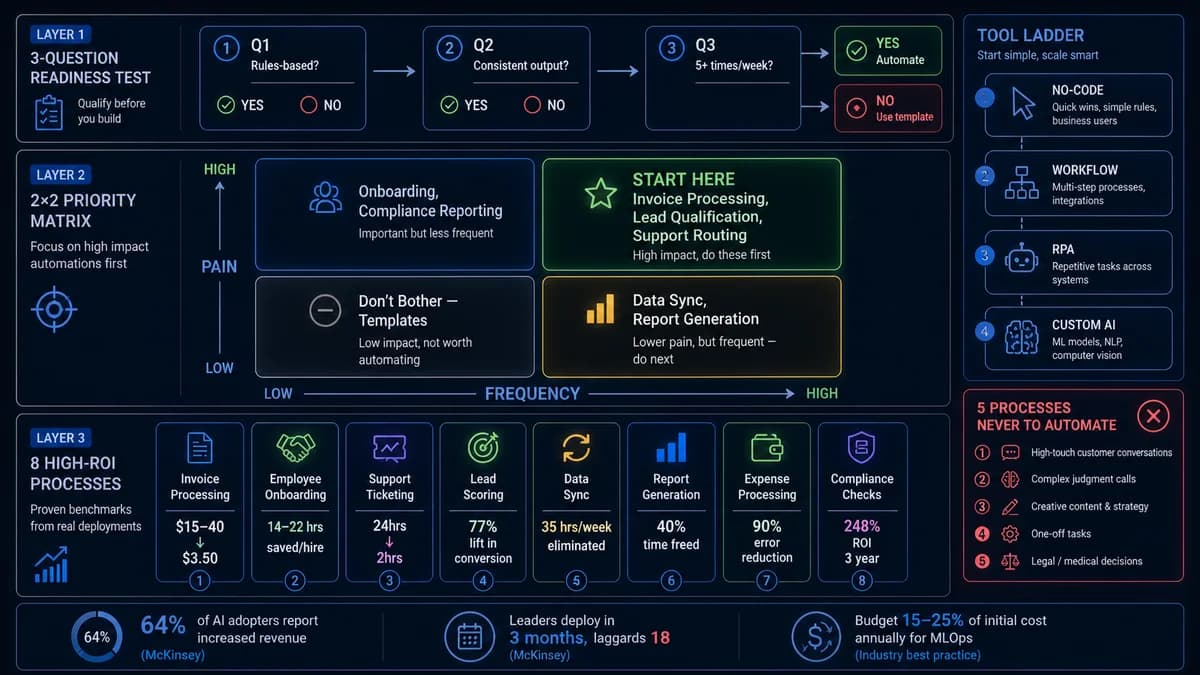
Leading RPA platforms in 2026: UiPath (enterprise standard), Automation Anywhere (cloud-first), Blue Prism (large enterprise, strong governance), and Microsoft Power Automate (integrated with Microsoft 365). Enterprise RPA implementations typically cost $10,000–100,000 depending on process complexity, with payback periods averaging under 12 months for well-selected processes.
What AI Automation Actually Is — The Honest Technical Explanation
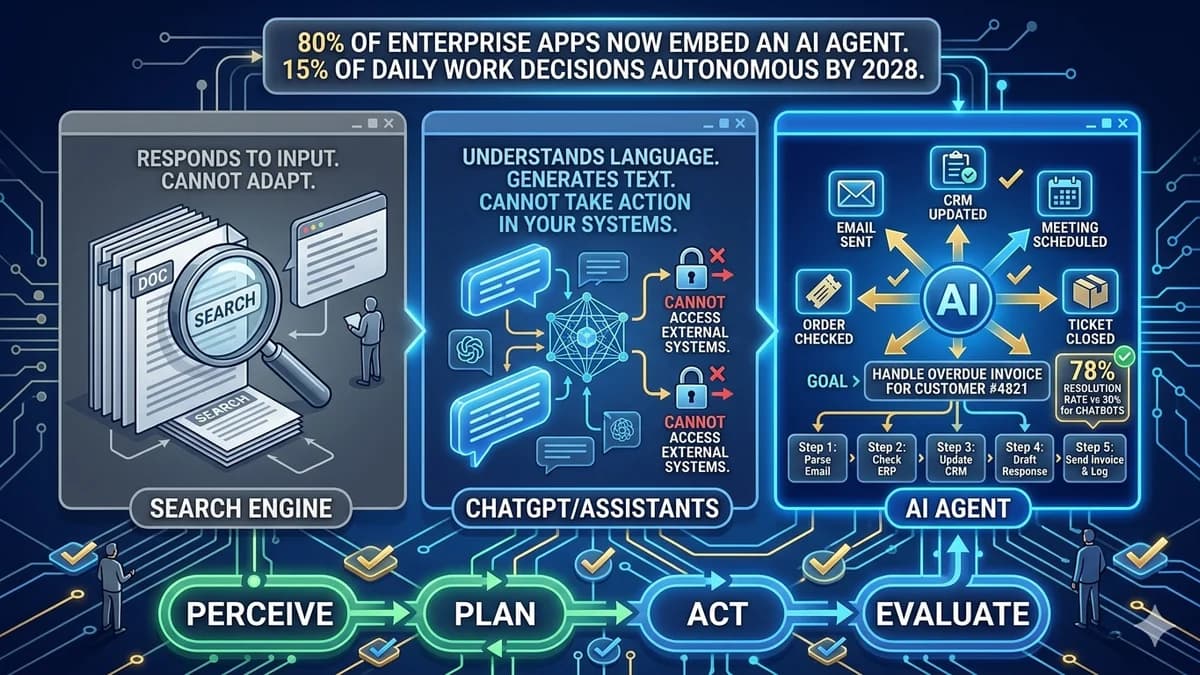
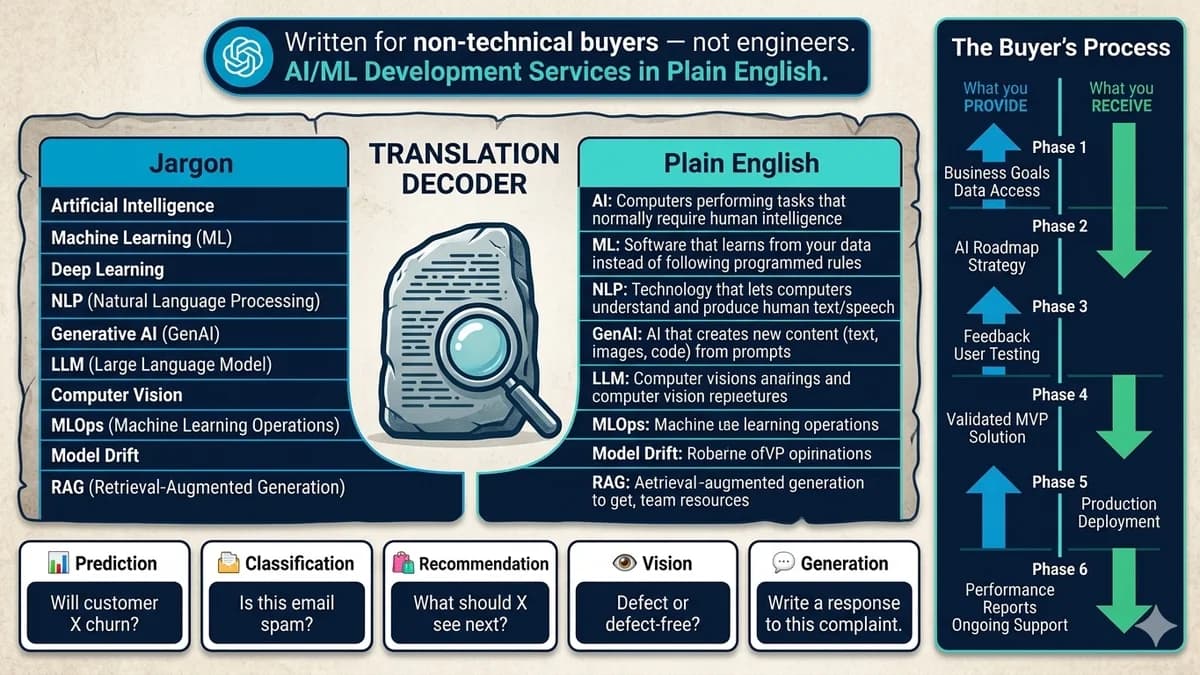
AI automation uses machine learning, natural language processing (NLP), computer vision, and — in 2026 — generative AI models to automate tasks that involve unstructured data, contextual decision-making, or judgment that cannot be reduced to explicit rules. The fundamental difference from RPA is in the input type: RPA requires structured, consistent inputs in known positions. AI automation can process inputs in any format because it uses learned models to interpret what it receives rather than programmed rules about where to look.
The most practically important distinction: RPA uses structured inputs and programmed logic. AI uses unstructured inputs and learns its own decision logic from training data. A second distinction: RPA is static — it does not change its behaviour unless explicitly reprogrammed. AI models improve as they process more data, becoming more accurate over time.
What it does well
Interprets, classifies, and makes decisions on inputs that do not have a consistent, predictable format — the tasks that break RPA bots.
- Reads invoices, contracts, emails regardless of format variation
- Classifies customer enquiries by intent, sentiment, and urgency
- Makes routing decisions based on context, not just keywords
- Improves accuracy over time as it processes more cases
- Handles exceptions that would require human intervention in RPA
- Generates structured outputs from unstructured inputs
Where it requires care
AI automation introduces probabilistic decision-making. Unlike RPA's deterministic execution, AI produces decisions with varying confidence levels.
- Higher build cost and longer implementation than RPA for equivalent scope
- Requires quality training data — garbage in, garbage out
- Requires ongoing maintenance — models degrade as real-world data drifts
- Confidence thresholds must be designed in — low-confidence decisions need human review
- Cannot interact with legacy UI systems without an additional RPA or API layer
Head-to-Head: RPA vs AI Automation
| Dimension | RPA | AI Automation | Intelligent Automation (Both) |
|---|---|---|---|
| Input type | Structured, consistent — form fields, database records, screen positions | Unstructured — emails, PDFs, images, voice, varied formats | Both — AI interprets unstructured inputs; RPA executes on structured systems |
| Decision-making | Explicit if/then rules programmed upfront — deterministic, auditable | Probabilistic models trained on data — handles ambiguity and context | AI makes the decision; RPA executes it |
| System compatibility | Any software a human can use — legacy systems, no API required | Requires data access and API or webhook integration in most cases | AI layer accesses data; RPA handles the legacy execution |
| Adaptability | Static — breaks when the UI or process changes without reprogramming | Learns and improves over time from production data | Adaptive learning layer + stable execution layer |
| Exception handling | Predefined exception paths — cases outside the rules go to a human queue | Generalises from training — handles novel cases with appropriate confidence thresholds | AI handles ambiguous cases; RPA handles defined steps; humans handle high-stakes exceptions |
| Implementation speed | 6–7 weeks for medium complexity — fastest path to working automation | 4–12+ weeks depending on data quality and model complexity | 8–16 weeks for combined approach — longer, but covers end-to-end workflow |
| Typical cost | $10,000–100,000 enterprise implementation; lower for simpler deployments | $20,000–200,000+ depending on model complexity and data requirements | $50,000–300,000+ for end-to-end intelligent automation systems |
| Maintenance | Reprogramming needed when UI or business rules change — high change sensitivity | Ongoing model monitoring and retraining — 15–25% of build cost annually | Both maintenance types — structured IT change management + ongoing model ops |
| ROI timeline | Payback under 12 months for well-selected processes | Payback 3–18 months depending on volume and complexity | 25–50% operational cost reduction over 2–3 year horizon (Forrester) |
When RPA Is the Right Answer
You have legacy systems with no API
If your business runs on an ERP from 2008, a government portal, or any application where your team navigates screens and types data manually because there is no programmatic integration option, RPA is the technology that can automate it. No-code workflow tools (Zapier, Make) and API-based automation cannot touch these systems. RPA can — because it operates on the user interface, exactly as a human would.
Your inputs are fully structured and your logic is explicitly definable
If the process receives consistent, structured inputs — data from specific fields, specific screen positions, specific database records — and the decision logic can be completely written as if/then rules without needing to read intent, context, or unstructured content, RPA is simpler, faster to build, and lower cost than AI automation for this task.
Speed of implementation is critical
RPA delivers working automation in 6–7 weeks for medium-complexity processes. AI automation takes longer due to data assessment, model training, and evaluation cycles. If you need a working automated process quickly — to demonstrate ROI before a broader investment, to handle a compliance deadline, or to address an immediate operational bottleneck — RPA gets there faster.
You need a deterministic, fully auditable automation trail
Regulated industries (healthcare, finance, legal) often require complete auditability of every automated action — a precise record of exactly what decision was made, when, and based on what input. RPA provides this determinism inherently: every action follows a programmed rule and produces a logged output. AI automation requires additional governance design to achieve equivalent auditability.
You want quick wins before committing to a larger automation investment
RPA's lower implementation cost and faster payback (under 12 months average) make it the standard entry point for automation programmes. Demonstrate ROI on well-selected RPA processes first, build internal confidence and automation capability, then layer in AI for the processes that RPA's limitations prevent it from handling.
When AI Automation Is the Right Answer
Your process involves unstructured data
If your process starts with an email, a PDF that arrives in varying formats, a scanned document, a voice recording, or an image — RPA cannot read it. AI automation uses NLP, computer vision, and generative models to extract structured information from any format, enabling automation of processes that RPA simply cannot reach. Document intelligence, email classification, and invoice data extraction from varied-format PDFs all belong in this category.
Your exception rate exceeds 20–30%
If more than two or three out of every ten instances require human intervention because the input doesn't match the pattern RPA expects, the automation only handles the easy cases and creates a growing manual queue for the hard ones. AI automation handles novel inputs by generalising from training data — it can make decisions on cases it has never seen before, based on patterns learned from thousands of historical examples.
Your underlying systems or processes change frequently
RPA scripts are tied to specific screen positions, field names, and UI elements. When a software vendor updates their interface, the RPA bot breaks and requires reprogramming. AI automation using computer vision and semantic understanding is more robust to these interface changes because it interprets what it sees rather than relying on pixel-perfect positions. For processes running on frequently-updated SaaS platforms, AI-powered automation has dramatically lower maintenance overhead.
You need the automation to make contextual decisions — not just execute rules
If the decision in your process depends on context — the tone of a customer email, the relationship history with a vendor, the combination of factors in a risk assessment — AI automation can model this contextual decision-making from historical examples. Processes involving sentiment analysis, intelligent prioritisation, risk scoring, or any decision that an experienced human would make based on context rather than explicit rules are candidates for AI automation.
You want the automation to improve over time without reprogramming
RPA executes exactly what it was programmed to do — no more, no less — until a human reprograms it. AI models learn from production data and improve their accuracy as they process more cases. For processes where the underlying patterns evolve — changing customer behaviour, evolving fraud patterns, shifting product inventory dynamics — AI automation that learns from production data maintains performance without requiring continuous manual rule updates.
Not sure whether your specific process calls for RPA, AI automation, or the intelligent combination?
Automely will tell you in a free 45-minute consultation. We map your process, identify the automation type that fits, and recommend the simplest approach that solves your problem — including if it's just a no-code workflow tool.
Intelligent Automation and Hyperautomation — When Both Technologies Work Together
The best-performing automation programmes in 2026 do not choose between RPA and AI — they combine them. The combination has a name: Intelligent Automation (also called Cognitive Automation or AI-augmented RPA). The strategy of applying this combination across an entire organisation is called Hyperautomation.
The functional distinction is clean: RPA automates tasks — individual steps. Intelligent Automation automates processes — entire end-to-end workflows that include both rule-based execution steps and cognitive interpretation steps. The one-sentence illustration: “RPA sends the email. Intelligent Automation writes the email, decides who to send it to based on context, and then triggers the RPA bot to hit send.”
What the combination enables
End-to-end automation of workflows that include both structured execution steps and unstructured interpretation steps — which describes most real business processes.
- AI reads and interprets the unstructured input (the email, the invoice, the document)
- AI makes the decision (classify, route, score, approve, escalate)
- RPA executes the action in the system (enters the data, fills the form, triggers the workflow)
- AI monitors the output and flags anomalies for human review
- The combination handles what neither could alone — from document receipt to system update
The organisation-wide strategy
Hyperautomation extends intelligent automation across entire business functions using process mining to discover automation opportunities and analytics to measure and optimise.
- Process mining discovers how work actually flows (often different from documented processes)
- RPA handles rules-based execution steps across all identified processes
- AI/ML handles interpretation and decision steps
- NLP enables natural language interaction with automation systems
- Analytics tracks performance and identifies optimisation opportunities continuously
- Gartner: 25% operational cost reduction for hyperautomation adopters
The automation maturity progression most organisations follow:
Real-World Example: Invoice Processing With RPA, AI, and Intelligent Automation
Invoice processing is the clearest illustration of why the three approaches solve different problems. Here is the same business process — 200 invoices per month from 50+ different suppliers in varying formats — handled three ways.
Step 1: Bot opens email, downloads the attachment
RPA can handle this perfectly — structured action on a consistent interface.
Step 2: Bot attempts to enter invoice data into accounting system
Problem: invoices arrive from 50+ suppliers in different formats. The bot was configured for 3 standard formats. 60% of invoices fail and go to a human exception queue. RPA automation coverage: ~40% of invoice volume.
Step 1: AI reads the invoice, extracts key fields regardless of format
AI handles this excellently — NLP and computer vision extract invoice number, amount, vendor, date, and line items from any format with 95%+ accuracy.
Step 2: AI determines approval routing and validates against PO data
AI makes the routing decision correctly. Problem: the accounting system is a legacy ERP with no API. AI cannot enter the data — a human must complete the final execution step. Automation coverage: decision and extraction only.
Step 1: AI reads the invoice regardless of format (NLP + computer vision)
Extracts all fields with 95%+ accuracy. Flags low-confidence extractions for human review.
Step 2: AI validates against PO data and routes for approval
AI makes the routing decision based on amount, vendor, and category. Sends approval request to the correct authority level.
Step 3: RPA enters validated data into the legacy ERP and triggers payment
RPA navigates the legacy system UI, enters the structured data from the AI extraction, and triggers the payment workflow. End-to-end automation: ~95% of invoice volume handled without human intervention.
The 5-Question Decision Framework — What Your Situation Calls For
Does your automation process need to interact with a legacy system that has no API?
Does the process involve unstructured inputs — emails, PDFs in varying formats, images, voice, or documents from multiple sources?
Can the entire decision logic in this process be expressed as complete, explicit if/then rules — with no judgment, context, or intuition required?
What percentage of cases currently require human intervention because they don't fit the standard pattern?
How frequently do the underlying systems, interfaces, or business rules change?
Start with RPA if: your inputs are structured, your logic is explicit, you have legacy systems to automate, and you need quick wins. RPA delivers the fastest ROI for the right process types and provides the execution backbone of any intelligent automation programme you build later. Start with AI automation if: your process involves unstructured data, high exception rates, or decision-making that cannot be programmed explicitly. Plan for Intelligent Automation if: you have end-to-end processes that include both structured execution steps and cognitive interpretation steps — which describes most real-world business workflows.
How Automely Approaches RPA and AI Automation
Automely designs and builds automation systems across the full spectrum — from standalone RPA implementations for legacy system automation to custom AI-powered document intelligence and the combined intelligent automation architecture that delivers end-to-end process coverage. Every engagement starts with the same question: what type of task is this, and what is the simplest technology that handles it?
We do not recommend AI automation when RPA solves the problem. We do not recommend no-code workflow tools when RPA is required. And we do not recommend custom builds when a $30/month tool handles the use case. The recommendation is always derived from the process, not from what we prefer to build.
For the broader context on selecting what to automate before choosing the technology, see our business process automation guide. For the AI automation layer specifically — ML problem types, costs, and vendor evaluation — see our AI/ML development services guide.
Have a process you are trying to automate but are not sure which technology fits?
Free 45-minute consultation. We assess your process, tell you whether it calls for RPA, AI automation, or both, and give you an honest cost and timeline estimate before you commit to anything.