


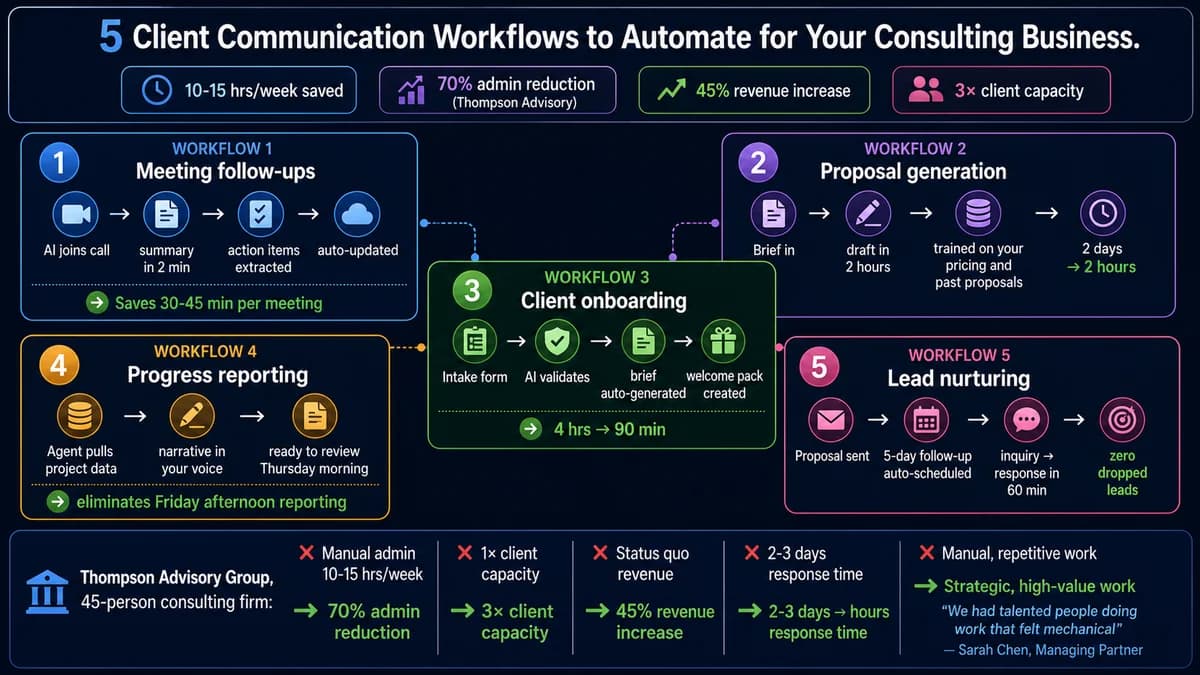
The Real Consulting Time Problem — 60-70% on Admin, Not Strategy
Strategic consulting firms face a problem that is not about capability — it is about time allocation. Research consistently shows that consultants spend 60-70% of their time on research, data gathering, client preparation, and administrative communication — not strategic thinking. The activities clients pay premium rates for occupy the minority of consultant hours. The activities that could be systematically automated consume the majority.
This is not a minor inefficiency. For a consulting business with four consultants at $250/hour billable rates, recovering 10 hours per week of non-billable administrative time per consultant represents $520,000 in annual billable capacity. Most consulting businesses are leaving this on the table — not because they lack the expertise to deliver more, but because their client communication workflows are manual, inconsistent, and time-intensive by default.
This guide covers five specific client communication workflows that AI can automate for a consulting business — with the exact before-and-after, what tools and systems are involved, and the implementation sequence that produces results without disrupting client relationships in the process.
Workflow 1: Meeting Follow-Ups and Action Item Extraction
- 30-45 minutes writing follow-up email after each client call — from memory or handwritten notes
- Action items captured inconsistently — different consultants capture different levels of detail
- Meeting notes never make it to the CRM — they sit in email or personal notes and are lost when the consultant moves on
- Follow-up timing varies — some clients receive same-day follow-up, others wait days
- No searchable record of what was discussed across multiple engagements
- AI joins the call (Fathom, Fireflies, or Granola) and produces a structured summary within 2 minutes of the call ending
- Action items extracted automatically with owner and deadline — formatted for direct use in follow-up email
- Meeting summary synced to CRM automatically — searchable record across all client engagements
- Follow-up email drafted in consultant's voice based on summary — consultant reviews and sends, not writes
- Preparation agent: before next call, AI generates briefing from previous meeting notes and any updates
Workflow 2: Proposal Generation
- 2 days to draft a thorough proposal from a client brief — especially for new service lines or unfamiliar industries
- Start from scratch each time despite covering the same core service descriptions and methodology
- Quality inconsistent across proposals depending on who writes them and how much time is available
- Pricing and scope described differently across proposals — creates client confusion and negotiation difficulties
- Proposal templates become outdated and are not updated consistently
- Consultant completes a structured brief (client name, problem, scope, timeline, constraints) — 15-20 minutes
- AI proposal agent generates first-draft proposal: executive summary, methodology, timeline, team, pricing, terms — trained on your service descriptions, pricing tiers, and successful past proposals
- First draft ready in 20 minutes — consultant reviews, refines, and customises the client-specific elements
- Consistent quality and formatting across all proposals regardless of who initiates them
- Proposal library builds over time — successful proposals feed the agent's pattern recognition
Want a custom AI proposal agent trained on your consulting firm's specific services, pricing, and past proposals? This is the automation that recovers the most time in the shortest period for most consulting businesses.
Free 45-minute consultation. We audit your current proposal process, design the AI proposal agent architecture, and give you a realistic build timeline and cost estimate — specific to your firm's tools and workflows.
Workflow 3: Client Onboarding Automation
- 4 hours of onboarding admin for each new client — intake calls, information gathering, brief writing, welcome documentation
- Intake information arrives inconsistently — some clients answer in detail, others leave gaps that require follow-up
- Project brief written from scratch based on intake information — same structure every time but never templated properly
- Welcome pack (access instructions, process overview, communication guidelines) created manually or sent inconsistently
- New client experience varies depending on which consultant runs the onboarding
- New client triggers automated intake: AI agent sends a structured intake questionnaire via email or form
- Agent validates completeness and follows up automatically on incomplete fields before the project brief stage
- Project brief auto-generated from intake responses — consultant reviews and refines, does not write from scratch
- Welcome pack generated automatically: personalised with client name, project name, key dates, communication process
- Consistent, professional onboarding experience for every client regardless of team capacity at the time of onboarding
Workflow 4: Client Progress Reporting
- Friday afternoons consumed by pulling data from project management tools, formatting into client report templates, writing narrative commentary
- Report quality and format varies depending on how much time the consultant has
- Data is always slightly stale by the time the report is written and sent — clients receive weekly snapshots, not real-time insight
- Consultant narrative covers the same themes every week — generic updates that add little strategic value
- High client count makes consistent reporting increasingly unsustainable
- Reporting agent connects to project management tool (Monday.com, Asana, ClickUp) via API — pulls current status automatically
- Narrative generated in consultant's voice: progress this week, what is on track, what needs attention, upcoming milestones
- Consultant receives a draft for review on Thursday morning — 20-30 minutes to review and approve, not 2-3 hours to produce
- Consistent report format and quality across all clients — no client gets a better report than another based on workload
- Proactive exception flagging: agent flags items at risk before the weekly report, allowing consultant to address issues proactively
Workflow 5: Lead and Prospect Nurturing
- Warm leads go cold because follow-up is manual and depends on the consultant remembering to do it between client work
- No consistent timing or sequence — some prospects receive immediate responses, others wait a week
- Past clients who could generate repeat work are not consistently nurtured — relationships lapse due to inattention, not lack of mutual value
- CRM data is not actioned — opportunity flags and follow-up reminders are seen but not acted on promptly
- Proposals go out and then sit without follow-up — "I'll follow up if I don't hear from them" leads to lost deals
- Proposal sent → automated 5-day follow-up email drafted in consultant's voice and scheduled, with escalation if no response at day 10
- New inquiry received → AI drafts personalised acknowledgment email with specific questions based on the inquiry content, sent within 60 minutes
- CRM-triggered check-ins: past clients with no recent contact flagged at 90 days → AI drafts personalised reconnect email for consultant review
- Post-project: 30-day, 60-day, and 90-day value-add touchpoints auto-generated — case study sharing, relevant insight, check-in
- No lead is forgotten because no individual consultant has to remember to follow up
The Thompson Advisory Case — What Full Implementation Delivers
Thompson Advisory Group, a 45-person management consulting firm in Chicago, implemented an AI agent system across their client communication workflows. Their documented outcomes after six months are the most comprehensive case study available for consulting business AI automation (MindStudio, January 2026).
Thompson Advisory Group — 45-Person Management Consulting Firm
Tasks that previously required 15-20 hours weekly now take 4-5 hours, with higher quality output. Client requests that used to take 2-3 days for initial research now get preliminary responses within hours — a responsiveness that became a competitive advantage in new business pitches. The firm now views AI agents as core infrastructure for their consulting practice, as essential as email or CRM systems. New consultants learn to work with agents as part of their onboarding process.
Off-the-Shelf AI Tools vs Custom AI Development for Consulting
The consulting business AI stack in 2026 has two layers: off-the-shelf tools for generic productivity tasks, and custom AI development for the workflows that require your firm's specific context. Understanding where each belongs is the most important decision in building your AI stack.
When Generic AI Is Sufficient
- Meeting transcription and generic summaries (Fathom, Fireflies, Granola)
- General email drafting and editing assistance (ChatGPT, Claude)
- Research and competitive intelligence gathering (Perplexity, NotebookLM)
- Basic CRM follow-up reminders and scheduling automation
- Starting point to measure time savings before committing to custom development
When Your Firm's Context Is the Value
- Proposal generation that knows your services, pricing, tone, and past proposals
- Client onboarding agents trained on your specific intake requirements and project brief format
- Reporting agents that know your reporting template, voice, and client-specific context
- Lead nurturing that sounds like you wrote it personally, not like marketing automation
- Integration between your CRM, project management, email, and document systems that off-the-shelf tools cannot connect
Seed & Society's 2026 analysis identifies the most common consulting AI mistake: "The mistake most consultants make is tool accumulation. They sign up for twelve things, use four of them inconsistently, and spend more time managing subscriptions than saving time with AI." The principle that works: start with the highest-friction task and solve that one first. If proposals take four hours each, fix proposals. If meeting follow-ups eat your Thursdays, fix meeting follow-ups. Do not automate everything at once. A single automation that genuinely saves 5 hours per week delivers more value than five automations each saving one hour if four of them are used inconsistently.
The Implementation Sequence — Where to Start
Instrument Your Current Time Usage First
Before building any automation, spend one week tracking where your non-billable communication time actually goes. Most consultants are surprised — their largest time sink is often not what they assumed. The data from one week of tracking tells you which of the five workflows to automate first.
Start with Meeting Follow-Ups (Fastest ROI)
Meeting transcription and follow-up automation is the lowest-friction first automation: off-the-shelf tools (Fathom is free for solo consultants), immediate time savings from the first call, no complex integration required. Start here, measure the time saved over 30 days, then proceed.
Build the Proposal Agent Second
After establishing that AI tools save real time on meeting follow-ups, build the proposal agent. This requires custom development — it must know your services, pricing, and voice. This is where generic off-the-shelf tools fail and where Automely's AI consulting services produce the most dramatic ROI. Proposal time reduction from 2 days to 2 hours is typically the single largest time recovery in any consulting firm's AI stack.
Add Onboarding and Reporting Automation
Once the core client communication workflows are automated, add the onboarding intake and progress reporting agents. These require integration with your project management tools — typically 6-8 weeks of custom development. Deliver these in sequence, not simultaneously.
Complete with Lead Nurturing — Full Stack Operational
Lead nurturing automation is the final layer — connecting your CRM data to automated but personalised outreach sequences. Once all five workflows are operational, you have a full AI client communication stack that eliminates the majority of non-billable communication time and consistently performs regardless of team capacity fluctuations. For the business process automation ROI framework behind these numbers, see our AI automation vs manual process cost guide.
Ready to build the specific AI automations for your consulting business — starting with the workflow consuming the most non-billable time this week? Automely provides free consultation, audit, and implementation planning.
Free 45-minute consulting operations audit. We identify your three highest-ROI automation opportunities, give you the implementation sequence, and tell you honestly where off-the-shelf tools solve the problem before recommending custom development.