

The phrase "AI customer support that retains the human touch" is everywhere — and almost nowhere in the actual implementation guides is it treated as a specific engineering problem rather than a philosophical aspiration. "Balance AI and human" does not tell you which queries the AI should handle, which it should not, when to trigger a handoff, how to execute that handoff without destroying the conversation, or what to do when the AI confidently gives a wrong answer.
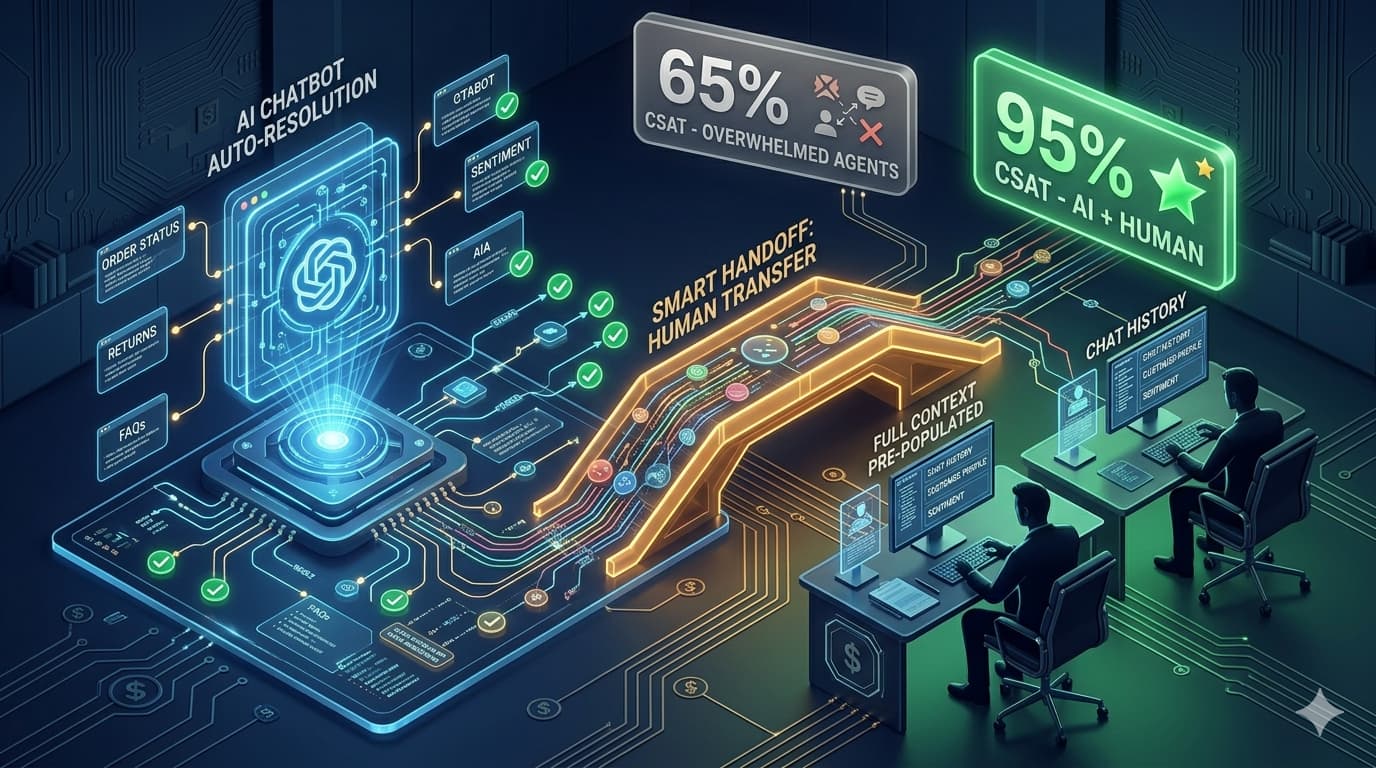
This guide covers exactly those questions. The human touch is not preserved by limiting how much AI you use. It is preserved by making precise decisions about which interactions AI handles, which it assists, and which it routes immediately to a human — with a handoff that transfers context rather than restarting the conversation from scratch.
Automate by interaction tier, not by percentage. A 70% automation rate that includes the wrong 70% destroys CSAT. A 55% automation rate that covers the right 55% — all Tier 1 interactions — improves CSAT and simultaneously reduces agent workload. The goal is not to automate as much as possible. It is to automate everything that AI does better than a human agent, and hand over everything else with full context.
The Real Problem With Most Customer Support AI Deployments
Most AI customer support failures are not technology failures. The model is capable. The problem is design: what the AI was asked to handle and how the handoff was built when it could not.
The most common failure pattern: an AI chatbot is deployed across all support channels with a goal of maximum deflection. Its knowledge base is loaded with post-purchase policies. Its escalation path requires the customer to fill in a contact form. The AI handles queries it should not — emotional complaints, complex billing disputes, multi-step technical issues — and handles them badly. It gives generic answers to specific problems. It dead-ends customers who need resolution with a redirect to a help article they already read. The CSAT score drops. The business concludes that AI does not work for customer support.
The AI was not the problem. The design was the problem. Specifically: the absence of a tier classification system (deciding which queries the AI should and should not handle), the absence of specific escalation triggers (conditions that initiate a handoff before the customer demands it), and the absence of a context-preserving handoff mechanism (so the human agent does not start the conversation from scratch).
The alternative is a system designed around Kustomer's documented observation: AI that eliminates the need for human agents to run multiple systems simultaneously, leaving them to deal directly with the human side of customer service. Agents become better at their jobs when AI handles the volume. Customers receive faster, more consistent responses on routine queries. And the interactions that genuinely require human judgment receive the full attention of agents who are not buried in tickets they are overqualified to answer.
Automate by Tier — The Classification System That Protects CSAT
Before building any AI chatbot solution for customer support, classify your incoming query types into three tiers. This classification drives every subsequent decision: knowledge base content, escalation triggers, routing logic, and success metrics.
High Volume · Low Complexity · Pattern-Based
✓ Fully automateQueries with a clear, consistent correct answer available in your documentation. The customer asks one thing, there is one accurate answer, and the answer does not require judgment about the customer's specific context beyond what they have provided.
AI handles these completely — no human involvement unless the customer explicitly requests it. Well-built AI chatbot solutions handle 55–75% of support volume at this tier. The key requirement: your knowledge base must contain accurate, specific answers. An AI that gives vague or generic answers to Tier 1 queries destroys trust even when the query is simple.
Moderate Complexity · Context-Dependent · Judgment Required
~ AI-assistedQueries where the correct answer depends on specifics the AI must gather and assess. The AI can handle the first phase — asking clarifying questions, retrieving account data, presenting options — but the resolution decision itself may require an agent. AI surfaces all relevant information and a suggested resolution path; the agent reviews, approves, and communicates.
This is where AI creates the most agent productivity gain: not by fully automating, but by doing the information-gathering and retrieval work so the agent arrives at the resolution conversation already prepared. HubSpot's framework notes that AI customer service workflows should "empower agents with context, not replace their judgment" — Tier 2 is where this matters most.
High Complexity · Emotionally Sensitive · High-Value or Novel
✗ Route immediatelyQueries that require human empathy, authority, or judgment that no current AI can replicate reliably. The AI's role here is classification and routing — identifying that this is a Tier 3 interaction and transferring it immediately with full context, without attempting to resolve it first.
Attempting to automate Tier 3 produces the most damaging customer support outcomes: an AI that responds to a genuinely upset customer with a polite generic answer, or that gives policy information to someone describing a serious product safety issue. The speed of an AI response is not an asset when the response misses the actual problem entirely.
Pull your last 200 support tickets. Label each as Tier 1, 2, or 3 using the criteria above. Calculate the percentage in each tier. Your Tier 1 percentage is your realistic maximum automation rate. If Tier 1 is 60% of volume, that is your AI's target — not 80%, not 90%. A system that overreaches into Tier 2 or 3 automation consistently produces worse CSAT than one that covers Tier 1 reliably.
What to Never Automate in Customer Support
Beyond tier classification, certain query categories should never be handled by AI regardless of their volume or apparent simplicity. These categories produce the worst outcomes when automated — outcomes that are disproportionately damaging to customer relationships relative to the frequency at which they occur.
Customers expressing distress signals. Anger, significant disappointment, explicit frustration, or any language suggesting emotional distress triggers an immediate human escalation — not an AI attempt at de-escalation. An AI response to "I'm so frustrated I want to cancel everything" that begins "I understand your frustration — here are your cancellation options" does not retain the human touch. It accelerates churn.
Complaints involving significant financial impact. A customer reporting that your product caused a financial loss, damaged their property, or created a significant business disruption needs a human who can make decisions — not an AI that can only present policy. These situations require empathy, authority to offer meaningful resolution, and often legal awareness that AI systems should not pretend to have.
Queries the AI has no confident answer to. An AI that provides a confident but incorrect answer to a support query damages trust more permanently than an AI that immediately says "I'm not the right tool for this question — let me connect you with someone who is." Never configure your AI to fill gaps in its knowledge base with plausible-sounding guesses.
Legally sensitive situations. Data breach notifications, liability claims, regulatory compliance queries, and privacy rights requests all require human ownership and in some jurisdictions have specific legal response requirements. An AI response to a GDPR subject access request that says "Your data is stored securely in accordance with our privacy policy" is both unhelpful and potentially non-compliant.
VIP or high-value account contacts. Your top 5–10% of customers by revenue or relationship value should have defined routing rules that bypass AI queuing entirely — not because AI cannot handle their queries, but because their relationship with your business is too commercially significant to risk on an AI interaction that might fall short. Identify these contacts and route them immediately.
Want a customer support AI designed around your specific tier classification?
Automely builds AI chatbot solutions that automate the right queries and escalate the right ones. Book a free 45-minute scoping call.
Escalation Trigger Design — The Specific Conditions That Initiate a Handoff
The difference between a support AI that preserves the human touch and one that destroys it is almost entirely determined by escalation trigger design. An escalation trigger is a specific, detectable condition that initiates a handoff from AI to human — before the customer demands one.
Negative Sentiment Threshold
Sentiment analysis flags language patterns indicating frustration, anger, or distress — words like "furious," "unacceptable," "never again," escalation language, or multiple consecutive negative statements. When detected, the AI transitions immediately: "I can hear this has been frustrating — let me connect you with a specialist right now." No policy recitation before the handoff.
Repeated Contact on the Same Issue
A customer contacting about the same issue for the second or third time indicates the AI (or a prior agent) did not resolve it. Repeat contact on the same issue is an automatic Tier 3 trigger — regardless of the query's apparent complexity. "I see you've been in touch about this before — I'm routing you directly to someone who can resolve this fully." The customer should not have to explain their situation again.
Knowledge Base Boundary Reached
When the AI has attempted an answer and the customer has indicated it was unhelpful — a follow-up question that suggests the AI's answer missed the point, an explicit "that's not what I asked," or a clarification that the AI cannot provide a more specific answer. At this point, the AI should not retry with another attempt. It should escalate: "I want to make sure you get the specific answer you need — let me connect you with a team member."
High-Value Transaction or Account Signal
When a customer's CRM record indicates enterprise tier, high order value, or specific account flags — or when the conversation references a transaction above a defined monetary threshold — escalation is automatic. Configure this as a lookup in your CRM integration: if account revenue tier = Enterprise, route immediately regardless of query type.
Explicit Human Request
"Let me speak to a human" or any variation should trigger an immediate escalation with zero friction. An AI that attempts to resolve the query one more time before handing off — or that requires the customer to navigate a menu to reach a human — is designed against the customer's interests. The explicit human request is the hardest escalation trigger to honour consistently under deflection-rate pressure. Honour it unconditionally.
Topic Category Classification
Certain topic categories are automatic Tier 3 escalations regardless of tone: refund disputes above a defined value threshold, product safety reports, data privacy requests, media enquiries, and legal or compliance questions. The AI classifies the topic in the first exchange and routes without attempting to handle it.
The 5-Element AI-to-Human Handoff That Retains Trust
The handoff moment is where "human touch" is most concretely at risk. A handoff that requires the customer to repeat their issue, wait in a queue without acknowledgment, or receives a generic "a team member will be in touch" message that arrives 4 hours later is a trust-destroying moment regardless of how well the AI handled the preceding conversation.
1. Trigger-Specific Language
The handoff message reflects why the handoff is happening — not a generic "connecting you with an agent." Sentiment trigger: "I can hear this has been really frustrating — I'm connecting you with our specialist right now so we can sort this out." Repeat contact trigger: "I can see this issue has been ongoing — I'm routing you directly to someone who will own this to resolution." Specific language signals that the AI understood the situation before handing off.
2. Full Context Transfer to the Agent
Before the human agent says their first word, they receive: the complete conversation transcript, the AI's attempted resolution and the customer's response to it, the customer's account status and history, the escalation trigger that initiated the handoff, and any relevant data the AI retrieved (order details, account flags, prior contact history). The agent should not need to ask "can you tell me what the issue is?" — they already know.
3. Speed — Defined and Communicated
The handoff message includes the specific wait time: "You're next in our specialist queue — estimated wait is 3 minutes." Not "a team member will be with you shortly." Indefinite wait times are experienced as abandonment. A specific estimate, even a longer one, is experienced as respect. If wait time exceeds the estimate, a proactive update message ("it's taking a little longer than expected — you're next") retains trust where silence loses it.
4. Agent Opening That Demonstrates Context Awareness
The agent's opening message uses the context they received: "Hi [Name] — I can see you've been dealing with [specific issue] and it hasn't been resolved yet. I'm going to personally own this for you." This single opening line accomplishes three things: it prevents the customer from having to repeat the problem, it signals that the handoff worked and the agent is informed, and it establishes personal accountability. The contrast with "Hi, how can I help you today?" is the difference between a retained customer and a churned one.
5. Resolution Logged for AI Learning
Every escalated conversation and its resolution is logged back to the AI system. What was the trigger? What did the agent resolve and how? Was the resolution something the AI could have handled with better knowledge base content? This feedback loop is the mechanism that improves the AI's Tier 1 coverage over time — and identifies patterns in Tier 2 that can be partially automated as the system matures.
Building the Knowledge Base for AI Customer Support
The single biggest determinant of how well your AI chatbot solution performs on Tier 1 queries is knowledge base quality — not model quality. A mediocre prompt with excellent product documentation produces better support outcomes than an excellent prompt with a generic FAQ. The knowledge base is what the AI retrieves to answer your customers' specific questions.
What the knowledge base must contain for customer support:
- Specific product documentation. Not just what a product is — how it works, what it integrates with, what its limitations are, and the exact answers to the questions your support team receives most frequently. Pull the top 50 support questions from your ticket history. Every one of them should have an accurate answer in the knowledge base before the AI goes live.
- Accurate, current policies. Returns, refunds, shipping, warranty, subscription cancellation — every policy with exact terms, not paraphrases. AI that answers "approximately 30 days" when your policy is exactly 28 days produces customer complaints when the actual policy is applied. Policy accuracy is non-negotiable in customer support.
- Troubleshooting guides matched to product version. Step-by-step troubleshooting for each product version currently in the market. Outdated guides that reference interface elements that no longer exist create worse customer experiences than no guide at all.
- Known issues and workarounds. Current bugs, service disruptions, and their workarounds should be in the knowledge base the moment they are identified internally — before customers call about them. An AI that can say "We're aware of an issue with X — here is the current workaround while we fix it" retains significantly more trust than one that diagnoses the same issue as a customer error.
- Account-specific retrieval via CRM integration. The most powerful knowledge base element is live account data: the customer's order history, their current subscription status, their previous contacts, their account flags. When the AI can retrieve this in real time and respond with "I can see your order #12345 is currently in transit with an estimated delivery of Thursday" rather than "you can check your order status at [link]," the quality gap versus human agents disappears for Tier 1 queries.
Measuring AI Customer Support Performance
The right metrics for AI customer support measure both automation impact and quality preservation — not just one of them. A deflection rate that is rising while CSAT is falling is a signal that the wrong queries are being automated.
Track these four metrics specifically — at the tier level, not in aggregate:
- Deflection rate by tier. Tier 1 deflection should be 70%+. If Tier 2 deflection is above 20%, queries are being incorrectly classified downward. If Tier 3 deflection is above 5%, your escalation triggers are not firing correctly on sensitive queries.
- AI CSAT vs human CSAT on equivalent query types. The comparison that matters is not overall AI CSAT vs overall human CSAT — it is AI CSAT on Tier 1 queries vs human CSAT on Tier 1 queries. If these are equivalent, your AI is performing at human level on the queries it is designed for. If they are significantly different, diagnose whether the knowledge base is accurate and specific enough.
- Escalation-to-resolution rate. What percentage of escalated conversations are resolved by the human agent to the customer's satisfaction? This measures the quality of your tier classification — if agents are receiving escalated queries that they resolve immediately with basic information, those queries were incorrectly classified as Tier 2 or 3.
- Repeat contact rate. What percentage of customers who received an AI response contact again on the same issue within 7 days? This is the most reliable indicator of whether the AI actually resolved the query. A repeat contact rate above 15% indicates systemic knowledge base gaps or inaccurate answers on specific query categories.
5 AI Customer Support Automation Mistakes That Kill CSAT
Setting a deflection rate target instead of a tier coverage target
A "70% deflection" goal pushes the AI into queries it should not handle. A "cover all Tier 1 queries accurately" goal produces a system that deflects the right volume without sacrificing quality. Never optimise an AI customer support system for deflection rate as the primary metric — optimise for first-contact resolution rate on the queries it handles.
Making human escalation difficult or friction-heavy
An escalation path that requires the customer to fill a contact form, wait for a callback, or navigate a menu after interacting with an AI chatbot signals that the system is designed to avoid human contact rather than provide it when needed. Every additional step between a customer requesting a human and reaching one reduces the probability that the customer is still there at the end of it.
Deploying without CRM integration — no account context
An AI customer support system without access to the customer's actual account data is answering general questions rather than providing customer service. "I can see your order #12345 is in transit and due Thursday" is customer service. "You can check your order status at your account page" is a redirect. CRM integration is what distinguishes AI customer support from an enhanced FAQ.
No feedback loop from escalated conversations to knowledge base
Every escalated conversation contains a learning signal: this is a query the AI could not handle adequately. Without a systematic process for reviewing escalated conversations, identifying knowledge base gaps, and updating content, the AI's coverage stays static while your product, policies, and customer expectations evolve. A knowledge base that is not actively maintained becomes less accurate over time, not more.
Agents receiving escalations without context
When an agent's first message after receiving an escalation is "Hi, how can I help you today?" — the handoff has failed. The customer re-explains their issue. The agent looks up the account. The conversation starts over. The entire value of having an AI gather context before the handoff is lost. Context transfer is not optional — it is the primary mechanism through which the human touch is preserved when AI handles the first phase of a conversation.
Automely's AI Customer Support Development
Automely's AI chatbot development service builds customer support AI systems designed around tier classification, escalation trigger design, and context-preserving handoffs — not maximum deflection. Our approach starts with your support ticket history, classifies query volume by tier, and designs the knowledge base specifically to cover your Tier 1 queries with the accuracy your customers expect.
Every system we build includes a RAG knowledge base on your specific product documentation, CRM integration for live account data retrieval, sentiment detection for automatic escalation triggers, and a context transfer mechanism that gives human agents full conversation history before they type their first message. We measure success by CSAT on AI-handled conversations versus baseline — not by deflection rate.
Our production track record includes Cerebra Caribbean — a multi-channel AI communication platform that has automated 10,000+ customer conversations at 95% CSAT — built on the exact tier classification and escalation design principles in this guide. Browse our case studies, read client testimonials, and explore our full AI services portfolio including AI agent development, generative AI development, and AI integration services.
Ready to build an AI customer support system that retains CSAT?
Book a free 45-minute call. We will classify your query tiers, identify your knowledge base gaps, and give you a scoped build plan — before you commit anything.