


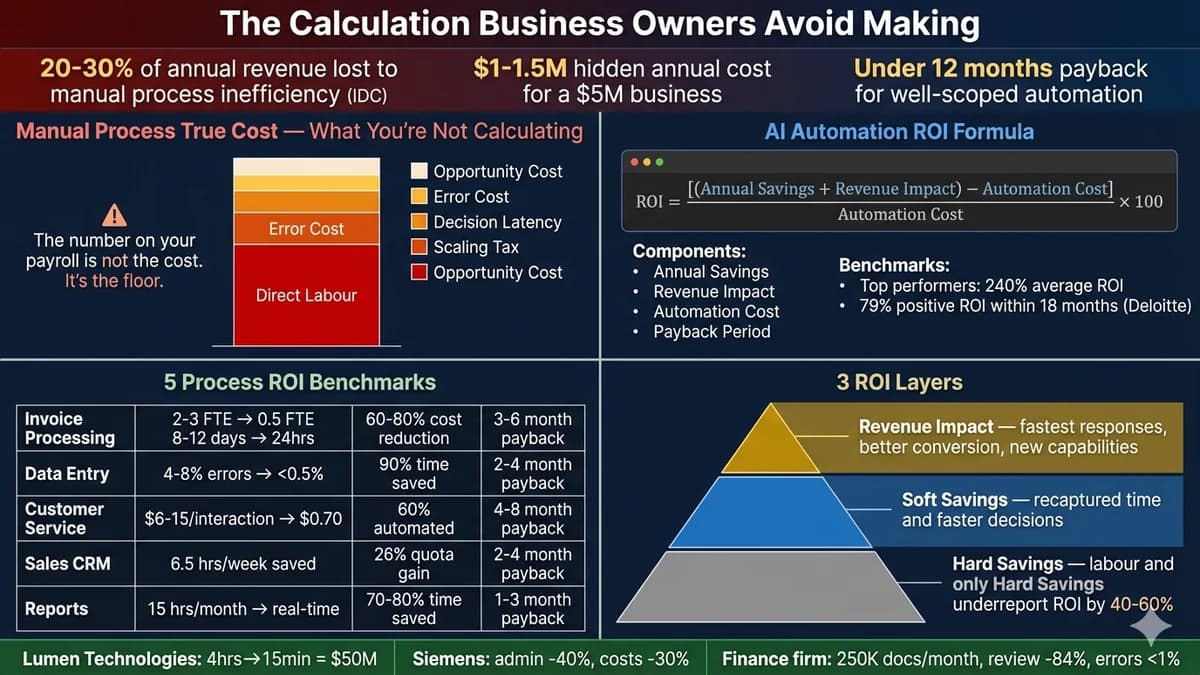
The Calculation Business Owners Avoid Making
Most businesses know that automation could save them money. Most businesses have not calculated how much their current manual processes are actually costing them. These two facts coexist because the calculation is uncomfortable. It reveals that the cost of inaction is not theoretical — it is measurable, it is ongoing, and in most businesses it is significantly larger than the cost of automation.
IDC research puts a specific number on it: manual processes cost companies 20-30% of annual revenue every year. For a $2 million business, that is $400,000-$600,000 in annual inefficiency costs. For a $5 million business, $1-1.5 million. This is not the cost of a software subscription or a development project. It is money already leaving the business — through employee time spent on repetitive tasks, through error correction that should not be necessary, through decisions delayed by manual approval queues, and through the scaling cost of adding headcount every time volume grows.
As one analysis from automation practitioners puts it precisely: “In many cases, companies are already ‘paying’ for automation; they're just paying through inefficiency instead of investment.” This guide does the calculation that most business owners avoid — with the actual formula, real benchmark data for five high-volume processes, and the payback period numbers that justify the business case for business process automation investment.
The True Cost of Manual Work — The Number on Your Payroll Is Not the Cost
The most common error in manual-versus-automation cost comparisons is using base salary as the cost of manual work. Base salary is the floor. The true cost of a manual process — what Automation Atlas calls the “fully loaded hourly rate” — is significantly higher and includes costs that do not appear on the payroll line item.
The 5 Cost Categories Most Businesses Never Measure
Direct labour is the only cost most businesses track. The other four — error correction, decision latency, scaling tax, and opportunity cost — are what move the automation business case from marginal to obvious. Each is detailed below with the manual baseline, the post-automation reality, and the supporting data.
Want to run this calculation for your specific business — the real fully loaded cost of your top 3 manual processes and the automation ROI estimate for each? Automely provides this analysis free.
Free 45-minute business process automation consultation. We identify your highest-cost manual processes, calculate the true cost using the formula above, and give you a realistic ROI projection before any commitment.
The Business Process Automation ROI Formula
The complete ROI formula sits on top of the fully loaded rate from Section 2. It adds error reduction value, revenue impact, and the annual cost of running the automation itself. The three-layer structure — hard savings, soft savings, and revenue impact — is what determines whether the business case captures the full return or the 40-60% that single-category measurement omits.
Worked Example — A 10-Person Customer Service Team
The formula in the abstract is convincing. The formula applied to a realistic scenario is decisive. The worked example below walks a 10-person customer service team through the full six-step calculation — from base salary to Year-1 ROI, payback period, and three-year net value — using benchmark assumptions from the industry data above.
Scenario: 10-Person Customer Service Team, 40% Tier-1 Query Volume
Average salary $45,000/year. 3,000 tickets/month. 40% are tier-1 (password resets, order status, FAQ — fully automatable). 4% error/rework rate on manual resolutions.
Calculate Current Manual Cost of Tier-1 Queries
10 employees × $45,000 salary × 1.35 (fully loaded) = $607,500 annual team cost. 40% of time on tier-1 queries = $607,500 × 0.40
Calculate Error Reduction Value
1,200 tier-1 tickets/month × 4% error rate = 48 errors/month. Average cost per error (rework + customer comp): $35. Annual error cost: 48 × $35 × 12
Total Current Annual Cost
Labour cost + Error cost for tier-1 volume
Calculate Post-Automation Cost
60% containment rate: 720 tickets/month handled autonomously by AI. Remaining 480/month still handled by humans (complex queries, complaints). AI cost at $0.70/interaction: 720 × $0.70 × 12 = $6,048/year. Remaining human cost: 40% reduction in tier-1 hours = $243,000 × 0.40 = $97,200/year.
Calculate Automation Investment
Custom AI customer service agent build: $45,000. Annual platform/maintenance: $12,000/year. Total Year 1 investment: $57,000.
Calculate ROI and Payback Period
Annual savings: $263,160 – $103,248 = $159,912. Year 1 net saving: $159,912 – $57,000 investment = $102,912. Payback period: $57,000 / ($159,912/12) = 4.3 months. Full ROI Year 1: ($102,912 / $57,000) × 100
Real-world case from Lumen Technologies: a manual sales process running 4 hours was automated to 15 minutes — a 93.75% time reduction translating to $50 million in annual savings value. Siemens reduced administrative tasks by 40% through automation, lowering costs by 30%. A mid-sized financial services firm processing 250,000+ documents per month reduced manual review time by 84% and cut errors to under 1%. The pattern is consistent: the calculation business owners avoid making almost always reveals automation ROI of 150-300%+ over 3 years.
5 Business Process Automation Benchmarks — Real Data
Five high-volume processes account for the majority of automation ROI in the businesses Automely works with. The table below sets the manual baseline, the realistic post-automation outcome, the dominant savings driver, and the typical payback window — using the same data sources cited throughout this guide (IDC, Gartner, Deloitte, Salesforce, MAIA, Automation Atlas, Samyotech).
| Process | Manual Baseline | After AI Automation | Key Savings | Typical Payback |
|---|---|---|---|---|
| Invoice Processing & Accounts Payable | 2-3 FTE for 2,000 invoices/month; 8-12 day processing; 3-5% error rate (MAIA) | 98%+ accuracy; under 24 hours; 0.5 FTE exception management | 60-80% cost reduction per invoice; AP team freed for strategic finance | 3-6 months |
| Data Entry & Validation | 4-8% error rate; high rework cost; significant staff hours on repetitive entry | <0.5% error rate; 75-90% time reduction; automatic validation | 90%+ error reduction; rework cost elimination; Gartner: $878K saved in finance rework alone | 2-4 months |
| Customer Service (Tier-1) | $6-$15/interaction; 100% human handling; limited to business hours; high volume | $0.50-$0.70 AI-handled interactions; 60-70% autonomous resolution; 24/7 | 40-60% customer service cost reduction; CSAT maintained with correct routing | 4-8 months |
| Sales CRM & Lead Qualification | Sales reps spend 6.5 hours/week on CRM hygiene, data entry, follow-up scheduling (Salesforce 2025) | CRM auto-updated; lead scoring automated; follow-up sequenced; reps focus on relationships | 28-35% shorter sales cycle; 19-26% higher quota attainment; 87% CRM usage increase | 2-4 months |
| Report Generation & Data Aggregation | 15 hours/marketer/month on manual reporting (Automation Atlas median); data delayed by compilation time | Real-time automated dashboards; data from all sources aggregated automatically | 70-80% time saved; real-time decisions instead of weekly/monthly reports; median payback 2-4 months | 1-3 months |
What to Automate First — The Priority Framework
The sequencing of business process automation determines whether the investment produces fast, compounding ROI or gets stalled in complexity. The principle from Automation Atlas and Progressive Robot: start with the process where manual cost is highest, the task is most clearly rule-based, and data inputs are already digital. These three conditions produce the fastest payback and build the governance foundation for more complex automation later.
High Volume + Rule-Based + Digital Inputs
Invoice processing, data entry validation, CRM updates, email routing, report generation, standard customer service responses. Clear inputs, clear outputs, no judgment required. Error reduction value is immediate and measurable.
Multi-Step + Conditional + System Integration
Lead qualification workflows, approval routing, customer onboarding, exception handling in AP. Requires integration between multiple systems and conditional logic. More complex to build but higher ROI when done correctly.
Judgment + Unstructured Data + Novel Inputs
Contract analysis, complex customer dispute resolution, strategic planning support, creative workflows. Requires AI models with reasoning capability. High potential ROI but longer implementation and validation time. Build on proven foundation.
Common Mistakes in the Business Process Automation ROI Calculation
Four mistakes recur across automation business cases — each one understates the true return and gets otherwise sound proposals rejected. They are documented below in the order they most commonly appear.
Mistake 1: Measuring only labour cost savings and ignoring the other four categories. Businesses that only count hard savings (direct labour reduction) consistently underreport true automation ROI by 40-60%. Error reduction, decision latency elimination, scaling tax avoidance, and opportunity cost recovery are frequently larger than the direct labour saving — but they are harder to quantify and therefore omitted from the business case. The result: automation proposals get rejected because the business case understates the return.
Mistake 2: Using base salary instead of fully loaded cost. A $50,000/year employee costs $67,500-$75,000 fully loaded. The automation ROI calculation should use the fully loaded rate, not the base salary. Using base salary understates the manual process cost by 25-40%, which understates the automation saving by the same margin.
Mistake 3: Automating a process without measuring the baseline first. Without a clear baseline — actual hours spent per month, actual error rate, actual processing time — the ROI calculation is speculative. Best practice: instrument your manual processes for 30 days before building the automation. The baseline data becomes both the business case justification and the benchmark for measuring success after deployment.
Mistake 4: Overscoping the first implementation. 15% of automation projects report negative ROI in Year 1, primarily from overscoped implementations and insufficient training (Automation Atlas). Organisations with a dedicated automation approach report 40% higher ROI than those treating it as a one-time project. Start with a single high-value, clearly scoped process. Prove the ROI. Scale from there. The correct sequencing — foundation first, complexity second — is the most reliable predictor of automation programme success.
For the broader strategic context on how AI development fits into business process automation — including when to build custom versus use off-the-shelf platforms — see our build vs buy AI guide and our generative AI architecture guide.
Ready to run this calculation for your specific processes — identify the highest-ROI automation opportunities in your business and commission the implementation that delivers measurable results in under 12 months?
Free 45-minute business process automation consultation. We calculate the real cost of your top manual processes, prioritise by ROI potential, and give you a clear implementation plan with realistic payback projections — before any commitment.