

The One-Sentence Answer
An AI agent is software that you give a goal to — and it figures out the steps, uses the tools it has access to, takes the actions, and reports back.
That is it. Everything else in this guide is elaborating on what that means in practice and why it matters for your business. But that one sentence is the answer. An AI agent is not an app. It is not a chatbot. It is not a smarter version of ChatGPT. It is a piece of software that has been given a goal, access to your business systems, and the ability to act — not just answer.
If you have heard "AI agent" fifty times this year and still felt unclear on what it actually is, you are in good company. The term is used to describe everything from basic automation scripts to Klarna's AI system that handles the equivalent of 700 customer service employees. This guide will make the distinction clear — and help you understand whether your business has a workflow that an AI agent could transform.
The Analogy That Makes It Click
The best way to understand an AI agent is to compare it to hiring an employee.
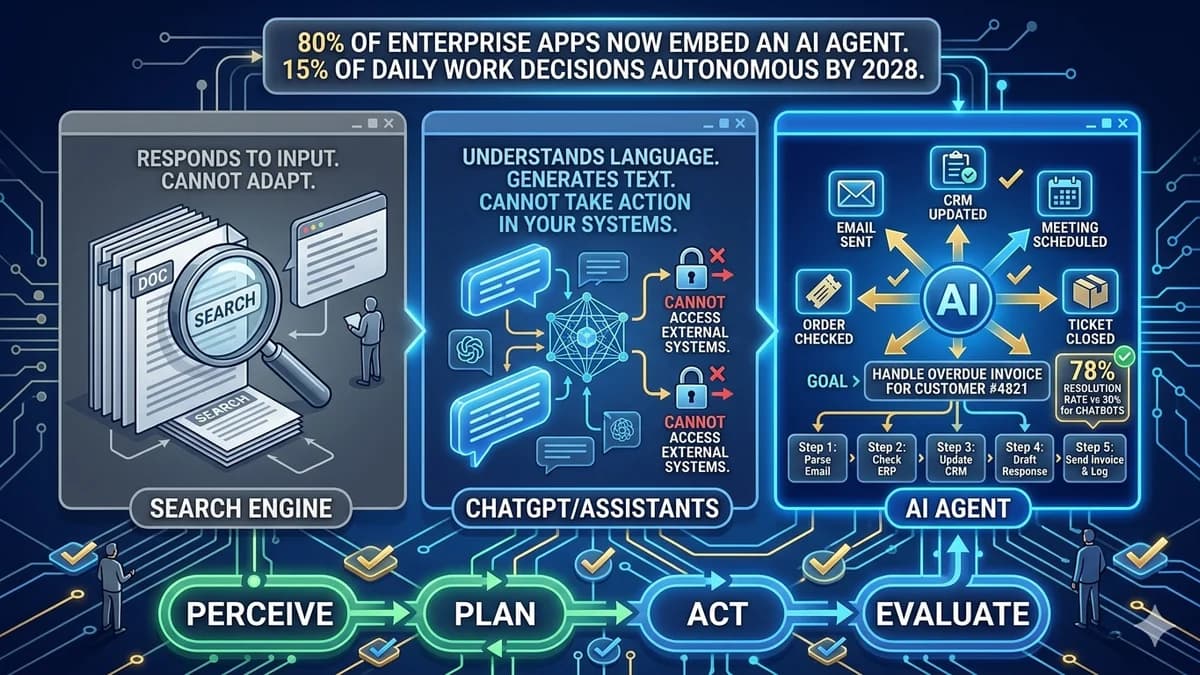
Imagine you hire a capable employee and you say to them: "Our customer Jane Smith emailed about her overdue invoice. Handle it." A good employee knows what that means. They check your billing system to see which invoice is overdue. They look at Jane's customer record to understand her history. They draft a professional email, send it, log the interaction in your CRM, set a follow-up reminder, and email you a summary of what they did. You get the outcome without having to orchestrate every step.
Now imagine you said the same thing to a search engine. It would return results for "how to handle overdue invoices." Not useful.
Imagine you said the same thing to ChatGPT. It would draft a very good email that you could send to Jane. You would still have to copy it, open your email, find Jane's address, send it, then open your CRM, find Jane's record, log the interaction, and set the follow-up yourself. Better than a search engine — but you are still doing all the steps.
The AI agent is the employee. It handles all those steps autonomously. Not because it is smarter than ChatGPT — they might use the same underlying AI model — but because it has been given access to your systems and the ability to act on them, not just generate text about them.
The difference between an AI assistant (like ChatGPT) and an AI agent is not intelligence — it is access and action. ChatGPT can plan what to do. An AI agent can actually do it. The agent is connected to your real systems and authorised to take real actions on your behalf.
AI Agent vs ChatGPT vs Chatbot — What Each One Actually Is
Three things that get confused constantly. Here is the plain-English distinction:
| Dimension | Search / Traditional Software | ChatGPT / AI Assistants | AI Agent |
|---|---|---|---|
| What it does | Returns information matching a query | Generates text responses to questions | Plans steps, takes actions, reports outcomes |
| Access to your systems | No — reads fixed indexed data | No — generates from training knowledge | Yes — connects to CRM, email, databases, APIs |
| Can take actions | No | No — produces text you then act on | Yes — sends emails, updates records, triggers workflows |
| Handles multi-step tasks | No | Partially — with your help at each step | Yes — plans and executes the full sequence autonomously |
| Adapts when things change | No | In conversation, yes. In your systems, no. | Yes — evaluates outcomes and adjusts approach |
| Customer query resolution rate | — | — | 78% vs 30% for chatbots (can actually resolve, not just respond) |
What about chatbots specifically?
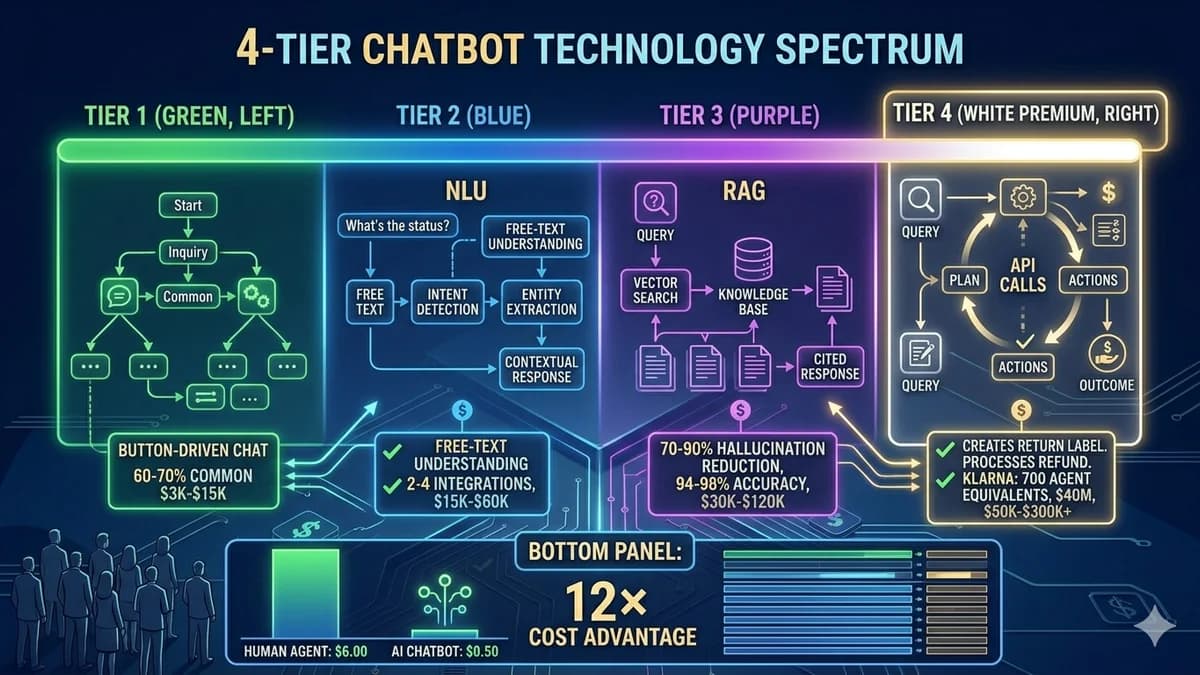
A chatbot is an interface — it receives a message and sends a reply. The most sophisticated chatbots understand natural language, retrieve from a knowledge base, and handle nuanced follow-up. But at the end of every conversation, the chatbot has produced text. Nothing has changed in your business systems unless a human reads the chat and acts.
An AI agent handles a workflow, not just a conversation. When a customer messages about a delayed order, a chatbot tells them what it knows. An AI agent checks the tracking system, detects the exception, files a carrier report, reschedules the delivery, sends the customer an updated ETA, and closes the support ticket — all in one autonomous sequence triggered by a single customer message. The customer got their problem resolved. No human touched it.
How an AI Agent Works — Plain English, Four Steps
Every AI agent works through a four-step cycle that repeats until the goal is achieved. You do not need to understand the technical mechanics — but understanding the cycle helps you grasp why agents can handle complex, multi-step tasks that older software cannot.
👁️ Perceive
The agent receives its task — either from a trigger (a new email, a customer message, a scheduled time) or from a direct instruction — and gathers information about the current situation from connected systems.
🧠 Plan
The agent reasons about what steps are needed to achieve the goal. It breaks a complex objective into a sequence of specific actions, in the right order, using the tools available to it.
⚡ Act
The agent executes the next step in its plan using available tools — calling an API, sending an email, querying a database, updating a record, triggering a workflow, creating a document.
🔄 Evaluate
The agent checks whether the action produced the expected result and whether the goal is now achieved. If further steps are needed, it returns to planning. If not, it reports the outcome.
This four-step cycle — perceive, plan, act, evaluate — is what distinguishes an AI agent from a simple automation (which follows a fixed script) or a chatbot (which responds to questions). A fixed automation cannot adapt when something unexpected happens. An AI agent evaluates the outcome of each action and adjusts. That adaptability is what allows agents to handle complex, variable workflows that rule-based automation cannot.
A Real Example, Step by Step
Here is what an AI agent handling a single business workflow actually looks like from start to finish. This is not hypothetical — this is the kind of workflow that a well-built customer service AI agent handles every day at businesses that have deployed one.
The scenario: A customer emails your support inbox: "I ordered 3 days ago and still haven't received a shipping confirmation. What's going on?"
Email received — agent triggered
The AI agent detects the new support email. It reads the message and classifies it as "order status inquiry." It pulls the customer's record from your CRM using their email address.
Order system query
The agent queries your order management system using the customer ID. It retrieves the order — placed 3 days ago, status: "Processing." Shipping label not yet created. The agent identifies this is a fulfilment delay, not a shipping issue.
Agent evaluates and decides the appropriate response
The delay is within your defined acceptable window (5 business days). The agent composes a specific, accurate reply explaining where the order is, the expected shipping date, and a direct offer to escalate if it has not shipped within 2 more days.
Actions taken simultaneously
Email sent from your support inbox (with your branding). CRM record updated with contact log. Support ticket marked resolved. If no shipping confirmation in 48 hours: follow-up task created for a human agent. Report logged for your team's dashboard.
Entire sequence completed in under 90 seconds
No human touched this ticket. The customer received a specific, helpful reply. Your CRM is updated. Your team is not spending time on a routine inquiry. The agent moves to the next ticket in the queue.
Now scale that to 500 customer emails per day. Or 5,000. The agent handles all of them the same way — 24 hours a day, 7 days a week, without getting tired, without making the same mistake twice, without needing a break. That is the business case for AI agents, in one concrete example.
Can you see a workflow in your business that looks like this example? A repetitive, multi-step process that currently requires a human to coordinate across systems?
That is an AI agent candidate. Book a free 45-minute call to scope it.
What AI Agents Can Actually Do for Your Business
Six business use cases where AI agents are deployed and generating measurable ROI right now — with documented outcomes, not projections.
💬 Customer Service Resolution
Handle customer inquiries end-to-end — checking order status, processing returns, updating account details, filing carrier claims, and closing tickets. Not just answering: actually resolving.
📧 Sales and Outreach
Research prospects, personalise outreach messages based on their company's recent activity, schedule follow-up sequences, log all activity in CRM, and surface the highest-priority leads for human attention.
🗂️ Internal Workflow Automation
Process and route invoices, onboard new employees (create accounts, send welcome emails, assign training), generate weekly reports from your data, manage approval workflows without human chasing.
🔍 Data Research and Analysis
Gather information from multiple sources, synthesise it into structured reports, flag anomalies, and trigger downstream actions based on what the analysis reveals. What took an analyst hours takes the agent minutes.
🎫 Helpdesk and IT Automation
Triage incoming support tickets, resolve known issues autonomously (password resets, access requests, software installations), escalate genuine exceptions, and keep your team's queue focused on complex work.
📅 Scheduling and Coordination
Manage calendars, schedule meetings across multiple participants, send and track follow-up communications, reschedule based on conflicts, and coordinate across teams — all from a single goal instruction.
What AI Agents Cannot Do (Yet) — The Honest Boundaries
Understanding what AI agents cannot do is as important as understanding what they can — because building the wrong expectation is the fastest path to a failed deployment.
🚫 What Agents Cannot Do Well
Handle genuinely novel situations they were not designed for. Agents operate within defined scope — they are not general problem-solvers.
Exercise human judgment on emotionally sensitive interactions. Angry customers, complex complaints, and high-stakes relationship decisions still need humans.
Work without connected systems. An agent with no access to your business systems has nothing to act on — integration is what makes them useful.
Guarantee zero errors. Agents make mistakes. Guardrails, human oversight thresholds, and review processes are not optional — they are essential design elements.
Replace all human work. Agents handle the volume, the routine, the coordination overhead. Humans handle the judgment calls, the relationships, the creative work.
✓ What Agents Do Exceptionally Well
Handle high-volume, repetitive workflows at consistent quality — 24/7, without fatigue, at $0.50 per interaction vs $6.00 for human agents.
Coordinate across multiple systems simultaneously — checking, updating, and acting on several data sources in a single workflow.
Scale instantly. Adding capacity means deploying more agents, not hiring and training people.
Operate without breaks, vacations, sick days, or peak-hour degradation. The 3am inquiry gets the same quality response as the 9am one.
Free your team from coordination overhead so they can spend time on work that genuinely requires human judgment and creativity.
MIT Sloan research found that 80% of the work in implementing AI agents is not the AI itself — it is unglamorous data engineering, stakeholder alignment, governance design, and workflow integration. An AI agent without governance — defined boundaries, human oversight thresholds, audit trails, and clear accountability for errors — is an agent you cannot trust in production. Every well-deployed AI agent has explicit rules for what it can do, what requires human approval, and what it should escalate rather than resolve. This is not a limitation. It is sound operational design.
Is Your Business Ready for an AI Agent?
Three indicators that strongly suggest your business has a workflow that an AI agent could handle. You do not need all three — one is enough to begin exploring.
You have a high-volume, repetitive process that requires human coordination across multiple systems
If someone on your team is spending significant hours every week on work that follows the same pattern — checking system A, updating system B, sending a templated communication, logging in system C — that is a strong AI agent candidate. The agent handles the coordination; the human handles the exceptions that fall outside the pattern.
Your team's bottleneck is information gathering and action routing, not genuine judgment
If the most time-consuming part of a workflow is collecting information from multiple places and routing it to the right next step — rather than making a genuinely difficult judgment call — an AI agent can take over the information gathering and routing, freeing your team for the judgment calls only humans should make.
You have at least one business system with an API that an agent could connect to
An agent that can only generate text has limited capability. An agent connected to your CRM, helpdesk, order system, or calendar can take meaningful actions. Most modern business software (Salesforce, HubSpot, Shopify, Zendesk, Google Workspace, Microsoft 365) provides APIs that AI agents can use. If you use any of these, you likely have the integration foundation an agent needs.
Wait if: your process requires frequent judgment calls that are difficult to define in advance
If your highest-value work involves navigating ambiguity, reading people, exercising domain expertise in non-standard situations, or making calls that depend on years of experience — start with an agent that handles the routine work around these decisions, not the decisions themselves. The goal is to free up more time for the high-judgment work, not to replace it.
The Honest Next Step
If you have read this and recognised a workflow in your business that looks like the example in Section 5 — a high-volume, multi-step process that currently requires human coordination across systems — the next step is not to commission a large AI agent platform. It is to identify one specific workflow, scope a minimum viable agent on that single use case, measure the outcome, and decide whether to expand.
This is how every successful AI agent deployment starts. Klarna started with one workflow before scaling to the equivalent of 700 agents. Every business that has genuinely benefited from AI agents validated a narrow, measurable use case first — not because they were cautious, but because starting narrow is what makes the business case clear enough to justify expansion.
Automely's AI agent development service starts every engagement this way: identify one high-volume, repetitive workflow, define what good looks like, build a minimum viable agent, measure against the baseline, and present the result before any further investment is discussed. For the enterprise deployment context — what AI agents look like at organisational scale — see our enterprise AI solutions guide.
Which workflow in your business would you most want an AI agent to handle — and what is it costing you in human hours right now?
Book a free 45-minute call to identify your first AI agent use case and understand what building it actually looks like.