

The 40% GRR Problem — Why Most SaaS AI Features Are Being Built Wrong
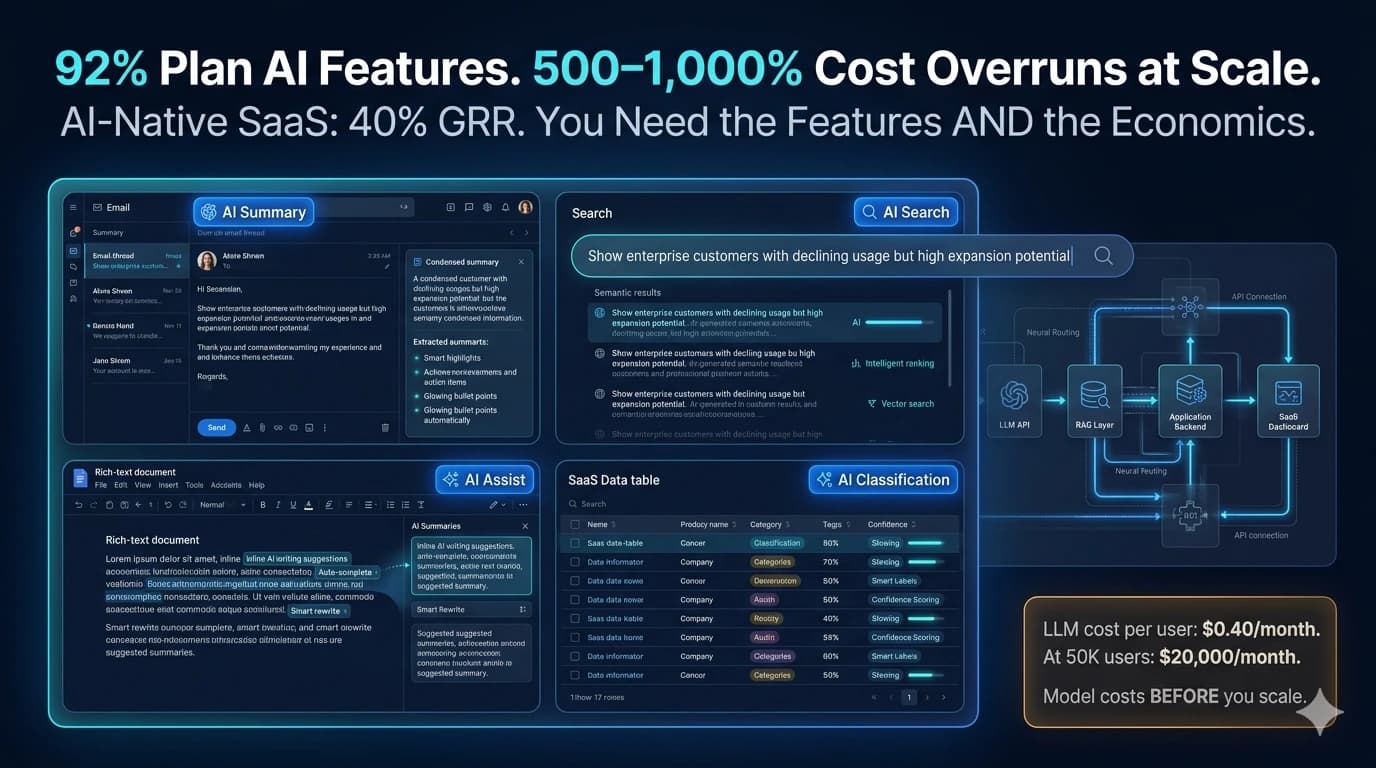
92% of SaaS companies have launched or plan to launch AI features. The global SaaS market is surging toward $315 billion, with 80% of enterprises expected to deploy GenAI-enabled applications by 2026. Every SaaS founder has received at least one board deck or investor email noting that their competitors are "adding AI." The pressure to build AI features is real and accelerating.
Here is the data that the conference circuit is not presenting alongside the market size projections: AI-native SaaS companies — those built primarily around AI — have median Gross Revenue Retention (GRR) of only 40%. This is worse than B2C SaaS at 49%, and far worse than traditional B2B SaaS at 82%. The reason is both specific and preventable: scaling LLM features to production routinely reveals 500–1,000% higher LLM costs than estimated in the pilot; a single highly active user can consume 100× the tokens of a typical user; and AI features built without cost architecture destroy gross margins precisely at the moment when product metrics look their strongest.
This guide covers both sides of the equation. The technical implementation — how to build AI features into an existing SaaS product without training models, without a data science team, and without months of ML research. And the economics — how to model LLM costs per user, which features generate retention rather than churn, and how to price AI features without destroying the margin profile that made SaaS attractive in the first place. A SaaS is still a SaaS: it lives or dies on its unit economics. AI does not cancel financial gravity.
The 3-Layer Architecture — How AI Features Are Actually Built in 2026
The core misconception that holds SaaS founders back from building AI features is the assumption that AI requires training models, GPU infrastructure, a data science team, and months of machine learning research. It does not. In 2026, the overwhelming majority of AI features in SaaS products are built using a 3-layer architecture that your existing engineering team can implement: an LLM API layer, a knowledge retrieval layer (RAG), and your existing application backend. No model training. No ML expertise. No dedicated AI team.
LLM API Layer — The AI Capability Layer
Your backend calls an LLM provider's API (OpenAI, Anthropic, Google, etc.) with a prompt. The LLM processes the prompt and returns a completion. You return the completion to your user. This is a standard REST API call — no different from calling Stripe or Twilio. Your frontend engineer can implement a basic LLM API integration in a day. The sophistication comes from prompt engineering and the surrounding architecture, not the API call itself.
RAG Layer — The Knowledge Retrieval Layer (When Needed)
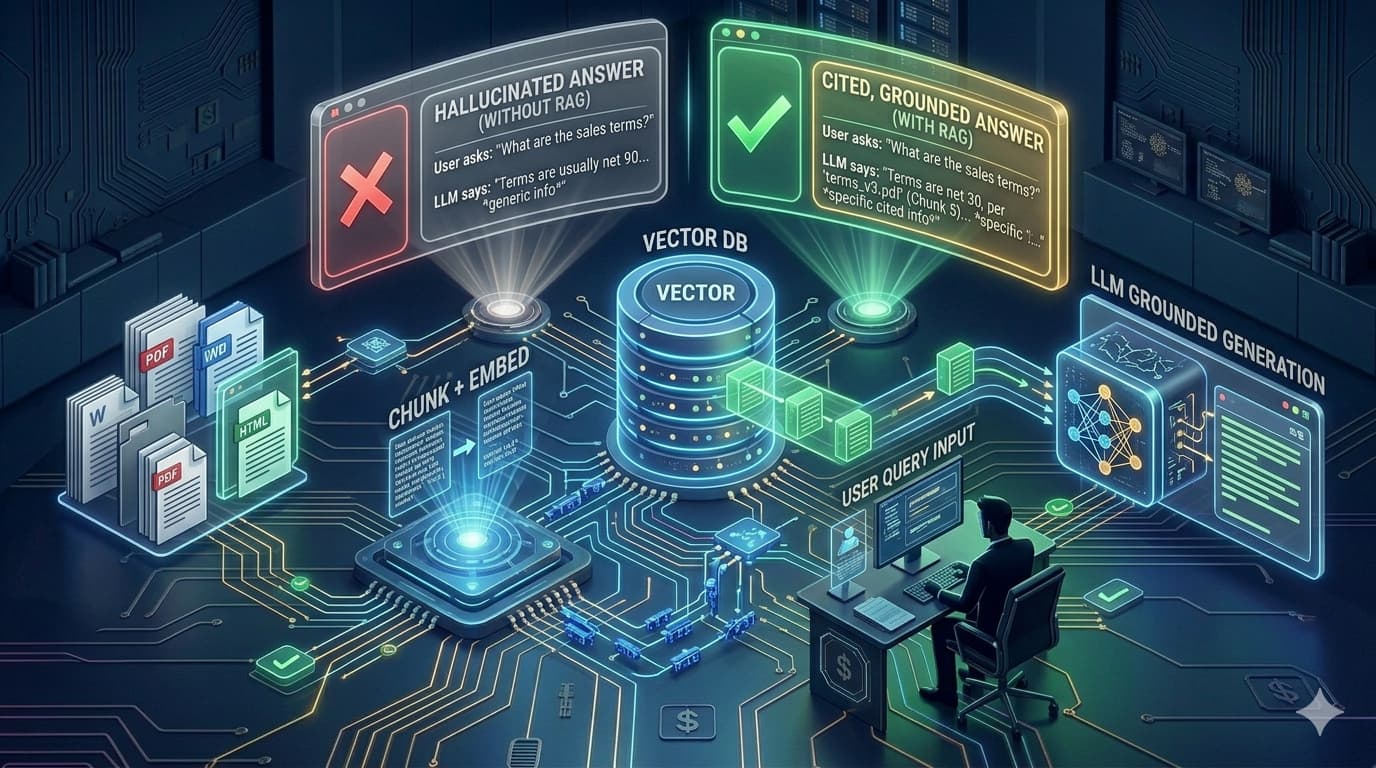
When your AI feature needs to answer questions using your product's specific data (customer records, documents, product history), you need RAG. The user's query goes through a vector search against your embedded knowledge base; the most relevant documents are retrieved and appended to the prompt as context before sending to the LLM. The LLM generates its answer from that retrieved context, not from generic training knowledge. Implementation: an embedding model (via API) + a vector database (Pinecone, Weaviate, or pgvector in Postgres). Both are API calls, not ML infrastructure.
Application Backend — Your Existing System
Your existing backend handles authentication, user context, feature flags, cost tracking, and the business logic that wraps the LLM calls. Nothing about this layer changes fundamentally — you are adding API calls and a caching layer, not rebuilding your data model. The backend is also where you implement token budgets, usage monitoring, and the response caching that prevents your API costs from scaling uncontrollably with heavy users.
Building AI features without a dedicated AI team means: no model training (you use pre-trained models via API), no GPU infrastructure (the LLM provider runs the inference), no ML research (you are an API consumer, not a model developer), and no data science team (you need engineers who can write API integrations and understand prompt engineering). What you do need: engineering time for integration and testing, a clear specification of what the feature should do, prompt engineering skills (learnable in days, not months), and a cost model for LLM usage. The skill gap between "can build web APIs" and "can integrate LLM APIs" is smaller than most non-technical founders expect.
LLM API Selection — The Decision That Determines Your Margin
LLM API selection is a product and business decision, not just a technical one. The cost per token across LLM providers varies by 100× — from $0.00015 per 1,000 tokens to $0.015 per 1,000 tokens — and the right choice depends on your user volume, usage patterns, quality requirements, and per-seat pricing. Using a premium model for tasks that a budget model handles adequately costs 5–10× more than necessary at scale.
| Provider / Model | Best For | Cost Tier | Quality | Best SaaS Fit |
|---|---|---|---|---|
| GPT-5.4 Mini (OpenAI) | General features, summarisation, classification, chat | Low | Very Good | Most SaaS AI features — best balance of cost and reliability at scale |
| Claude Sonnet 4.6 (Anthropic) | Complex reasoning, legal/medical/enterprise content, multi-step tasks | High (5–10× premium) | Excellent | Enterprise SaaS at $100+/seat where AI quality IS the differentiator |
| Gemini Flash (Google) | High-throughput, multimodal (text + image), real-time features | Low | Good | Document processing, image analysis features, high-volume async tasks |
| DeepSeek V4 | Cost-sensitive features, simple classification, basic extraction | Very Low (80–90% cheaper) | Good | Budget-conscious startups with simple AI feature requirements |
| Model Routing (Multi-provider) | Different models for different task complexity levels | Optimised | Optimised | Production SaaS with >10,000 users — standard cost optimisation approach |
The most important LLM API cost management technique for SaaS at scale is model routing: defining which task types use cheap models and which use premium models. Classification, summarisation, and structured extraction can typically be handled by lower-cost models. Complex multi-step reasoning, nuanced content generation, and enterprise-grade analysis tasks justify premium models. Building a routing layer that applies model selection based on task type reduces average LLM cost by 50–70% compared to routing everything through the most capable (and most expensive) model.
The 6 AI Feature Types — Sorted by Retention Impact and Build Complexity
AI Summarisation — Documents, Threads, Records
Summarisation is the AI feature with the highest ratio of user value to implementation complexity. Your product already contains long content — email threads, meeting transcripts, customer interaction history, long documents, project activity feeds — that users currently wade through manually. An AI that reads this content and surfaces the most relevant points in 3 sentences saves users real time, every time they interact with it. It is embedded in existing workflow (users were already going to read that content), invisible in operation (the AI does its work automatically), and immediately demonstrable in value.
Implementation: one LLM API call with the full content as context and a prompt instructing the model to summarise with key points and action items. No RAG required. No vector database. Suitable for a junior engineer's first AI integration.
- CRM: "AI Summary" on each customer record showing last 30 days of interactions
- Project management: Sprint summary showing completed items, blockers, and risks
- Email tool: Thread summary surfacing key decisions and next actions
- HR/Recruitment: Candidate profile summary from application and notes
- Legal: Document summary showing key clauses and obligations
AI-Powered Search — Natural Language Over Product Data
Traditional SaaS search is keyword-based: users must know the exact term to find the record. AI search allows users to query their data in natural language — "show me all clients that haven't replied in 2 weeks" or "find the project where we discussed the partnership with Acme" — and the AI retrieves the relevant results semantically rather than lexically. This is the AI feature most directly replacing functionality that users previously did with complex manual filtering, spreadsheet exports, or simply couldn't do at all.
Implementation: embed your product data into a vector database (Pinecone, Weaviate, or pgvector in Postgres), convert the user's search query into an embedding using an embedding model, perform vector similarity search, and return the matching records. The RAG pattern. Complexity: medium — requires embedding pipeline maintenance as new records are created, and relevance tuning based on user feedback.
- Conversational data queries without SQL or complex filters
- Cross-object semantic search (find related items across different record types)
- Intent-based search ("clients at risk of churning" from behaviour patterns)
- Document semantic search (find the passage that mentions a specific concept)
Automated Classification and Tagging
Classification AI takes unstructured input — a support ticket, a lead form submission, a product feedback entry, a document — and assigns it to a defined category without human judgment. The value: it eliminates the manual triage work that your customers are doing to keep their data organised. Users who previously spent 20 minutes per day tagging and categorising records now have that done automatically, consistently, and immediately on record creation.
Implementation: an LLM call with the content to classify and a prompt describing the classification categories. For high-volume classification where cost matters, this is a perfect model routing candidate — use a cheap, fast model for classification, not a premium reasoning model. Classification is also the AI feature with the clearest quality metric: measure classification accuracy against a sample of human-labelled records and monitor for drift.
- Helpdesk: Auto-categorise and route tickets by topic and priority
- CRM: Classify lead quality and assign to appropriate sales tier
- Content platforms: Auto-tag user-generated content by topic and sentiment
- E-commerce: Classify product return reasons for inventory insights
- HRIS: Classify leave requests and automatically check policy compliance
In-Product AI Writing Assistant
An in-product AI writing assistant helps users create content within your product's context — drafting email responses in a CRM, completing contract language in a legal tool, generating social media posts in a marketing platform, writing performance reviews in an HRIS. The key to retention: the AI is accessing your product's context (the customer record, the contract template, the campaign brief) to generate contextually appropriate content — not just a generic text generator the user could access anywhere.
Implementation: standard LLM API call with the product context (current record fields, template, user preferences) as part of the prompt. Complexity is low for basic generation, medium for maintaining consistent brand voice or style guidelines across organisations (requires few-shot prompt engineering with examples).
- Email drafts from CRM context — account history, last touch, rep notes
- Proposal sections from client brief and product catalogue
- Performance review drafts from goal tracking and 1:1 notes
- Social copy from campaign brief, brand guidelines, audience profile
Product-Specific AI Chatbot / Copilot
A product-specific AI chatbot answers questions about your product's data using RAG — retrieving relevant context from the user's actual records before generating responses. The distinction from a generic chatbot: your copilot knows this user's specific data, not generic training data. "What was the total contract value with Acme Corp last quarter?" — the copilot retrieves the correct CRM records and answers precisely. The retention driver is that the copilot becomes increasingly valuable the more data the user has in your product.
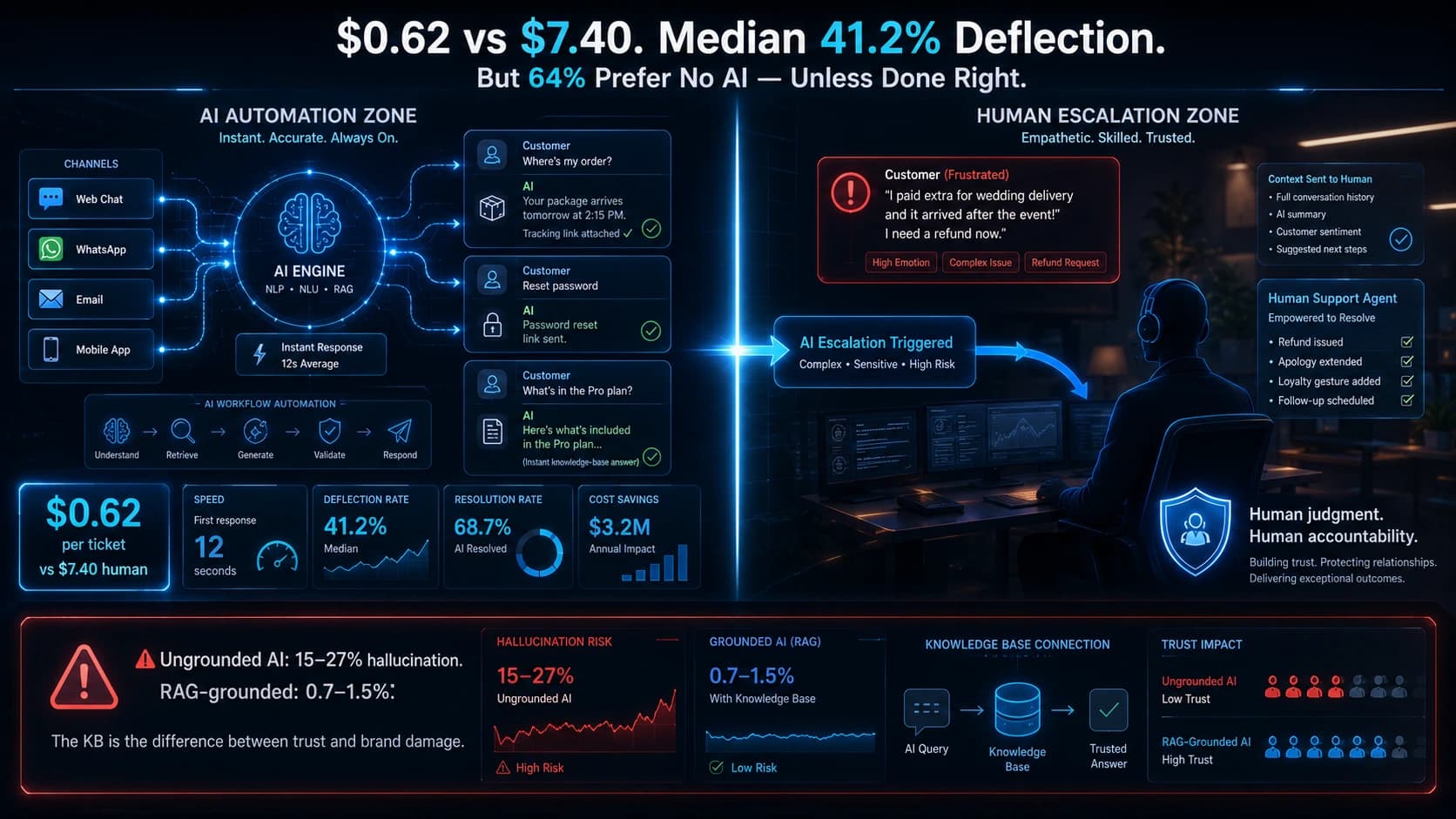
The critical design requirement: ground every response in retrieved product data, not model training knowledge. Ungrounded chatbots hallucinate; a product copilot that invents answers about the user's own data is a worse outcome than no copilot at all. RAG grounding is non-optional for product-specific chatbots.
- "Summarise my top 5 deals this month and their current stage"
- "Which projects are overdue and what are the blockers?"
- "Draft a follow-up email to the clients I haven't contacted in 30 days"
- "What are the most common support ticket categories this week?"
Predictive Insights and Anomaly Detection
Predictive AI features analyse patterns in your product's data over time to surface insights that users would not identify manually — accounts showing churn signals before they cancel, transactions that look anomalous compared to historical patterns, usage forecasts that enable capacity planning. These features have the highest retention impact when they are accurate, because they enable users to act on information they could not otherwise have.
For SaaS teams without ML expertise, the pragmatic approach is combining LLM pattern analysis (for qualitative anomaly detection and interpretation) with statistical thresholds (for quantitative triggers). "Alert me when a customer's login frequency drops more than 50% from their baseline" is achievable without ML. "Score each customer's churn probability from 0–100" benefits from ML but is implementable with an API-accessible ML service (Google Vertex AI, AWS SageMaker) for teams willing to invest in the higher complexity.
- Churn risk signals — usage pattern drops, feature abandonment, support ticket spikes
- Expansion signals — usage approaching plan limits, new use cases detected
- Anomaly alerts — transactions, records, or events outside expected ranges
- Next-best-action recommendations — surfacing the most relevant next step for each record
Which AI feature adds the most retention and the least cost to your SaaS product?
Automely scopes AI feature architecture, LLM cost models, and build estimates for SaaS products. Free 45-minute call.
The Economics Trap — Modelling LLM Costs Before You Launch
Every serious AI SaaS founder needs to answer one question before launching any AI feature: how much does an average active user cost me in LLM usage per month? If you cannot answer this question in dollars and cents before launch, you are guessing at your gross margin. The 500–1,000% cost overrun at scale is not a rare failure — it is the modal outcome for SaaS products that skipped this calculation.
📊 LLM Cost Model — Example: AI Summarisation Feature, 50,000 Users
The calculation above illustrates why model selection is a product economics decision, not just a technical preference. For a SaaS product charging $40/user/month, GPT-5.4 Mini's $0.40/user/month LLM cost represents 1% of revenue — acceptable. Claude's $2.25/user/month represents 5.6% of revenue — still acceptable if the AI is the core differentiator. But for a SaaS charging $10/user/month, Claude's cost is 22.5% of revenue before infrastructure, support, or any other COGS — margin-destroying.
Three cost controls that must be built into your AI features from day one:
- Token budgets per user tier. Define maximum tokens per user per month for each pricing tier. When a user approaches their budget, either prompt them to upgrade or queue their requests. This converts an unbounded cost into a bounded one that maps to your pricing model.
- Response caching. Cache LLM responses for identical or near-identical inputs. If 30% of your users are asking the same summarisation question about the same document, serve cached responses rather than calling the LLM 30 times. Caching typically reduces LLM API costs by 20–40% at scale.
- Model routing by task complexity. Route simple classification and extraction tasks to low-cost models; route complex reasoning and generation tasks to premium models. This alone reduces average LLM cost by 50–70% in production deployments with diverse task types.
Monetising AI Features — The Three Models and Which One Protects Margin
Per-Seat Add-On
AI tier priced at a premium above base subscription. Microsoft Copilot: 60–70% premium. AI add-ons typically add 30–110% to base SaaS cost.
Risk: only 16% of providers are monetising AI standalone successfully. Buyers scrutinise AI add-ons heavily.
Usage-Based Component
Charge per AI action within a subscription — tokens used, queries processed, documents summarised. Heavy users pay more; light users pay less.
Risk: less predictable revenue; finance teams plan with difficulty.
Outcome-Based Tiers
Charge per result delivered. Zendesk: $1.50 per AI-resolved ticket. Outcome models produce 31% higher retention, 21% higher CSAT.
Risk: requires reliable outcome measurement; value must be demonstrably delivered.
The commercially safest approach for most SaaS products adding AI features in 2026 is the hybrid model: include AI features in higher pricing tiers with defined usage limits per tier, with overage pricing for heavy users. This gives customers predictability (they know what they are paying), the product margin protection (heavy users cannot consume unlimited LLM at the base tier price), and a natural expansion revenue mechanism (customers approaching their usage limit have a clear reason to upgrade).
The Build Sequence — How to Add AI Features Without Derailing Your Roadmap
Choose the AI feature by retention value, not impressiveness
The AI feature that will be most impressive in the demo is rarely the one with the highest retention impact in production. An AI copilot chatbot is impressive in a demo; AI summarisation on existing records that saves users 10 minutes per day is what drives retention. Before specifying any AI feature, map your highest-friction user interactions — where do users spend the most time doing something tedious? — and build AI for the highest-friction, highest-frequency task first.
Model the LLM cost before writing a line of code
Estimate: how many AI requests will an average active user make per month? How many tokens per request? What model are you using? Calculate cost per user per month. Multiply by your target user count at 12 months. If the number is more than 10–15% of your target ARPU, either choose a cheaper model, implement tighter token budgets, or adjust your pricing before launch — not after the first billing cycle at scale.
Start with the simplest LLM integration — summarisation or classification
The fastest way to build engineering team confidence with AI is a successful first integration on a low-complexity feature. Summarisation or classification requires a single LLM API call, produces verifiable output, and creates immediate user value. Do not start with the product copilot or predictive analytics. Start with summarisation. Ship it. Get users using it. Learn from usage patterns. Then scope the next feature.
Build RAG when — and only when — you need product-specific knowledge
RAG adds engineering complexity (embedding pipeline, vector database, retrieval tuning) that is not justified for every AI feature. Add RAG when: the user's queries require answers from their specific product data; the LLM cannot answer correctly from its training knowledge alone; or hallucination on your domain's facts would be worse than no answer. Do not add RAG to a summarisation feature. Do add RAG to a product copilot.
Build evaluation before scaling to more users
Before expanding your AI feature from 100 beta users to 10,000 production users, build the measurement infrastructure: sample AI outputs for human quality review weekly, track CSAT specifically for AI-involved interactions, measure task completion rate before and after AI feature adoption, and log the queries the AI cannot handle (for knowledge base improvement).
Consider a development partner if your engineering team is fully allocated
The opportunity cost of pulling your best engineers off core product development to learn LLM integration, RAG architecture, and AI evaluation is real. An AI-specialised development partner who has built the same integration patterns across multiple SaaS products compresses a 3-month learning curve into a 4-week delivery cycle — particularly when your window for competitive advantage is measured in months.
Building SaaS AI Features with Automely
Automely's SaaS development, generative AI development, and AI integration services cover the full stack of AI feature development for SaaS products — LLM API integration, RAG architecture, AI search, summarisation, classification, in-product AI assistants, chatbot/copilot, predictive analytics, and the cost control and evaluation infrastructure that keeps LLM costs predictable at scale.
Our most relevant SaaS production case: Lamblight — an AI-powered journaling application — delivered from concept to 20,000+ users at $312,000 ARR. The build demonstrates every component of this guide in production: LLM API integration for content generation, RAG-grounded knowledge retrieval, evaluation infrastructure for output quality, and cost management at scale. For the RAG architecture that powers product-specific AI knowledge systems, see our RAG system guide. For the AI chatbot implementation principles applicable to in-product copilots, see our AI chatbot solutions guide.
Automely's approach to SaaS AI development starts with the LLM cost model and the AI feature selection framework — because the features that look great in a demo but destroy gross margins at scale are a specific, avoidable failure mode. We have seen both patterns across our client portfolio, and the difference is almost always about whether the economics were modelled before the build or after the billing shock.
Ready to add AI features to your SaaS product — with the LLM cost model and pricing architecture built right the first time?
Book a free 45-minute SaaS AI build consultation. We scope the feature, model the costs, and design the architecture — before any development commitment.