

Most guides on how to build a chatbot focus on setup — choosing a platform, connecting integrations, loading a FAQ. This guide focuses on the outcome that justifies the investment: conversion.
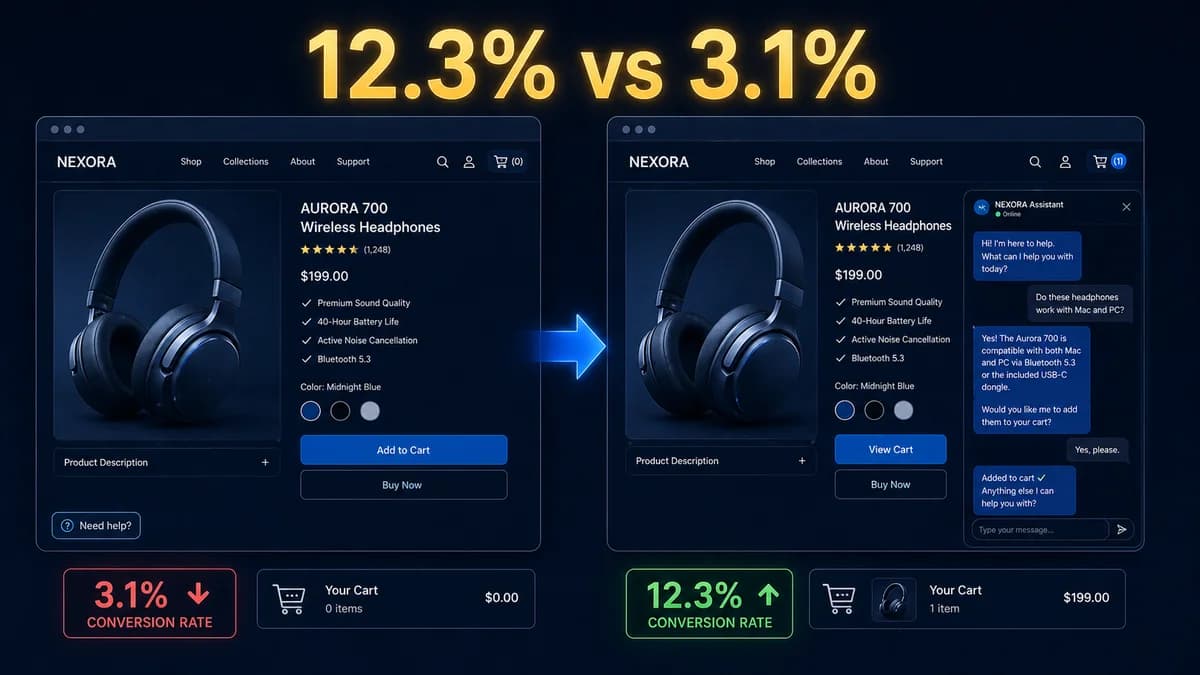
Here is the number that should anchor every chatbot decision you make:
The vast majority of chatbots in production today are optimised for a different metric entirely: ticket deflection. They are built to stop customers from reaching a human agent, not to move customers toward a purchase decision. And so they deliver ticket deflection numbers that look good in a dashboard, while leaving the 4x conversion opportunity untouched.
This guide is about building the chatbot that captures that opportunity — the conversation experience, the knowledge base content, the deployment strategy, and the measurement framework that transforms a chatbot from a support cost into a revenue channel.
Understanding the 4x Conversion Gap — Why It Exists
The 12.3% vs 3.1% conversion gap is not magic. It has a specific mechanism, and understanding it is the prerequisite for building a chatbot that reproduces it.
Conversion requires resolving purchase-blocking concerns. The majority of visitors who do not convert are not uninterested — they are uncertain. They have a question about sizing, compatibility, return policy, delivery time, or product fit that they cannot quickly answer from your product page. In most cases, that question goes unresolved — the visitor bounces to search, lands on a competitor, and does not return.
A chatbot that is deployed at the right moment, with access to the right product knowledge, resolves that concern in real time — keeping the visitor in the buying context rather than sending them to search. The concern is resolved before the purchase decision cools. The visitor converts.
That is the entire mechanism. The chatbot does not “sell” in any manipulative sense. It answers the question that was blocking the purchase — faster, more precisely, and at lower friction than any other channel. The conversion lift is the reward for that resolution.
Which means: a chatbot that is buried in a help centre, loaded with post-purchase policies, and optimised to reduce human agent contacts will not produce this conversion lift. It is designed for the wrong problem. A chatbot placed on product pages with product knowledge, comparison content, and objection-handling content will produce it — because it is designed to resolve the concerns that were blocking purchase decisions.
Two Chatbot Strategies — Support Deflection vs Conversion
Most chatbots are built for one of two fundamentally different strategies. Understanding which you are building determines every decision that follows — knowledge base content, deployment placement, opening message design, escalation triggers, and success metrics.
✗ Support Deflection Chatbot
- Deployed in help centre or universal "chat" button
- Knowledge base: return policies, FAQs, account issues
- Opening message: "How can I help you today?"
- Success metric: ticket deflection rate
- Escalation: reluctant, friction-heavy handoffs
- Revenue contribution: indirect (cost reduction only)
- Conversion mechanism: none intentional
✓ Conversion-Optimised Chatbot
- Deployed on product pages, pricing, cart, checkout
- Knowledge base: products, comparisons, objection handling
- Opening message: context-aware, purchase-focused
- Success metric: assisted conversion rate vs baseline
- Escalation: proactive, fast handoff at high intent signals
- Revenue contribution: direct (measurable assisted revenue)
- Conversion mechanism: purchase-concern resolution
These are not mutually exclusive — a well-designed chatbot can handle both functions. But the design priorities differ, and building for deflection first then adding conversion capability is significantly less effective than designing for conversion from the start and adding deflection capability where it fits.
The 7 Elements That Make a Chatbot Convert
Contextual Opening Message
The opening message should reflect where the user is, not who they are. A product page opening: "Wondering if [Product Name] is right for your situation? Ask me anything." A pricing page opening: "Not sure which plan fits best? I can walk you through the differences." A cart page opening: "Any questions before you check out? I can help with sizing, returns, or delivery." Generic "How can I help you?" performs significantly worse because it places the cognitive load on the visitor rather than guiding them toward a relevant conversation.
RAG Knowledge Base With Buying-Journey Content
A RAG (Retrieval-Augmented Generation) system retrieves relevant documents before generating a response, grounding answers in your specific product information. The critical distinction: the knowledge base must contain buying-journey content — product specifications, use case examples, compatibility information, comparison versus alternatives, objection-handling content — not just post-purchase policies. A chatbot that can accurately answer "Is this product compatible with X system?" from your documentation converts. One that can only discuss return policies does not.
Instant, Accurate, Grounded Responses
Response accuracy is non-negotiable for conversion. A chatbot that confidently provides incorrect product information — wrong compatibility, wrong delivery time, wrong policy detail — produces a worse outcome than no chatbot at all: the visitor receives wrong information, acts on it, and then has a negative experience when reality does not match. RAG systems grounded in your actual product documentation produce accuracy rates of 90–97% on questions within the knowledge base. Responses outside the knowledge base should be honestly escalated rather than hallucinated.
High-Intent Escalation — Fast and Frictionless
Certain conversation signals indicate a visitor is ready to speak with a human: they have asked three or more product questions, they have mentioned a specific budget, they have asked about custom requirements, or they have expressed strong positive sentiment about the product. A converting chatbot recognises these signals and proactively offers a human connection — "It sounds like you have a clear picture of what you need — would you like to speak with someone on our team?" — with a single-click escalation. Friction in the escalation path (lengthy forms, email-only, 24-hour callbacks) kills the conversion that the chatbot created.
Objection-Handling Without Over-Qualifying
The most common conversion-killing chatbot behaviour is excessive qualification and disclaimers. "I'm just an AI and cannot advise on your specific situation — you should consult with one of our team members." This response to a straightforward product compatibility question ends the conversation, removes any trust built in the interaction, and sends the visitor to search. A converting chatbot gives a direct, accurate answer from its knowledge base. It adds "If you'd like to confirm this specifically for your setup, I can connect you with our team" as an optional escalation — not as a deflection from giving the answer.
Consistent Brand Voice
A chatbot that sounds like a different entity from your brand disrupts the purchase decision rather than supporting it. The chatbot's tone — formal or casual, enthusiastic or measured, direct or conversational — should match the brand voice used in your product copy and marketing materials. This is achieved through system prompt design and, where the discrepancy is significant, through fine-tuning on your brand's communication examples. A brand with a warm, informal voice served by a stiff, formal chatbot creates a jarring experience at the most important moment in the customer journey.
CRM Integration for Lead Capture at Peak Intent
Every high-intent chatbot conversation is a lead. A visitor who spent 8 minutes asking detailed questions about your product and then left without purchasing is a warm lead who did not convert in that session — not a lost opportunity. A converting chatbot logs high-intent conversations (email collected, specific product expressed interest in, objections raised) to your CRM automatically, enabling the sales team to follow up with full conversation context. Without CRM integration, these leads are invisible. With it, they become a structured follow-up pipeline with a 30–40% higher close rate than cold outreach.
Want a chatbot designed for conversion — not just support deflection?
Automely builds AI chatbots with RAG knowledge bases, CRM integration, and conversation design optimised for the 4x conversion gap. Book a free 45-minute scoping call.
Deployment Placement — Where You Deploy Has More Impact Than What You Build
The placement of your chatbot determines what conversations are possible. A chatbot buried in a help centre can only have post-purchase or support conversations. A chatbot on a product page can have purchase-decision conversations. The conversion gap is only accessible to chatbots deployed at high-intent moments.
| Deployment Page | Visitor Intent | Conversion Impact | Ideal Opening Trigger |
|---|---|---|---|
| Product Detail Page | High purchase intent — evaluating a specific product | ★★★★★ Highest | After 30 seconds on page or scroll to price section |
| Pricing / Plans Page | High intent — comparing options, evaluating fit | ★★★★★ Highest | Immediately on load or after 20 seconds |
| Cart / Checkout | Highest intent — active purchase consideration, potential hesitation | ★★★★★ Highest | After 60 seconds without checkout action |
| Post-Purchase Confirmation | Satisfied buyer — high receptivity to cross-sell | ★★★★ Very High | Immediately — "You might also like X" |
| Category / Collection Page | Medium intent — browsing, not yet product-specific | ★★★ Medium | After 45 seconds — "Looking for something specific?" |
| Homepage / Landing Page | Low-medium intent — general interest | ★★ Low-Medium | After 30 seconds or exit intent |
| Help Centre / Support Page | Post-purchase or issue — not purchase intent | ★ Support Only | Immediately — but optimise for resolution, not conversion |
Adding a chatbot only to your help centre and measuring its success by ticket deflection rate will produce a chatbot that never contributes to the 12.3% vs 3.1% conversion gap — because help centre visitors are not in a purchase decision state. Deploy on product, pricing, and cart pages first. Measure assisted conversion rate. The conversion lift appears when the chatbot is present at purchase-intent moments.
The Converting Knowledge Base — What to Include
The knowledge base is the difference between a chatbot that generates accurate, helpful answers and one that hallucinates or gives vague non-answers. For conversion, the content categories that matter most are pre-purchase, not post-purchase.
🛍️ Product Information
Full product specifications, use cases, compatibility information, versions and variants, setup requirements, and ideal customer profiles for each product. "What type of business is this best suited for?" is a conversion question that requires specific product knowledge to answer accurately.
⚖️ Comparison Content
How your product compares to alternatives — including honest tradeoffs. "How does this compare to [Competitor X]?" is a high-frequency pre-purchase question. An accurate, specific answer builds trust and keeps the conversation with you. A vague non-answer sends the visitor to a comparison site they may not return from.
🚧 Objection Handling
The top 10–20 reasons customers do not buy, and the accurate responses to each. Pull these from sales call recordings, support tickets, and lost-deal feedback. "Is this worth the price?" requires a knowledge base answer, not a deflection.
📦 Pre-Purchase Logistics
Delivery timelines, shipping costs, availability, lead times for custom orders. Pre-purchase logistics questions are among the most common conversation starters. Accurate, specific answers resolve last-moment hesitation.
↩️ Returns and Risk Reduction
Clear, accurate return and refund policies. Uncertainty about returns is a primary driver of purchase hesitation, especially for higher-ticket items. A chatbot that can clearly explain your returns policy at the moment of hesitation reduces abandonment.
⭐ Social Proof and Cases
Specific customer testimonials, use case examples, and success metrics. "Has anyone in my industry used this?" is a conversion question. Specific case examples from your knowledge base answer it convincingly.
The Chatbot Build Process — Step by Step
Whether you are building with a no-code platform or commissioning a custom AI chatbot, the build process follows these steps in order. Skipping steps — particularly steps 1, 2, and 6 — are the primary causes of chatbots that get deployed but fail to convert.
- Define conversion goals before any technical decisions. What specific conversation outcomes represent success? A purchase initiated? An email captured? A sales call booked? Quantify the baseline conversion rate on the pages where you plan to deploy. This baseline is what you will measure the chatbot's lift against.
- Map the top 30 purchase-blocking questions. Pull these from support history, sales call notes, product page comments, and exit surveys. These become the core use cases the chatbot must handle accurately. If the chatbot cannot answer these 30 questions correctly, it will not produce meaningful conversion lift regardless of how well it is built.
- Audit and organise your knowledge base content. Collect, clean, and format the product documentation, comparison content, objection-handling answers, and logistics information the chatbot needs to answer those 30 questions. Quality and organisation of this content directly determines answer accuracy.
- Choose your build path. No-code platforms (Tidio, Intercom, Freshchat) for simple, quick deployments with standard integrations. Custom AI chatbot development for RAG knowledge bases, CRM integration, multi-channel deployment, or behaviour that exceeds no-code platform capabilities. See our AI development cost guide for a full cost comparison.
- Design the conversation architecture. Write the opening messages for each deployment page. Define the escalation triggers and the escalation experience. Map the conversation flows for your top 10 purchase scenarios. Write the “I don't know — let me connect you” response that maintains trust when the chatbot reaches the edge of its knowledge.
- Test against real purchase-blocking questions before launch. Run your top 30 pre-purchase questions through the chatbot manually. Score each answer: correct, acceptable, or wrong. Fix wrong answers in the knowledge base or prompt design. Target 90%+ correct before deploying to live traffic.
- Deploy at highest-intent pages first. Start with product detail pages and pricing pages — the highest-conversion deployment contexts. Measure assisted conversion rate vs baseline for 30 days before expanding to additional pages.
- Iterate based on real conversation data. Review conversations weekly for the first month. Identify questions that received wrong answers or dead-end responses. Update the knowledge base. Track conversion metric changes after each update. The chatbot improves fastest when this iteration cycle is systematic.
Measuring Chatbot Conversion Performance
The right metrics frame the chatbot as a revenue channel rather than a cost centre. Track these at the page level and by deployment placement — global aggregates hide which placements are performing and which are dead weight.
| Metric | What to Measure | Why It Matters |
|---|---|---|
| Engagement Rate | % of chatbot deployments that result in a conversation (user sends ≥1 message) | Tells you whether placement and opening message are attracting conversations. Under 5% suggests deployment context or opening message needs revision. |
| Assisted Conversion Rate | Conversion rate of sessions that include a chatbot interaction | The primary revenue metric. Compare to baseline (non-chatbot session conversion rate) to calculate the chatbot's revenue contribution. |
| Baseline Conversion Rate | Conversion rate of sessions without any chatbot interaction (on same pages) | The comparison point. The gap between this and Assisted Conversion Rate is the chatbot's revenue lift. |
| Escalation-to-Sale Rate | % of human handoffs from chatbot that result in a purchase within 30 days | Measures the quality of leads the chatbot routes to human sales. High rate validates the escalation trigger design. |
| Resolution Rate | % of conversations where the user's question was answered without "I don't know" | Measures knowledge base completeness. Under 85% indicates significant gaps that are costing conversion. |
| Abandonment Rate | % of conversations that end mid-flow without resolution or escalation | High abandonment at specific points identifies friction in conversation design that is losing potential buyers. |
5 Chatbot Mistakes That Kill Conversion
Deploying only in the help centre
A chatbot visible only to visitors who clicked "Help" or "Support" reaches visitors who are already post-purchase or in a problem state — not purchase-decision state. The conversion lift lives on product pages, pricing pages, and cart pages. Deploy there first, measure the assisted conversion rate vs baseline, then expand to other placements based on data.
Knowledge base loaded with policies instead of products
A knowledge base built from your returns policy, shipping FAQ, and account support documents answers post-purchase questions — not pre-purchase questions. Pre-purchase visitors who ask "Is this the right product for my use case?" and receive a policy document answer immediately lose confidence and bounce. The knowledge base must prioritise product information, comparisons, and objection handling — the content that resolves purchase-blocking uncertainty.
Dead-end "I can't help with that" responses
Any response that ends with "I don't know" without an immediate alternative (a specific escalation to a human, a specific resource, a specific follow-up offer) is a dead end — the conversation ends and the visitor bounces. Design every edge-of-knowledge response as an escalation opportunity: "I don't have specific information on that — but I can connect you with someone who does, right now." Maintain the momentum of the buying conversation even when the chatbot's knowledge is exhausted.
Measuring ticket deflection instead of conversion lift
A chatbot optimised for ticket deflection will be built to deflect — avoiding escalations, providing generic answers to avoid ownership, and routing to self-service wherever possible. These behaviours reduce ticket deflection and reduce conversion simultaneously. Measure assisted conversion rate vs baseline as the primary KPI. Ticket deflection is a secondary metric, not the primary one, for any chatbot designed to contribute to revenue.
No CRM integration — high-intent conversations disappear
A visitor who spent 12 minutes discussing your product in detail with the chatbot, then left without purchasing, is a warm lead with specific known interests, known objections, and known intent level. Without CRM integration, that conversation data disappears. With CRM integration, it becomes a structured follow-up task with full context. The sales team that follows up with "I see you were asking about X — did you have any remaining questions?" converts significantly higher than cold outreach.
Automely's AI Chatbot Development Service
Automely's AI chatbot development service builds chatbots designed from the first design decision for conversion — not support deflection as an afterthought. Our generative AI development team has shipped conversational AI systems processing 10,000+ customer conversations at 95% CSAT for Cerebra Caribbean, and consumer AI experiences for 20,000+ active users on the Lamblight platform.
Every chatbot we build includes a RAG knowledge base on your product documentation, CRM integration for lead capture at peak intent, conversation design reviewed against the 7 conversion elements in this guide, and deployment placement consulting based on your specific analytics. We measure chatbot success by assisted conversion rate vs baseline — not ticket deflection rate — and we include the metrics framework and dashboard as a deliverable, not an afterthought.
Browse our case studies, read client testimonials, and explore our full AI services portfolio including AI agent development, AI integration services, and generative AI development. Chatbot projects start from $5,000.
Ready to build a chatbot that captures the 4x conversion gap?
Book a free 45-minute scoping call. We will map your deployment placement, audit your knowledge base readiness, and give you a scoped build plan — before you commit anything.