

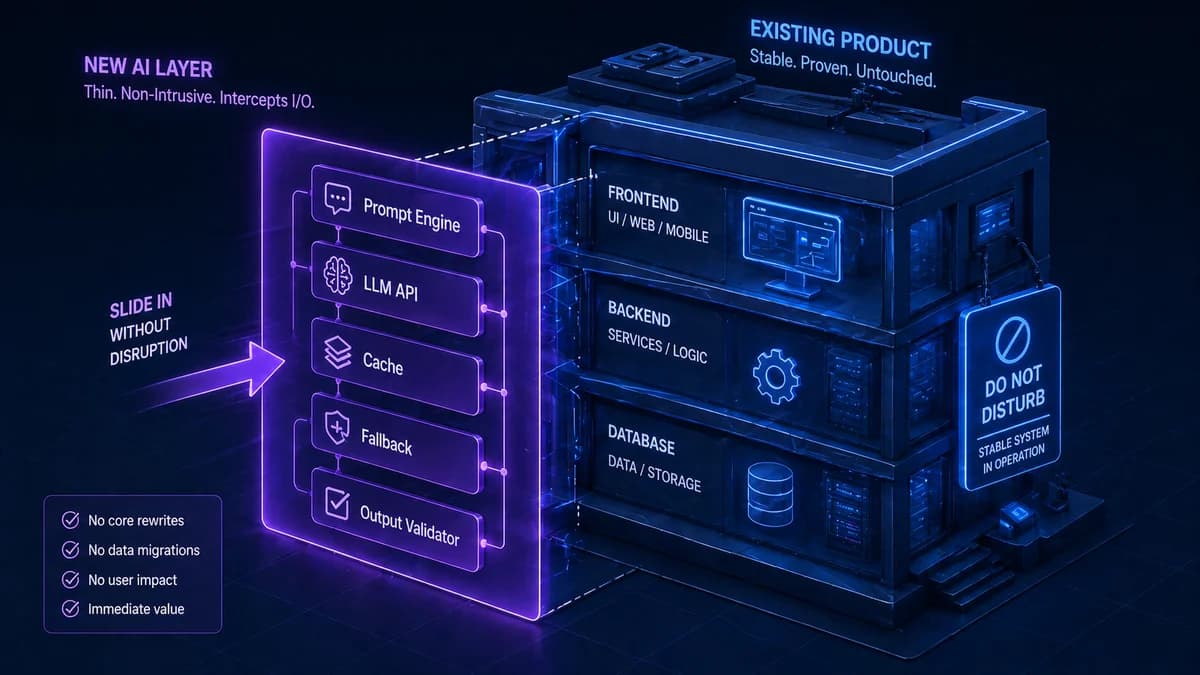
The assumption that adding AI to a working product means rebuilding it is the single biggest reason businesses delay AI integration. It is also wrong. Adding AI capabilities to an existing software stack is, in most cases, an additive operation — you are plugging a new layer in, not replacing what already works.
The AI feature does not need to live inside your existing codebase. It can sit alongside it, receiving requests from your existing backend, calling an AI API, and returning results through the same channels your existing code uses. Your database, your authentication, your business logic, your frontend — all of it stays exactly as it is.
What changes is that you now have new capabilities available to expose to your users. This guide covers exactly how that works — the four integration patterns, which one fits your situation, how to keep costs controlled, and the failure handling that most AI integration guides conveniently skip.
AI integration is about adding a capability layer — not replacing an existing one. Your job is to identify the right feature to add, choose the pattern that introduces the least risk to your existing system, and build in the failure handling that makes the AI feature robust enough for production. Everything your software currently does continues exactly as before.
Why AI Integration Almost Never Requires a Rebuild
The fear of a rebuild comes from conflating two very different things: adding an AI feature and replacing core system architecture. Adding an AI feature is more analogous to adding a third-party payment processor or an email service — you integrate via API, the third-party service does the work, and your existing code calls it when needed.
Modern AI capabilities are almost entirely accessed through APIs. OpenAI, Anthropic, Google, and a growing ecosystem of specialised AI services all expose their capabilities via simple HTTP endpoints. Your backend sends a request with your text input, the API processes it using a large pre-trained model, and returns a response. Your existing backend code does not need to understand how the AI works — it just needs to be able to make an HTTP request and parse a JSON response. If it already does that to integrate with any other service, it can integrate with AI.
The cases where significant architectural work is genuinely required are narrow: embedding AI into a legacy system with no API layer at all (where the API layer itself must be built first), integrating AI into a real-time system with extremely strict latency requirements where LLM response time is a constraint, or building a deeply embedded AI feature that touches core data models across the entire product rather than adding a new, isolated capability. These exist but are not the norm.
Stack Readiness Audit — Before You Choose an Integration Pattern
Before selecting an integration approach, audit your current stack against six readiness criteria. Your answers determine which pattern is appropriate and what preparatory work may be needed.
Software Stack Readiness Checklist for AI Integration
The 4 AI Integration Patterns — Which One Fits Your Situation
Direct API Integration
Your existing backend adds an API call to an AI provider (OpenAI, Anthropic, Gemini) directly in the code path for a specific feature. When a user triggers that feature, the backend makes the AI call, waits for the response, and returns it to the frontend. No new services. No new infrastructure.
Dedicated AI Middleware Layer
A dedicated AI service sits between your application and AI providers. It receives requests from your backend, manages prompt construction, handles caching, routes to the right model, manages retries and fallbacks, enforces cost limits, and returns formatted results. Your existing app just calls this service.
Event-Driven Integration
AI processing is triggered by events in your system rather than user-initiated requests. When a new document is uploaded, a message is put on a queue. An AI worker picks it up asynchronously, processes it (extracts data, classifies, summarises), and writes the result back to your database. The user sees the AI output when they return.
Embedded SDK Integration
An AI SDK is added directly into your application code — the AI logic lives inside the same codebase, using your existing data models, database connections, and business logic directly. Tightest integration, fastest for features that deeply share context with the rest of the application.
The pattern that is right for most teams starting their first AI integration is Pattern 1 (Direct API) for a first feature, graduating to Pattern 2 (Middleware Layer) when adding a second or third AI feature. Pattern 3 (Event-Driven) is appropriate when AI processing time makes synchronous calls impractical — document processing, large batch analysis, and nightly enrichment jobs. Pattern 4 (Embedded SDK) is appropriate when the team has one codebase, and the AI feature needs to share deeply with existing business logic.
5 Highest-ROI AI Integration Points for Existing Software
The right integration point has a disproportionate impact on ROI versus the integration effort. These five consistently deliver the highest ratio of user value to integration complexity.
| AI Feature | What Changes for the User | What Changes in the Stack | Pattern |
|---|---|---|---|
| Intelligent Search | Users find what they need using natural language instead of exact keywords. "Show me contracts with liability clauses expiring this year" returns correct results. | Search queries are vectorised and matched against an indexed vector database. Semantic similarity replaces keyword matching. | Direct API or Middleware |
| AI-Assisted Drafting | Users get a first draft of emails, reports, tickets, or responses generated in context. They review and edit rather than writing from scratch. | A new endpoint receives context (thread history, customer data, document type) and returns an LLM-generated draft. Nothing else in the stack changes. | Direct API |
| Automated Document Processing | Uploaded documents (invoices, contracts, forms) are automatically classified, key data extracted, and routed to the correct workflow — no manual data entry. | An event-driven AI worker processes documents after upload. Extracted data is written back to your existing database fields. No frontend changes needed. | Event-Driven |
| In-App Knowledge Assistant | Users ask questions and receive answers from your specific documentation, SOPs, or knowledge base — not generic internet results. | Your documentation is loaded into a vector database (RAG). A new API endpoint accepts questions, retrieves relevant docs, and returns grounded answers. | Middleware or Direct API |
| Conversation Summarisation | Long support threads, sales call transcripts, or meeting notes are automatically summarised and the key action items are extracted and saved to the record. | A background job or event trigger sends conversation text to an LLM for summarisation. The summary is written back to the existing record. No frontend impact. | Event-Driven |
Want a scoped AI integration plan for your specific software stack?
Automely's AI integration service covers everything from direct API integrations to full AI middleware layers. Book a free 45-minute call for a stack assessment.
Failure Handling — The Part Most AI Integration Guides Skip
Every AI integration guide covers how to make the happy-path call. Almost none covers what happens when the AI API fails — which it will. AI API providers experience outages, rate limits, latency spikes, and model-specific degradation. A production AI integration that has not been designed for these failure modes will fail visibly and embarrassingly when they occur.
Timeouts — Set Them and Respect Them
LLM API calls can take anywhere from 200ms to 30 seconds depending on model, prompt length, and load. If your AI call blocks a user-facing request, a slow API response blocks your user. Set a timeout (typically 10–15 seconds for synchronous user-facing calls). When the timeout fires, fall back gracefully — show a "processing" state and try again asynchronously, or return a non-AI fallback response. Never let an external API response time control your user experience latency.
Retry Logic With Exponential Backoff
Many AI API failures are transient — a brief overload condition, a rate limit reset, a momentary network issue. Retry with exponential backoff (wait 1 second, then 2 seconds, then 4 seconds before each retry) handles the majority of these automatically. Set a maximum retry count (3 is typical) and a maximum total wait time. Do not retry immediately — that piles more requests onto an already-overloaded service and makes the problem worse.
Circuit Breakers — Stop Queuing Requests to a Failing API
When an AI API is experiencing an extended outage, your retry logic will keep attempting calls, consuming resources and blocking request queues. A circuit breaker detects when failure rate exceeds a threshold and temporarily stops sending requests to the failing service — returning an immediate fallback response instead. After a configured cooldown period, it allows a test request through to check if the service has recovered. This pattern is essential for any production AI integration handling significant traffic volume.
Multi-Provider Fallbacks
For AI features that are critical to your product experience, maintaining integrations with at least two providers (e.g., OpenAI as primary, Anthropic as fallback) ensures continuity when one provider has an outage. The AI middleware layer pattern makes this straightforward — the middleware handles provider selection and failover logic transparently. Your application code just requests "generate this content" and does not need to know which provider handled it.
Output Validation — Never Pass Raw LLM Output Directly
Raw LLM outputs should never be passed directly to users or written to databases without validation. LLMs hallucinate. They return text that sounds correct but is factually wrong. They sometimes return malformed JSON that breaks downstream parsing. Build an output validation layer between the LLM response and your application: format validation, schema compliance checking, confidence thresholding for decisions, and content policy filtering for user-facing outputs. This is not optional for production — it is part of the integration.
The Full Cost Model for AI Integration
AI integration costs have two distinct components that must both be included in your budget. Most initial estimates include only the first.
One-Time Build Costs
Ongoing Monthly Running Costs
LLM API costs scale with usage in ways that are easy to underestimate. A feature used by 100 users in testing may be used by 50,000 users in production — and the API cost scales proportionally. Before launch, calculate your expected cost per query (tokens in + tokens out × price per token) and multiply by your expected monthly query volume. Set hard spending alerts at 80% of your monthly budget. A single poorly-optimised prompt at scale can produce an invoice that erases the project's ROI.
Cost Optimisation That Matters Most
Four mechanisms reliably reduce ongoing AI API costs in production without quality loss:
- Caching. Store AI responses for identical or near-identical inputs. Cache hit rates of 20–40% are achievable for many knowledge-base Q&A use cases, reducing API costs proportionally.
- Model routing. Use cheaper, faster models (GPT-4o-mini at $0.15/1M tokens, Claude Haiku at $0.25/1M tokens) for simpler tasks. Reserve GPT-4o ($5/1M tokens) and Claude Sonnet ($3/1M tokens) for genuinely complex reasoning. This routing decision alone typically reduces costs by 50–70%.
- Prompt optimisation. Audit prompts for unnecessary verbosity. System prompts that are 2,000 tokens when 400 would suffice multiply costs by 5× at scale. Token-efficient prompt design is an engineering discipline worth applying systematically.
- Async processing where synchronous is not required. Background jobs can use slower, cheaper model configurations and batch requests — further reducing per-query cost.
5 AI Integration Mistakes That Derail Production Launches
No failure handling beyond a generic error message
The most common production incident in a first AI integration: the LLM API goes down, and the application shows a raw error or crashes entirely. AI APIs are external dependencies — they require the same failure handling as your payment processor or email service. Plan the fallback behaviour before building the happy path. What does the user see when AI is unavailable? A degraded non-AI version? A queue message? Define it, build it, test it.
Sending raw LLM output to users or databases without validation
LLMs produce plausible-sounding text, not verified facts. Customer-facing AI features that pass raw LLM output directly to users will eventually produce incorrect, embarrassing, or harmful outputs. Features that write raw LLM output directly to a database will eventually corrupt records with malformed data. Output validation is not optional — it is part of the integration scope, and any cost estimate that does not include it is an underestimate.
No spend monitoring before going live
LLM API costs are usage-dependent and can grow faster than traffic volume if prompts are token-inefficient. Teams that launch without spend monitoring often discover the cost problem via an invoice rather than an alert. Set up spend monitoring with automated alerts at 50%, 80%, and 100% of the monthly budget — before the integration goes live, not after.
Sending PII to external AI APIs without a compliance review
Customer names, email addresses, health information, financial data, and other PII sent to a third-party API without a Data Processing Agreement (DPA) and a compliance review may violate GDPR, HIPAA, or other applicable regulations. This is not a theoretical risk — it is a documented pattern in AI integrations that were built quickly without legal review. Identify which data will be sent to external APIs before building, not after launching.
Building the integration tightly coupled to a single AI provider
An AI integration that directly and tightly calls OpenAI throughout the codebase — with OpenAI-specific request formats, response parsing, and error codes hardcoded — is one deprecated model or pricing change away from significant rework. Build an abstraction layer between your application and AI providers — even a simple one — that lets you swap providers or add fallbacks without touching your application code. The middleware pattern handles this; direct integrations should still abstract the AI call behind a service interface.
Automely's AI Integration Service
Automely's AI integration services cover every pattern described in this guide — from a focused direct API integration for a single feature to a full AI middleware layer supporting multiple features with caching, fallback, cost controls, and output validation.
Our standard integration process begins with a stack readiness assessment — checking your existing architecture against the six readiness criteria, identifying the appropriate pattern for your first feature, assessing any compliance exposure, and producing a scoped integration plan with a realistic cost model including both build and ongoing API costs.
We have integrated AI into SaaS products, e-commerce platforms, communication systems, and enterprise software without requiring clients to rebuild their existing product. Our integration work has included intelligent document search, AI-assisted email drafting, RAG knowledge bases added to existing customer platforms, and automated document classification pipelines — all built as additive layers that left existing functionality completely intact.
Browse our case studies, read client testimonials, and explore our full AI services portfolio including generative AI development, AI agent development, and AI chatbot development. If you already have a working product and want to add AI capabilities, the AI integration service page covers our specific approach and engagement model.
Have a working product and want to add AI capabilities to it?
Book a free 45-minute stack assessment. We will identify the right integration pattern, map your compliance exposure, and give you a scoped plan with build and ongoing costs — before you commit anything.