

The Utilisation Problem — Why Agencies Are Working Harder and Earning Less
Agency margins are not killed by bad client decisions or underpriced contracts alone. They are killed incrementally, in 30-minute blocks, by the operational overhead that scales with client count rather than the strategic work that creates value. A status update email. A report compiled from three platforms and pasted into a template. An invoice that sat in a draft folder until someone remembered to send it.
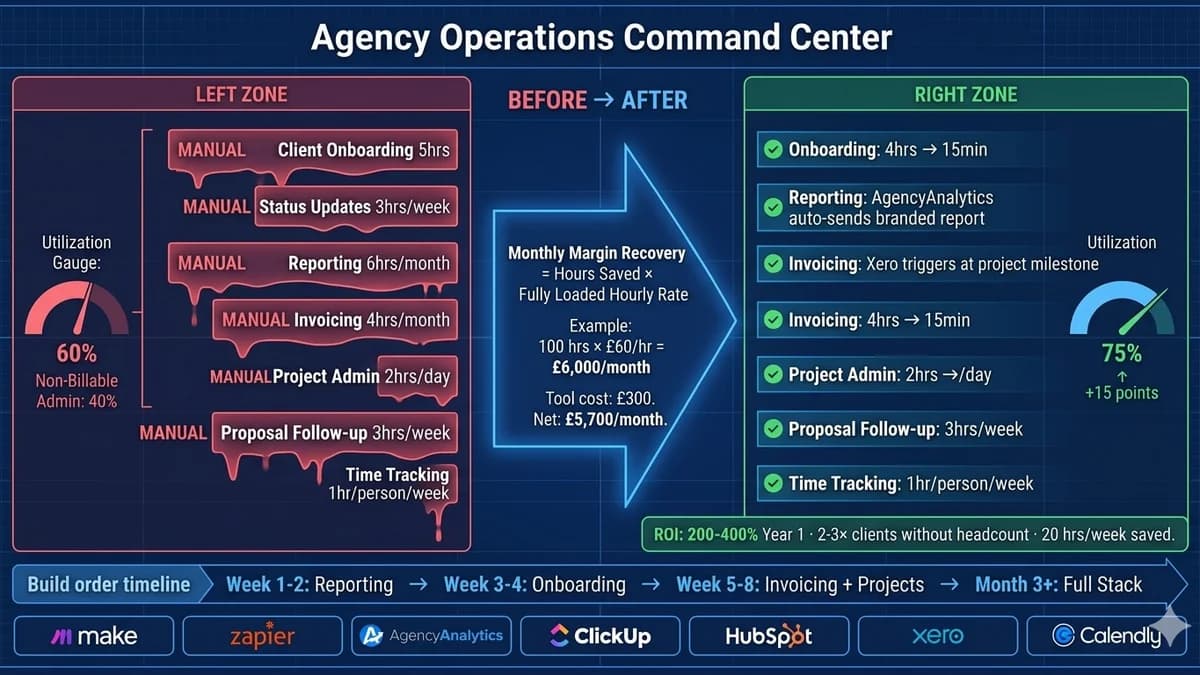
The agency profitability number that determines whether you are building a business or a treadmill is utilisation rate — the percentage of your team’s total working hours that are billable to clients. Most agencies run 55–65% utilisation. The target is 70–80%. The gap between where you are and where you should be is predominantly manual administrative overhead — and most of it is automatable.
The 7 Manual Workflows That Drain Agency Margins
When a new client signs, someone manually sends a welcome email, creates a project folder, sets up tasks, grants tool access, schedules the kickoff call, and populates the CRM. Four people touch this process sequentially over 2–3 days — high-effort, low-value, and error-prone.
- Contract signed in PandaDoc/DocuSign triggers the entire sequence automatically
- Welcome email and onboarding questionnaire sent instantly
- Project folder created in Google Drive from template
- Task structure created in ClickUp/Asana from project template
- Kickoff booking link sent automatically; Slack channel created with team added
- CRM record populated with start date, service tier, and billing schedule
'Where is my project?' is the most expensive question a client can ask — not because answering it is complex, but because the need to ask it means your communication process has already failed. Manually written status updates, approval-chasing, and milestone emails consume hours every week per client.
- Project management triggers send automated status updates when tasks reach defined milestones
- Weekly project health email generated automatically from project board data
- Approval requests sent automatically when deliverables reach the review stage
- Overdue approval reminders trigger at 48 and 72 hours without human chase
- Client portal provides real-time project status — eliminating most enquiries entirely
Someone logs into Google Analytics, exports data. Logs into Meta Ads, exports that. Checks Search Console. Pulls email marketing numbers. Pastes into a template, formats it, writes commentary, sends it. Repeat for every client. This is 3–8 hours of non-billable work per client per month.
- AgencyAnalytics or Looker Studio connects to 80+ data sources via API
- Branded white-label client report generated automatically on defined schedule
- Report sent directly to client without team intervention
- AI-generated commentary on performance trends added to report
- Team reviews the data story (20–30 min) rather than compiling data (3–8 hrs)
Manual invoicing at scale — drafting invoices at milestones, remembering retainer dates, chasing overdue payments, reconciling with the accounting system — is a consistent source of delayed cash flow, forgotten invoices, and wasted hours. Every late invoice is margin erosion.
- Xero or QuickBooks generates recurring invoices automatically at billing cycle dates
- Project milestone triggers invoice generation in the accounting system
- Overdue payment reminders sent automatically at 7, 14, and 30 days
- Payment received triggers project management update and CRM status change
- Finance dashboard updates in real time — no manual reconciliation
Project managers spend a disproportionate share of their day on project administration rather than project management: manually creating task structures, chasing internal approvals, updating statuses after calls, redistributing workload when a team member goes over capacity.
- New project creation triggers automatic task structure from template — no manual build
- Workload automation redistributes tasks when a team member hits capacity threshold
- Internal approval requests trigger automatically at defined task stages
- Weekly capacity report generated automatically from project board data
- Deadline reminders sent to assignees automatically 48 hours before due date
Proposals enter a manual purgatory after they're sent: someone needs to remember to follow up at 48 hours, then a week, then two weeks. Someone needs to check whether the prospect opened it. Someone needs to update the CRM when the prospect responds. Leads go cold from follow-up gaps, not disinterest.
- Proposal sent triggers a CRM follow-up sequence automatically — 48 hours, 1 week, 2 weeks
- Proposal viewed notification sent to sales rep for immediate follow-up opportunity
- Prospect reply automatically pauses the sequence and alerts the rep
- Discovery call booked via Calendly — confirmation and reminder fully automated
- CRM stage updated automatically based on prospect actions
Manual timesheet submission, collection, and compilation into utilisation reports provides incomplete data and consumes time from both the team and the person consolidating it. Without accurate utilisation data, resourcing decisions are made on assumptions — and unprofitable clients go undetected.
- Time tracking integrated directly into the project management tool — logged against tasks, not manually
- Weekly utilisation report generated and distributed to leadership automatically
- Over-serviced client alert triggered when hours exceed defined threshold vs budget
- Profitability dashboard updated in real time across all active clients
The Agency Margin Recovery Formula
Before any automation project is commissioned, run this calculation to quantify what each workflow is actually costing you. This is the number that justifies the investment internally and gives you a measurable baseline to compare against post-automation.
Build Order — Fastest Margin Improvement First
The sequence in which you automate matters as much as what you automate. Automating everything simultaneously creates a fragile system where one failure cascades and adoption suffers. Start with the highest-ROI single automation, prove the margin recovery within 4–6 weeks, then add the next layer.
Start here regardless of what feels most painful elsewhere. Client reporting consistently produces the highest immediate time savings (3–8 hours per client per month) and the clearest before-and-after measurement. Connect your reporting platform to your data sources, set up automated delivery, and measure hours saved in the first four weeks.
Map the entire current onboarding manually, document every step, standardise the output, then automate the sequence. The immediate time saving is dramatic (4–6 hours per client down to 15–20 minutes) and the side effects compound: clients experience a faster onboarding, quality is consistent, and senior team members are freed for strategic work.
Layer in invoicing automation (immediate cash flow improvement from faster invoice delivery and automated reminders) and project management task templates (eliminating manual project setup). These compound with onboarding — by this point, a new client signing triggers their onboarding, project setup, and billing schedule automatically.
Complete the stack with proposal follow-up sequences, automated status updates, and integrated time tracking. By this point, the agency operations layer largely runs itself — the team is focused on strategy, creative execution, and client relationships rather than administrative orchestration.
The Agency Workflow Automation Tool Stack
These are tools in active use by agencies in 2026, with real pricing. The full stack for a 5–10 person agency runs $150–$400/month — typically recovered in the first week of reporting automation alone.
| Function | Tool | Monthly Cost | Why Agencies Choose It |
|---|---|---|---|
| Integration Engine | Make (formerly Integromat) | $9–$29/month | Multi-step agency workflows with conditional logic and loops. Best for complex onboarding sequences and project creation triggers. |
| Simple App-to-App Automation | Zapier | $0–$69/month | Fastest setup for standard integrations (form → CRM, contract signed → Slack). 5,000+ app integrations. Best starting point. |
| Client Reporting | AgencyAnalytics | $12/client/month | Purpose-built for agencies. Connects 80+ data sources. Branded white-label reports sent automatically. Most agencies recover cost in first month. |
| Project Management Automation | ClickUp / Monday.com | $5–$20/user/month | Template-based project creation, workload balancing, automated task assignment, deadline reminders. ClickUp more flexible; Monday.com more visual. |
| Invoicing and Payment Automation | Xero | $15–$78/month | Recurring invoice automation, payment reminder sequences, project billing integration. UK/EU agency standard. |
| CRM and Proposal Automation | HubSpot CRM | $0–$50/month | Free CRM with automation for proposal follow-up sequences, deal stage updates, and client communication. Sufficient for most SMB agencies. |
| Scheduling Automation | Calendly | $8–$16/user/month | Eliminates back-and-forth for discovery calls, kickoffs, and reviews. Integrates with CRM to log meetings and update deal stages automatically. |
| Document and Contract Automation | PandaDoc | $19–$49/user/month | Proposal creation from templates, e-signing, and signed contract triggers that initiate the onboarding automation in Make/Zapier. |
When Off-the-Shelf Tools Stop Working — and Custom AI Takes Over
The automation stack above handles 80–90% of the workflow overhead that drains agency margins. The remaining 10–20% requires custom AI automation — when the workflow involves inputs that no-code tools cannot interpret, decisions that require intelligence rather than rules, or multi-system orchestration that exceeds what drag-and-drop builders can handle.
Specific situations that typically require custom-built systems: reading and classifying unstructured client brief submissions or enquiries in free text; intelligent approval routing that considers context rather than just status; custom client profitability dashboards that pull from multiple disconnected systems; and AI-generated performance commentary that provides real insight rather than templated observations.
How Automely Helps Agencies Build Automation That Compounds
Your agency’s margins are being eaten by workflows that should not require humans. Map them, quantify the drain, and automate what off-the-shelf tools can handle.
Get a Free Agency Margin Audit →