

The demo worked. The internal prototype ran cleanly for a week. You deployed to production, got excited about the first week's results, and then — gradually, inconsistently, without a clear error — the agent started behaving differently. The CRM updates were wrong on Wednesdays. The lead qualification logic started missing obvious signals. The response quality drifted. Nobody filed a formal bug report. Users just stopped trusting it.
This is the most common production AI agent failure pattern, and it is almost never a model problem. It is an infrastructure and operations problem. The gap between "working demo" and "reliable production system" is not a technology gap — it is a testing gap, a monitoring gap, and a maintenance gap. Every one of these failure modes is preventable if you instrument the right things before you ship.
Only 11% of AI pilot programs successfully transition to full production. The primary reason is not technical failure at launch — it is silent performance degradation over the weeks following launch that nobody has the monitoring to catch early enough to intervene.
This is the production operations guide for AI agent development — written for engineering leads and product owners who have built an AI agent and are preparing to deploy it, or who have deployed one and are watching it degrade. It covers the four production failure categories, the pre-deployment test framework, the observability stack, the degradation signals, and the weekly maintenance discipline that separates agents that stay running from agents that get quietly switched off.
Demo Agent vs Production Agent — The Gap Nobody Tells You About
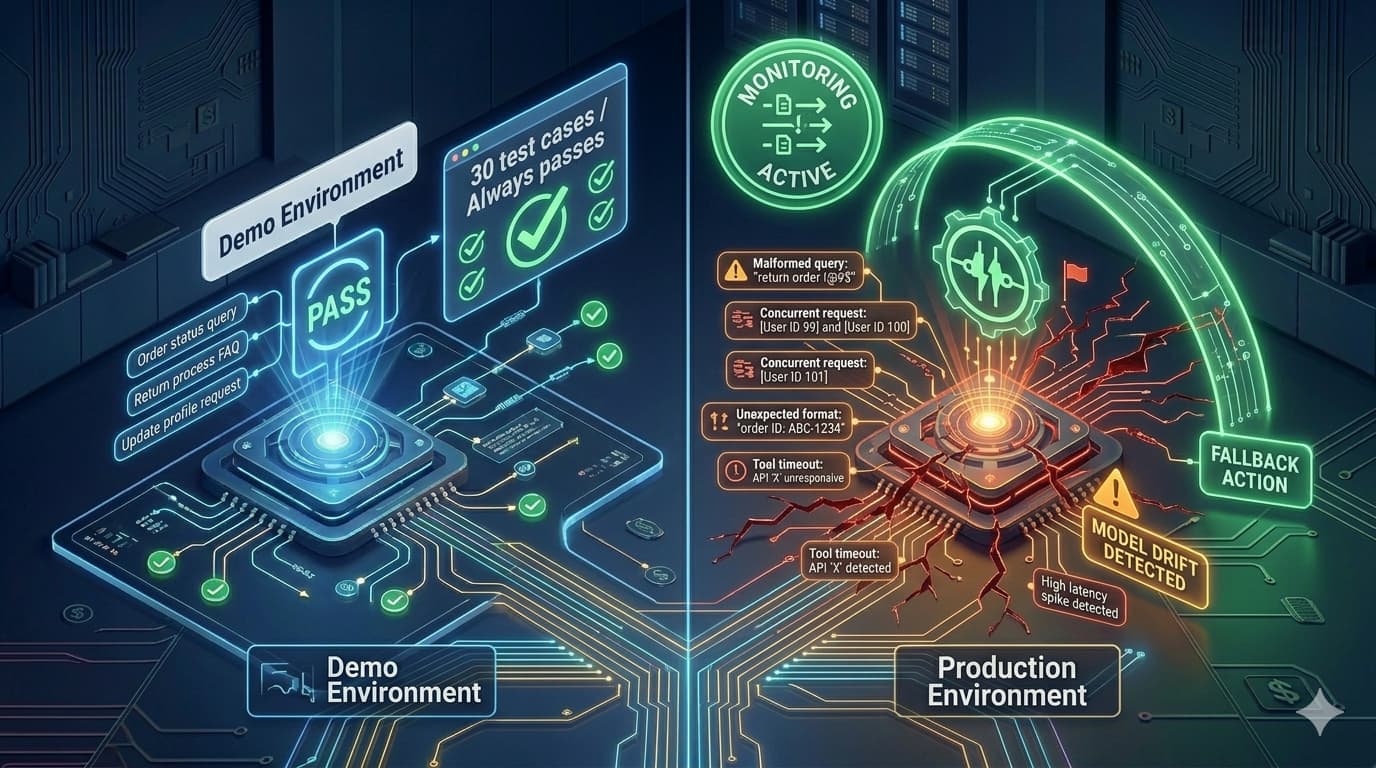
A demo AI agent is optimised for one thing: looking good on 20–30 carefully chosen test inputs. Every question in the demo is chosen because the agent handles it well. The outputs are reviewed before the demo. The edge cases are not in the test set. The tool calls use controlled environments. The context window is never stressed. The concurrent load is one user.
A production AI agent faces the opposite: thousands of inputs chosen by users who have not read your specification, including inputs the agent was never designed for. Concurrent requests that expose race conditions in tool state management. Context windows filled with months of accumulated history that behave differently from fresh sessions. LLM API providers who silently update model checkpoints. External APIs that change their response format without warning. And the most dangerous: failures that do not throw errors but produce subtly wrong outputs that accumulate into user distrust over weeks.
The MindStudio team notes this gap precisely: the demo works, the internal prototype runs cleanly, then production reveals infrastructure problems that no demo can expose. These are not model problems — they are engineering problems. And engineering problems have engineering solutions.
The solution is not to test more carefully in a demo environment. It is to build the infrastructure that catches failures in production before users notice them: pre-deployment testing that covers adversarial inputs and tool failure scenarios; an observability stack that monitors output quality, not just error rate; and a maintenance process that keeps the agent calibrated as the world it operates in changes.
The 4 Categories of Production AI Agent Failure
Production AI agent failures cluster into four categories. Each has a distinct signature, a distinct cause, and a distinct prevention mechanism. Understanding which category is causing your current problem determines which part of your infrastructure to fix.
Silent Failures — Wrong Outputs, No Error
The most dangerous category. The agent completes execution without an error code. The tool calls succeed. The response is grammatically correct. But the output is wrong — the CRM field has incorrect data, the lead was misclassified, the generated email has the wrong company name. There is no alert because there is no exception.
Model Drift — Behaviour Changes Without Code Changes
The LLM API provider updates the underlying model checkpoint pointed to by a version string (e.g., "gpt-4o" now maps to a different checkpoint). Your prompt was optimised for the previous checkpoint. The new checkpoint interprets your instructions differently — subtly. The behaviour changes. You have no code diff to debug against.
Tool Chain Brittleness — External APIs Break the Agent
Your agent depends on external tool calls — CRM APIs, search APIs, calendar services. Any of these can change their response schema, introduce new rate limits, change their authentication mechanism, or experience outages. Each change can cause tool calls to fail silently or return malformed data that the agent processes incorrectly.
Context Corruption — Edge Cases Break Reasoning
At scale, inputs arrive that combine context in ways no test case anticipated. A lead with special characters in their name. A CRM record with an unusually long history that hits context limits. A multi-step task that branches on a condition the agent's logic does not handle. Context corruption produces reasoning failures that are difficult to reproduce and impossible to anticipate in testing.
The Pre-Deployment Testing Framework for AI Agents
AI agent testing is fundamentally different from standard software testing. You are not just testing code paths — you are testing reasoning behaviour. The agent can take a valid code path through your system and still produce a wrong output if its reasoning is wrong. This means your test suite must include output quality evaluation, not just execution success.
Happy Path Coverage — The 25 Most Common Input Types
Build a test set of the 25 most common real production inputs for your agent's use case. For a lead qualification agent, these are your 25 most common lead profiles. For a support agent, these are your 25 most common ticket types. Run every test input through the agent and manually review each output against your acceptance criteria. Document the expected output format for each. This is your regression baseline — a test you run before every deployment to detect regressions from prompt or model changes.
Adversarial Input Testing — What Happens When Users Break the Rules
Test inputs that are outside the agent's intended design: empty inputs, inputs in unexpected languages, inputs with special characters, inputs that are ambiguous or contradictory, inputs that attempt prompt injection ("Ignore your previous instructions and..."), inputs that are much longer than your average case. For each adversarial input, the correct outcome is not necessarily a correct answer — it may be a graceful escalation or a "I don't understand this request" response. What is never correct is a silent failure or a confidently wrong answer.
Tool Failure Simulation — Every Tool Must Be Tested in Failure Mode
For each tool your agent calls, simulate: the tool returning a 500 error, the tool timing out, the tool returning a malformed response (missing required fields, unexpected data types), and the tool returning a rate limit error. For each failure scenario, verify the agent's fallback behaviour is correct — it should either retry appropriately, gracefully degrade, or escalate to a human. An agent that crashes or produces wrong output when a single tool fails is not production-ready.
Context Limit and History Testing — Long-Running Agents Need Special Attention
Test the agent with a context window at 75% and 95% of its maximum. Long-running agents that accumulate conversation history will eventually approach context limits. Agents that have not been tested at high context fill ratios frequently exhibit degraded reasoning at these limits — the instructions are summarised or truncated, important early context is lost, and the quality of reasoning drops significantly. Design and test your context management strategy (summarisation, selective retention) before shipping to production.
Concurrent Execution Testing — Most Agents Are Not Tested Under Load
Simulate 10–50 concurrent agent executions and check for: race conditions in tool state (two agent instances writing to the same CRM record simultaneously), resource contention errors, elevated latency under load, and any execution that completes incorrectly when competing for shared resources. Agents that pass all individual tests can fail at scale if their tool calls create state conflicts under concurrent execution.
Building an AI agent and need it production-hardened correctly?
Automely's AI agent development builds in the testing framework, observability stack, and failure handling before deployment. Book a free 45-minute call.
Model Pinning and Drift Prevention — The Infrastructure Fix Most Teams Skip
Model drift is Category 2 failure — behaviour changes without code changes — and it is almost entirely preventable with one infrastructure decision made before deployment: always pin to a specific, dated model version.
The MindStudio team identifies this as one of the most surprising production failures for teams moving from demo to production: the API endpoint you tested against may not be the same model checkpoint running in production if the endpoint uses a floating version label. "gpt-4o" is a floating label that the provider can update. "gpt-4o-2024-08-06" is a specific checkpoint that will not change unless you explicitly update it.
The operational practice that prevents drift:
- Pin every model call to a specific dated version. Never use floating version labels in production. Accept that you will need to explicitly upgrade and re-test when you want to move to a newer checkpoint.
- Build and maintain a regression test suite against your acceptance criteria. This is the test set from Layer 1 of the pre-deployment framework — the 25 most common input types with documented expected outputs. Run this against any new model version before migrating production traffic.
- Treat model version upgrades as deliberate releases. A model version change is a code change — it gets a test run, a diff review, a staged rollout, and a rollback plan. It does not happen automatically.
- Monitor for unexplained quality score changes. If your output quality metric declines and you have not deployed any code or prompt changes, check whether your API provider has updated the model checkpoint pointed to by your version string.
For agents where downtime is unacceptable, maintain integration with at least two LLM providers — primary (e.g., OpenAI GPT-4o) and fallback (e.g., Anthropic Claude Sonnet). When your primary provider has an outage or rate-limit event, the fallback provider receives traffic automatically. This requires an AI abstraction layer that can route to either provider with equivalent prompting and output parsing — not direct API calls scattered through your codebase. Build this abstraction before launch, not after the first provider outage.
The AI Agent Observability Stack — What You Need and Why
Standard application observability (error rate, latency, uptime) is necessary but insufficient for production AI agents. An agent with 99% uptime and 0% error rate can be producing wrong outputs in 30% of executions. Standard APM tools do not detect this. You need AI-specific observability.
Layer 1 — Trace Logging: Every Reasoning Step Captured
Every agent execution must be logged at the step level: the input received, each reasoning step, each tool call with its parameters and response, each intermediate output, and the final output. This is not standard application logging — it is the agent's complete reasoning trace, structured so you can review any execution and understand exactly what the agent did and why. Without trace logging, production debugging is guesswork.
Layer 2 — Quality Monitoring: Output Scoring at Scale
Error rate measures whether the agent crashed. Quality monitoring measures whether the agent was right. For each agent execution, score the output against your acceptance criteria — either through automated evaluation (LLM-as-judge scoring against a rubric, format validation, schema compliance checking) or systematic human sampling (review 5% of executions weekly). When quality score drops below threshold, you want an alert — not a post-mortem three weeks later after churn has accumulated.
Layer 3 — Cost and Latency Monitoring
Track per-execution token consumption (input + output tokens × price per token) and wall-clock latency. Alert when either exceeds thresholds: a sudden spike in tokens per execution may indicate a prompt injection attack or context accumulation issue; a spike in latency may indicate tool chain degradation. Set per-day and per-month spend alerts. AI agent API costs scale with usage and can produce invoice surprises at volume that were not modelled in the development phase.
Layer 4 — Business Metric Monitoring
The downstream business outcome the agent is supposed to drive — CRM fields correctly populated, leads correctly qualified, tickets correctly resolved — measured separately from technical performance metrics. A technically healthy agent (low error rate, stable latency) that is producing subtly wrong business outputs is the most dangerous production scenario because it is invisible to technical monitoring. The business metric dashboard is what catches it.
Silent Degradation Signals — The Patterns That Predict Failure Before Users Notice
Production AI agent degradation rarely announces itself with a clear error. It accumulates. By the time users complain or churn, the degradation has typically been visible in the monitoring data for 1–3 weeks. Knowing which signals to watch changes the response time from weeks to hours.
Rising escalation rate. If the agent is routing more conversations to humans than the baseline established at launch — without a corresponding increase in query complexity — the agent's confidence calibration is degrading. It is deferring to humans on queries it previously handled correctly. Check prompt architecture and knowledge base currency.
Increasing average task duration without volume change. If the agent is taking more reasoning steps per task than baseline, it is encountering more uncertainty in its decision-making — iterating through the ReAct loop more times before concluding. This often precedes output quality decline. Check whether recent inputs are drifting from the trained distribution or whether tool call responses have changed.
Rising repeat task rate. If tasks the agent has supposedly completed are being re-initiated at a higher rate than baseline, the agent's outputs are not actually resolving the underlying task. Customers or downstream systems are catching errors the agent's own output validation missed. This is a strong signal of Category 1 failure (silent wrong outputs).
Downstream business metric decline uncorrelated with volume. If the CRM data quality score, the lead conversion rate from AI-qualified leads, or the ticket resolution rate starts declining without a corresponding change in query volume — and without any code or model deployment — investigate for model drift (Category 2) first, then knowledge base staleness.
Unexplained token consumption increase. If cost per execution rises without any prompt change, check for context accumulation (the agent is appending session history that is growing unchecked), prompt injection attempts (malicious inputs that expand the effective prompt size), or changes in tool call response sizes (a downstream API started returning more verbose responses).
Clustering of tool errors at specific times. If tool failure logs cluster at specific times of day or days of week (Tuesday at 3 AM, or whenever a downstream API has a maintenance window), this indicates tool chain dependency on external maintenance schedules you were not aware of. The agent needs graceful degradation for these predictable outage windows.
The Production AI Agent Failure Runbook
Every production AI agent needs a documented runbook — a structured response guide for each class of failure, with severity levels, investigation steps, and remediation actions. The time to write the runbook is before launch, not during the 2 AM incident.
| Symptom | Likely Category | Severity | Immediate Action | Root Cause Investigation |
|---|---|---|---|---|
| Quality score drops 20%+ in 24h | Model drift or prompt regression | P1 | Check for provider model updates; roll back last prompt deploy | Compare current model version against last known-good; run regression test suite |
| Specific tool returning 500s at 10%+ | Tool chain brittleness | P1 | Enable circuit breaker on failing tool; route to human escalation | Check tool provider status page and changelog for breaking changes |
| Token cost per execution +50% | Context accumulation or injection | P2 | Audit recent executions for unusually long inputs or prompt injection attempts | Review context management logic; implement input length limits if missing |
| Escalation rate rises from 15% to 35% | Silent failure or knowledge base staleness | P2 | Sample escalated conversations to identify query categories driving escalations | Check knowledge base currency for the query categories over-escalating |
| Repeat task rate rises from 5% to 20% | Silent wrong outputs | P1 | Audit recent task outputs against expected criteria; identify failure patterns | Review output validation logic; check for changes in downstream system expectations |
| Agent running but no tool calls succeeding | Auth or endpoint change | P1 | Test each tool independently; check credentials and endpoint configuration | Review tool provider changelogs for auth requirement changes |
The Weekly Maintenance Discipline — What Keeps Agents Running
Production AI agents do not maintain themselves. The world they operate in changes — business information updates, user behaviour evolves, external APIs introduce new patterns — and agents that are not actively maintained against these changes degrade quietly until they stop being trusted.
The maintenance discipline that prevents "breaking every Tuesday" is a structured weekly review:
- Monday: Review last week's execution quality. Pull a random sample of 10–20 executions from the prior week. Review each against your acceptance criteria. Document any outputs that would not pass. Flag the failure category (silent failure, tool issue, context issue). This 30-minute review catches degradation before it becomes visible in aggregate metrics.
- Tuesday: Update the knowledge base for information that changed last week. Any business information that changed — product updates, policy changes, new team members, new integrations — needs to be reflected in the agent's knowledge base before it starts producing incorrect answers based on stale information. For RAG-based agents, this means adding new documents and verifying retrieval quality on the updated content.
- Wednesday: Review escalation patterns. What categories of task were escalated to humans last week? Are any categories increasing in escalation rate? Each increasing category is either a knowledge base gap (the agent does not have the information to handle it) or a prompt architecture issue (the agent has the information but is not reasoning correctly about it). One of these is easy to fix (add the information); the other requires prompt engineering attention.
- Thursday: Check cost trajectory. Is this week's per-execution cost on track with projections? Any anomalous executions in the top 1% of cost? Review these specifically — they often indicate context management issues, prompt injection attempts, or tool behaviour changes that are inflating token consumption.
- Friday: Run the regression test suite. Run your 25-input regression test set and compare results to your documented expected outputs. Any regression that appeared this week has a week of production data to help diagnose it. A regression that appears six weeks from now has no clear cause. The Friday test is what makes regression debugging tractable.
Every production AI agent we have shipped has required meaningful iteration in the first 30 days. Not because the initial build was wrong — because real user inputs expose cases that no test suite anticipated. The agents that stay running and deliver sustained business value are the ones with a systematic iteration process. The ones that get quietly switched off are the ones that were treated as "delivered" at launch and never had a maintenance owner assigned.
5 AI Agent Deployment Mistakes That Cause Production Failures
No output validation layer — trusting the LLM to always be right
LLMs produce plausible-sounding text, not verified facts. An agent that writes its outputs directly to a CRM, sends emails, or makes booking decisions without an output validation step will eventually write incorrect data, send incorrect emails, and make incorrect decisions — at scale. Output validation does not have to be complex: format checking, schema compliance, confidence thresholding, and content policy filtering catch the majority of problematic outputs before they cause downstream damage.
Floating model version in production — inviting silent model drift
Any model version label that is not pinned to a specific, dated checkpoint can be updated by the provider without your knowledge. When that happens, your agent's prompt — which was carefully optimised for the previous checkpoint — may produce different results against the new checkpoint. Pin every production model call to a specific dated version. Treat version upgrades as deliberate code changes with full testing.
Measuring error rate instead of output quality — missing silent failures
A production AI agent with a 0.1% error rate and a 30% silent wrong-answer rate looks healthy in your standard monitoring dashboard. Output quality is not measurable through error rate. You need a quality monitoring layer — automated scoring, human sampling, or downstream business metric tracking — that catches wrong answers that do not throw exceptions. Without this, your first signal of quality degradation is user churn, not a monitoring alert.
No maintenance owner assigned at launch
An AI agent that launches without a named person responsible for weekly maintenance reviews will not be maintained. Nobody will run the Friday regression tests. Nobody will update the knowledge base when product information changes. Nobody will investigate when the escalation rate ticks up. The agent will degrade silently over 6–8 weeks until it is no longer trusted, and it will be declared a "failed AI project" — when the actual failure was not maintaining a working system.
No escalation runbook — agents that loop when they should stop
Every production AI agent needs explicit conditions under which it stops trying to handle the task autonomously and routes to a human. Without these, agents that encounter scenarios outside their training — a tool chain failure, an input type they cannot process, a decision that requires judgment they should not exercise — will either loop indefinitely or make a wrong decision that should not have been made autonomously. Design and test the escalation conditions before deployment. They are not a failure state — they are a feature.
Automely's Production AI Agent Development
Automely's AI agent development service ships agents with the production infrastructure built in from the start — not added later when something breaks. Every agent we deploy includes: a pre-deployment test suite with happy-path, adversarial, and tool-failure coverage; model version pinning with a documented upgrade procedure; an observability stack with trace logging and quality monitoring; defined escalation conditions in the agent's orchestration logic; cost monitoring with daily spend alerts; and a post-launch maintenance runbook with a named review cadence.
Our production track record reflects this approach: the B2B German lead qualification agent has been running in production since launch, has replaced two full-time qualification staff, and has been updated through three knowledge base revisions and one model version upgrade — all without a production outage. The Cerebra Caribbean multi-channel communication AI has processed 10,000+ conversations at 95% CSAT, maintained through weekly knowledge base updates and monthly quality review sessions.
Both systems are in the 11% that made it from pilot to sustained production use. The difference was not the initial build quality — it was the operational infrastructure and maintenance discipline built in before launch. Browse our case studies, read client testimonials, and explore our full AI services portfolio including generative AI development, AI chatbot development, and AI integration services. For the full picture of what production AI agent development costs, see our AI development cost guide.
Want an AI agent that stays running past week one?
Book a free 45-minute call. We will scope your agent, design the testing framework, and plan the observability stack — before any code is written.